Home
>
Archive
>
SSW Standards
>
Rules
>
SSW Rules to Better Windows Forms Applications - ClickOnce
ClickOnce is a technology that allows developers to write Windows
Forms applications that utilize the powerful features of the client,
yet are as hassle-free to deploy and update as a Web page.
ClickOnce provides a rich set of easy to use capabilities for
deploying and updating smart client applications, including lots of
options and ways of approaching things. Once you understand how to get
your application out the door and updated, using the myriad of options
that ClickOnce provides, lots of other questions arise, including how
to make it more secure and how things will change in the future.
Do you agree with them all? Are we missing some?
Let us know
what you think.
-
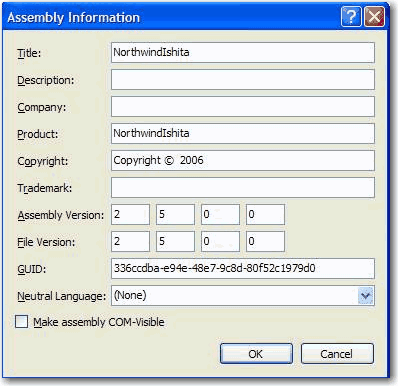
The Assembly and File Version should be the same by default
For the purpose of consistency, version numbers should be the
same there are few exceptions. One exception is for backward
compilation:
If you have other .dll files depend on the assembly, changing
Assembly Version will break these dependencies and then cause a
crash in your application. So you can keep the Assembly Version
unchanged and increase the File Version when you release new
build. It is easy to maintain the version numbers in VS.NET
2005, but we have some
suggestions on modification of version numbers in VS.NET
.
-
-
Do you keep the version in Sync (in all 3 places)?
The Assembly Version, File Version should be in Sync 95% of the
time. The only case is backward compatibility. If you are using
ClickOnce for deployment, you also need to keep the Publish
Version in sync also. Yes that is 3 places Microsoft should make
this easier. See
suggestions on modification of version numbers in VS.NET
-
Do you set the appropriate download (.exe or .application) for
your web users?
In general, you should set the user to download the Setup.exe of
your ClickOnce application. However there are many cases where
the only prerequisite of the application is .Net 2, and the
users don't need the Setup.exe. Instead, the .application file
would allow the user to install the application, or run it
instantly if they already have .Net 2. The following code allows
you to check for the .Net 2 runtime on the client's machine
(note: Request.Browser.ClrVersion may return 0.0 on some
browsers).
-
                            dim verHave as Version = Request.Browser.ClrVersion
                            dim verNeed as Version = new Version("2.0.50727")

                            if ( verHave < verNeed ) then
                                Response.Write("<a href=""./Download/Setup.exe"">")
                            else
                                Response.Write("<a href=""./Download/SSWDiagnostics.application"">")
                            end if
-
Figure: Code to detect the client's CLR version and offers the
download accordingly
Note:
SSW Diagnostics
uses this code on its homepage.
-
Do you make a clear symbol to inform the users that you are
using a ClickOnce version application?
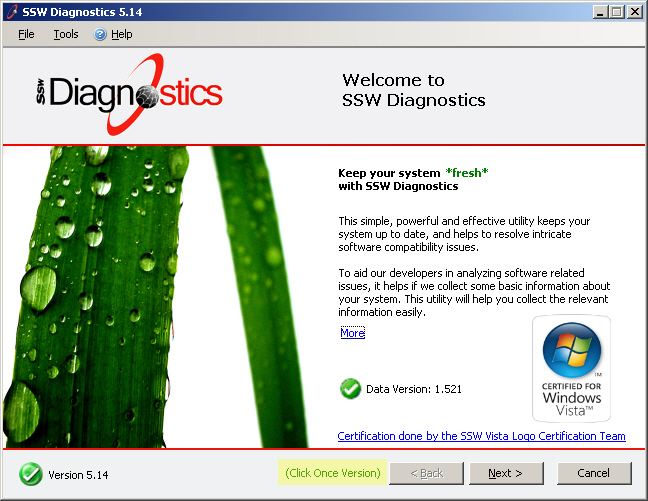
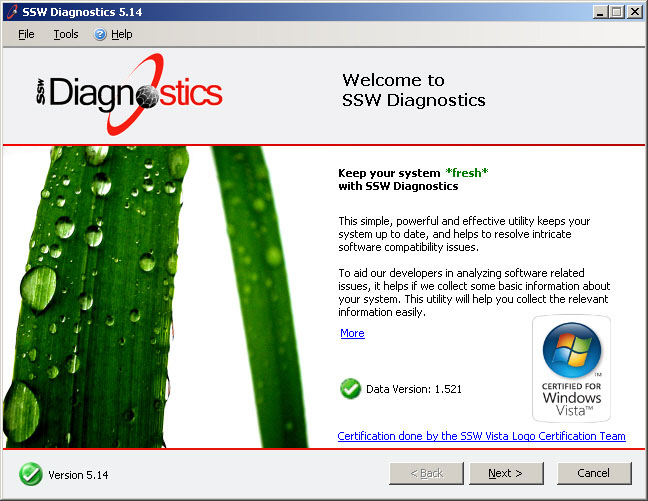
If you use ClickOnce to deploy your application, you should
clearly show a symbol indicating this is a ClickOnce version
application. ClickOnce makes applications enjoying convenient
update, maximizing to keep the safety of the users' system
environment.
-
-
Good Example: Showed a symbol indicates this is a ClickOnce
version of application.
-
-
Bad Example: No any symbol indicates this is a ClickOnce
version of application.
-
Do you know whether you should use Click Once or MSI?
-
Check the following table whether ClickOnce is suit for your
application.
This table compares the features of ClickOnce deployment
with Windows Installer deployment. Read
ClickOnce Deployment Overview
for more details.
|
Feature
|
ClickOnce
|
Windows Installer
|
|
Automatic update
1
|
Yes
|
Yes
|
|
Post-installation rollback
2
|
Yes
|
No
|
|
Update from Web
|
Yes
|
No
|
|
Does not affect shared components or other
applications
|
Yes
|
No
|
|
Security permissions granted
|
Grants only permissions necessary for the
application (more safe)
|
Grants Full Trust by default (less safe)
|
|
Security permissions required
|
Internet or Intranet Zone (Full Trust for CD-ROM
installation)
|
Administrator
|
|
Application and deployment manifest signing
|
Yes
|
No
|
|
Installation-time user interface
|
Single prompt
|
Multipart Wizard
|
|
Installation of assemblies on demand
|
Yes
|
No
|
|
Installation of shared files
|
No
|
Yes
|
|
Installation of drivers
|
No
|
Yes (with custom actions)
|
|
Installation to Global Assembly Cache
|
No
|
Yes
|
|
Installation for multiple users
|
No
|
Yes
|
|
Add application to
Start
menu
|
Yes
|
Yes
|
|
Add application to Startup group
|
No
|
Yes
|
|
Add application to
Favorites
menu
|
No
|
Yes
|
|
Register file types
|
No
|
Yes
|
|
Install time registry access
3
|
Limited
|
Yes
|
|
Binary file patching
|
No
|
Yes
|
|
Application installation location
|
ClickOnce application cache
|
Program Files
folder
|
Notes
1. With Windows Installer, you must implement programmatic
updates in the application code.
2. With ClickOnce, rollback is available in
Add or Remove Programs
.
3. ClickOnce deployment can access HKEY_LOCAL_MACHINE (HKLM)
only with Full Trust permission.
For more information, see
Choosing a Deployment Strategy
.
-
Customize the Installation of the Application, including:
Publish location, installation url, install mode, publish
version, Download files on demand, Prerequisites, Updates,
Options.
-
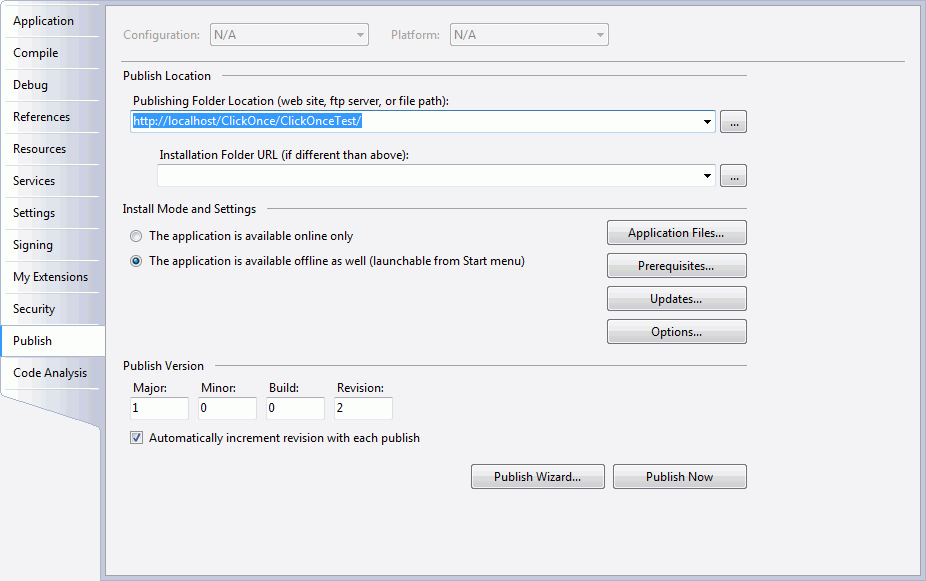
- Figure: Publish tab of the application properties
-
Specify the code access security permissions that the
application requires in order to run.
-
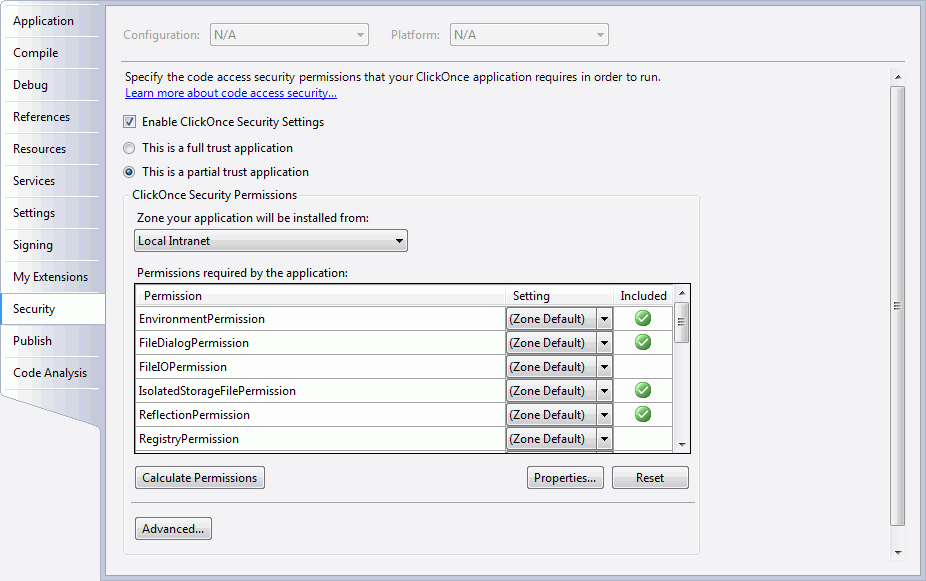
- Figure: Security tab of the application properties
-
Deploy the COM Components. Read
Deploying COM Components with ClickOnce
for more informations.
-
Publish the application using Publish Wizard.
-
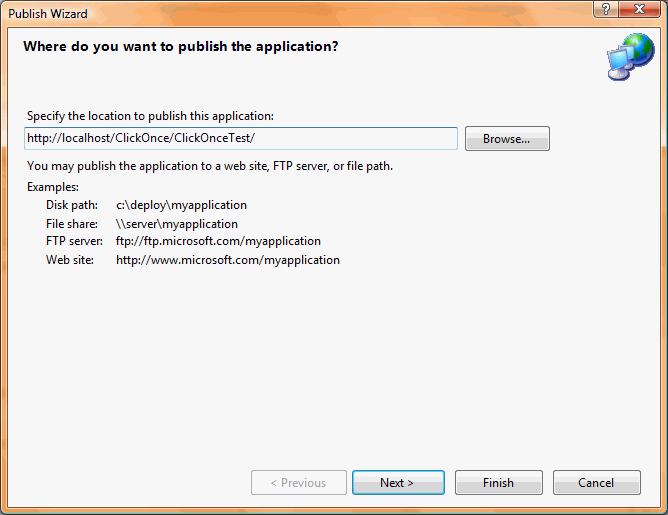
- Figure: ClickOnce Publish Wizard
-
Do you know to use async code to do the check for update? (using
System.Deployment.Application classes)
Application updates don’t have to be difficult to do for
the user. Pointing the user to a website where he can download
an update is not ideal. A better way is to take advantage of the
System.Deployment.Application namespace. You can develop custom
upgrade behaviours into your ClickOnce/Smart client application.
-
System.Diagnostics.Process.Start(@"http://www.ssw.com.au/ssw/Download/ProdBasket.aspx?ID=15");
-
Figure: Bad example - Using web page to do the check for a new
version
-
long sizeOfUpdate = 0;

private void UpdateApplication()
{
    if (ApplicationDeployment.IsNetworkDeployed)
    {
        ApplicationDeployment ad = ApplicationDeployment.CurrentDeployment;
        ad.CheckForUpdateCompleted += new CheckForUpdateCompletedEventHandler(ad_CheckForUpdateCompleted);
        ad.CheckForUpdateProgressChanged += new DeploymentProgressChangedEventHandler(ad_CheckForUpdateProgressChanged);

        ad.CheckForUpdateAsync();
    }
}

void  ad_CheckForUpdateProgressChanged(object sender, DeploymentProgressChangedEventArgs e)
{
    downloadStatus.Text = String.Format("Downloading: {0}. {1:D}K of {2:D}K downloaded.", e.State, e.BytesCompleted/1024,
    e.BytesTotal/1024);
}

void ad_CheckForUpdateCompleted(object sender, CheckForUpdateCompletedEventArgs e)
{
    if (e.Error != null)
    {
        MessageBox.Show("ERROR: Could not retrieve new version of the application. Reason: \n" + e.Error.Message +
        "\nPlease report this error to the system administrator.");
        return;
    }
    else if (e.Cancelled == true)
    {
        MessageBox.Show("The update was cancelled.");
    }

    // Ask the user if they would like to update the application now.
    if (e.UpdateAvailable)
    {
        sizeOfUpdate = e.UpdateSizeBytes;

        if (!e.IsUpdateRequired)
        {
            DialogResult dr = MessageBox.Show("An update is available. Would you like to update the application now?
            \n\nEstimated Download Time: ", "Update Available", MessageBoxButtons.OKCancel);
            if (DialogResult.OK == dr)
            {
                BeginUpdate();
            }
        }
        else
        {
            MessageBox.Show("A mandatory update is available for your application. We will install the update now,
            after which we will save all of your in-progress data and restart your application.");
            BeginUpdate();
        }
    }
}

private void BeginUpdate()
{
    ApplicationDeployment ad = ApplicationDeployment.CurrentDeployment;
    ad.UpdateCompleted += new AsyncCompletedEventHandler(ad_UpdateCompleted);

    // Indicate progress in the application's status bar.
    ad.UpdateProgressChanged += new DeploymentProgressChangedEventHandler(ad_UpdateProgressChanged);
    ad.UpdateAsync();
}

void ad_UpdateProgressChanged(object sender, DeploymentProgressChangedEventArgs e)
{
    String progressText = String.Format("{0:D}K out of {1:D}K downloaded - {2:D}% complete",
    e.BytesCompleted / 1024, e.BytesTotal / 1024, e.ProgressPercentage);
    downloadStatus.Text = progressText;
}

void ad_UpdateCompleted(object sender, AsyncCompletedEventArgs e)
{
    if (e.Cancelled)
    {
        MessageBox.Show("The update of the application's latest version was cancelled.");
        return;
    }
    else if (e.Error != null)
    {
        MessageBox.Show("ERROR: Could not install the latest version of the application. Reason: \n" + e.Error.Message +
        "\nPlease report this error to the system administrator.");
        return;
    }

    DialogResult dr = MessageBox.Show("The application has been updated. Restart? (If you do not restart now,
    the new version will not take effect until after you quit and launch the application again.)",
    "Restart Application", MessageBoxButtons.OKCancel);
    if (DialogResult.OK == dr)
    {
        Application.Restart();
    }
}
-
Figure: Good example - Using System.Deployment.Application
classes to do the check for a new version
More Information:
When testing whether your deployment has an available update by
using either the CheckForUpdate or CheckForUpdateAsync methods;
the latter method raises the CheckForUpdateCompleted event when
it has successfully completed. If an update is available, you
can install it by using Update or UpdateAsync; the latter method
raises the UpdateCompleted event after installation of the
update is finished.
-
Do you know what the user experience should be like?
As per the rule
Do you know there should be a standard menu item "Check for
Updates"?
on Rules to Better Windows UI, you should have a standard menu
item "Check for Updates" in the Help menu.
Here are a couple of examples of Check for Updates results:
-
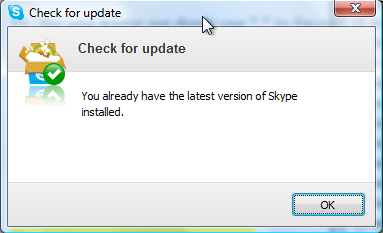
-
Figure: Skype does a good job, with a green tick and simple
message. The actual version number would have made it more
complete.
-
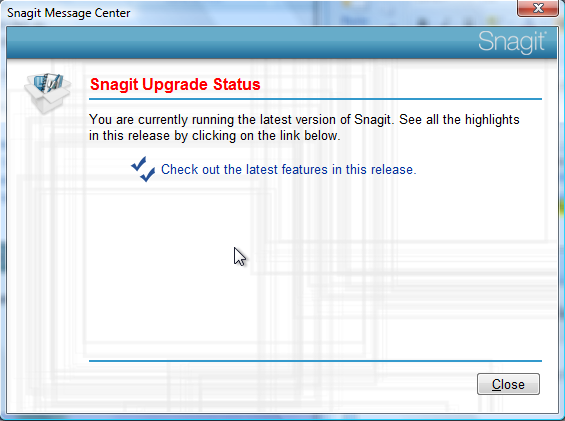
-
Figure: Snagit has horrible UI (
red text when it is not an error
and
Hyperlinks without underlines
), however the link to the latest features is not bad
-
-
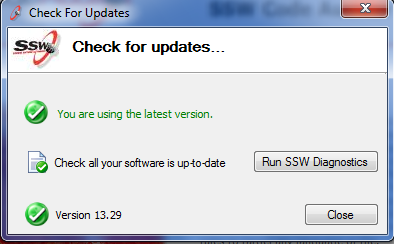
SSW Code Auditor has a great UI (using the freely available
component in .NET Toolkit)
More Information:
If you implement this code from the SSW Toolkit, you will get
this UI.
-
-
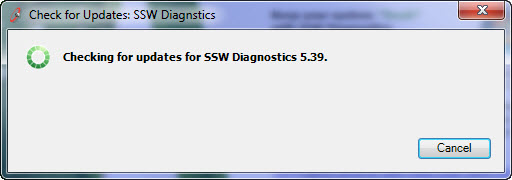
Figure 1: Help | Check for Updates opens the Updater form.
-
-
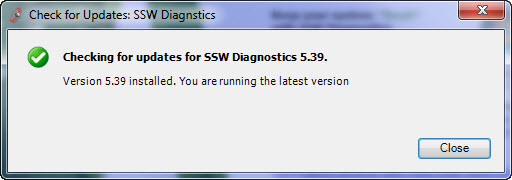
Figure 2: Confirmation that they already have the latest
version.
-
-
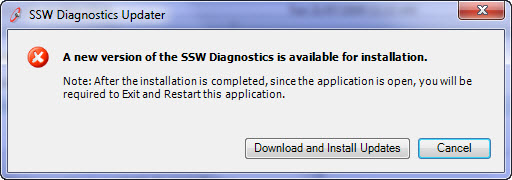
Figure 3: The simple prompt to upgrade when a new version is
available.
-
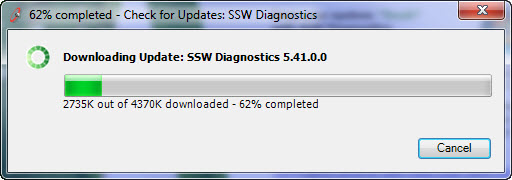
- Figure 4: Showing the upgrading progress.
-
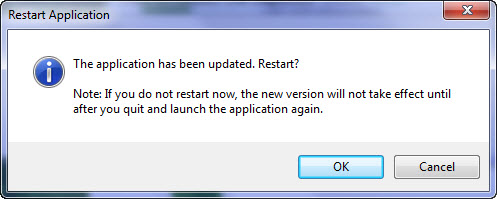
-
Figure 5: Restarting the application is required because the
new version will not take affect until quit and launch the app
again.
Acknowledgements
Adam Cogan
Marten Ataalla