Home
>
Archive
>
SSW Standards Internal
>
Developer SQL Server
>
How to Change SSWData2000
As per our standards:
Is a Back-end structural change going to be a hassle?
Do you have separate development, testing and production
environment?
There are three environments for SSWData2000:
- Production Database: TUNA/SSWData2000
- Development Database: TUNA/SSWData2000Dev
- Test Database: Tuna/SSWData2000Test
This means ALL developments (projects running from your PC) should
connect to SSWData2000Dev, and ALL testing should be done on
SSWData2000Test.
To keep track of changes, we have a centralized repository of change
scripts on our SSWData2000.
For simplicity, place all your change scripts under:
$/ssw/sswtimepronet/database/database scripts/ (SourceSafe path)
And make sure its included in the database project:
$/ssw/sswtimepronet/database/database.dbp (SourceSafe path)
Procedure:
1. Checkout $/ssw/timepronet/database/database.sln
2. Add the change script under Database Scripts; Remember to prefix it
with the next available number.
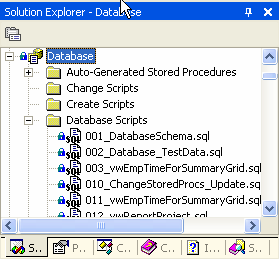
Figure: Add it under Database Scripts