Home
>
Archive
>
SSW Standards Internal
>
Developer SQL Server
>
How To Setup Concurrency for the Web Site
Just like in an Access database, it is important to setup
Concurrency on SQL Server tables and add code to our web sites so
that they handle Concurrency. Usually this would be done with a
Timestamp field. But we have decided to use an integer field called
Concurrency that would be incremented whenever a record is updated.
Steps for Setting up Concurrency for the Web Site
1.
Add the Concurrency field to the Table
2.
Update the Select Stored Procedure
|
-
Add the Concurrency field to the Table
First we need to add the 'Concurrency' field to the table we want to
update. More often than not, this table will be replicated and so we
will need to use the replication wizard to add the new field to the
table. To do this:
-
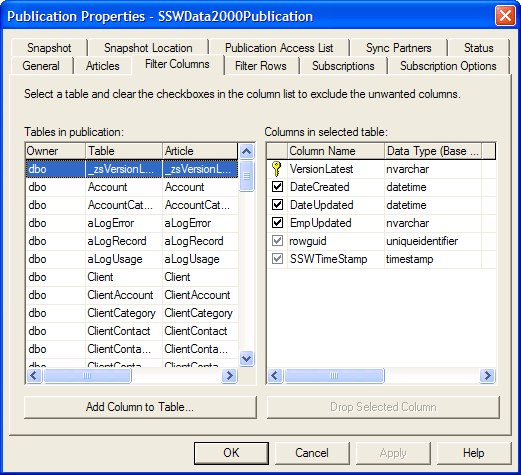
Select a publication and right-click on it and select
'Properties'.
-
Select the 'Filter Columns' Tab, select the table to modify and
click the 'Add Column to Table...' button.
-
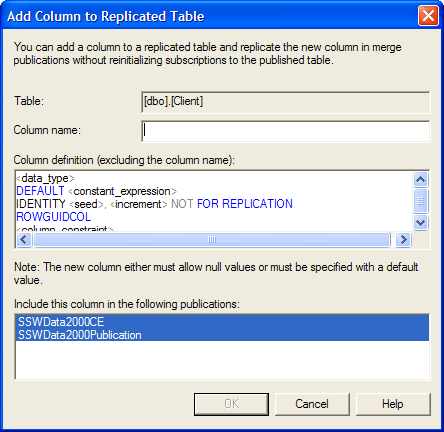
Specify the field name as 'Concurrency'. You will need to set a
default of 0 and the Data Type to integer. You can delete the rest
of the script. Click OK to add the field.
-
Update the Select Stored Procedure
Next we need to update the Select Stored Procedure to retrieve the
'Concurrency' field we created. E.g. the procedure would change to
(See bold):
Create Stored Procedure [dbo].[ClientContactSelect]
@ContactID int
AS
SELECT
ClientContact.FirstName,
ClientContact.Surname
,
ClientContact.Concurrency
FROM
ClientContact
WHERE
ClientContact.ContactID = @ContactID
GO