Home
>
Archive
>
SSW Standards
>
Support
>
Remote Support Sample Script
Remote Support Sample Script
Remote support via Skype or other tools make it easy to help customers
to investigate specific problems or resolve technical issues on their
PC remotely.
The steps involved in a remote support are:
-
If you already have the customers Skype account, skip to step 5
(Contact the customer to start remote support.)
-
Contact the customer via Skype or email to arrange a time for remote
support
Here is a sample email:

Dear Mr. Northwind,
I am contacting you in regard the problems you encountered
while configuring SSW Link Auditor on your pc.
- Please give me your Skype account name.
-
Please ensure that you have downloaded and installed the
latest version of
SSW Link Auditor
.
-
Also please let us know when it would be convenient to
contact you and start the remote support. We would
appreciate if the time could be given as Sydney,
Australia time.
- Please make sure the sound works on your PC.
-
Go to
www.teamviewer.com
and install the TeamViewer application, if we have
problems to connect over Skype.
Regards,
James
www.ssw.com.au
|
-
If necessary, send an appointment to the customer once you have time
arranged.
-
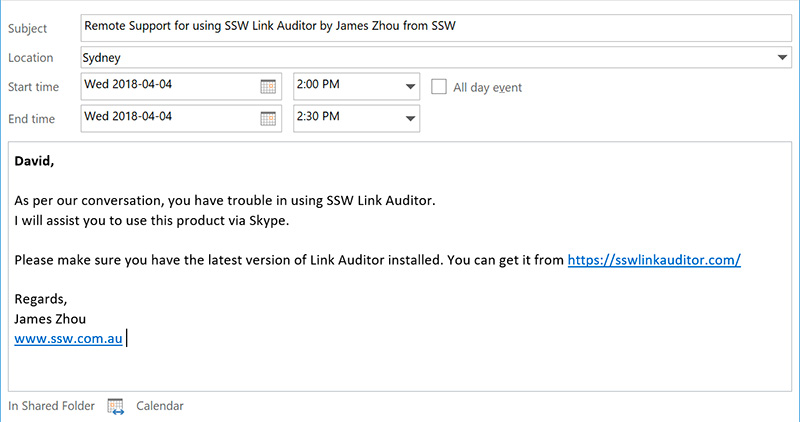
- Figure: Send an appointment to the client
-
Contact the customer to start remote support. The following is a
typical conversation of a remote support:
First of all, introduce yourself:

Hi Mr. Northwind,
This is James Zhou from SSW. I'm one of members of SSW Link
Auditor team.
|
Then continue by giving the customer a brief explanation of what you
will do and how long will it take:
Mr Northwind, can I confirm the agenda.
You would like me to connect to your PC and fix:
How does that sound?
|
Then tell the user to send you a remote assistance request:
OK, please allow me to remote control your PC using Skype.
In Skype, go to the menu Call |Share Screens...
PS: If I need you to do something I will nudge you
|
You try to get connected to customer's PC via Skype but failed.
Firewalls often block it. If so try to use another Remote Support
method as per
Remote Support via Teamviewer
:
This failed - it is likely a firewall issue. So let's try
using Teamviewer
|
See
Remote Support via Teamviewer
for how to use Teamviewer.
If that also fails, see the order of remote support at
Rules for remote support
Once connected to the customer's PC, let him/her know you are about
to control the PC:
Now please don't touch your mouse while I take control of
your mouse.
|
Once you finish remote control, close all applications that you have
opened on remote PC.
Then you should activate the remote conversation window to let
him/her see your message that you have done.
Let your customer take control back:
Now I have finished using your mouse.
|
Try your best to explain what you have found and how come the
problem your customer is experiencing:
This looks like a bug - caused by our web service being
down. I will report this to myself and get back to you.
|
Ask if he/she needs further assistance:
Do you need further assistance?
|
If no further assistance required, close the remote session and let
your customer know:
I’ve finished my remote session and disconnected from
your PC, has your problem been resolved?
|
At last say bye:
OK. Thanks Mr. Northwind. If you have any questions later,
just let me know.
Bye for now.
|
-
Finally send a summary email to the customer describing what you
have done/fixed and tell the customer not to hesitate to contact SSW
if they need any further support.
Here is sample email:
Dear Mr. Northwind,
As per our conversation during the remote support, I found
you didn't have your Reporting Services configured well so
the SSW Link Auditor Report could not be deployed.
What I have fixed for you were:
Configured the windows service identity for Reporting
Services
Configured the web service identity for Reporting Services
If you need any further support, don't hesitate to contact
me.
Regards,
James
www.ssw.com.au
|
Acknowledgements
James Zhou
Ryan Tee