ASP.NET 2 Migration using SSW Code Auditor
Migrating to ASP.NET 2.0 from ASP.NET 1.1 is as simple
as opening the ASP.NET web solution in Visual Studio
2005, but if the migration is done manually there are a
couple of things to know before you start. "Master
Pages", a new feature of Microsoft ASP.NET 2.0, enable
you to apply the same page layout to multiple content
pages in a Web application. Master Pages provide you
with an easy method of creating a consistent look and
feel for a Web site.
Migrating to ASP.NET 2.0 involves following steps:
-
Make changes on attributes in
Page
directive.
-
Add '
MasterPageFile
' attribute in Page directive.
-
Make change attribute name 'CodeBehind' to
'CodeFile' in Page directive
-
Add 'Title' attribute and then move HTML
title into title attributes in the Page directive.
-
Make changes on user controls
-
Make change 'src' value for RandomTestimonial
register tag to
~/Components/RandomTestimonial.ascx
-
Remove old 'Register' directives for incTop and
incBottom
- Remove asp comment lines
-
Remove next lines up to inctop user control line.
-
Add
'Content'
tag
- Remove footer section
- Add closing Content tag
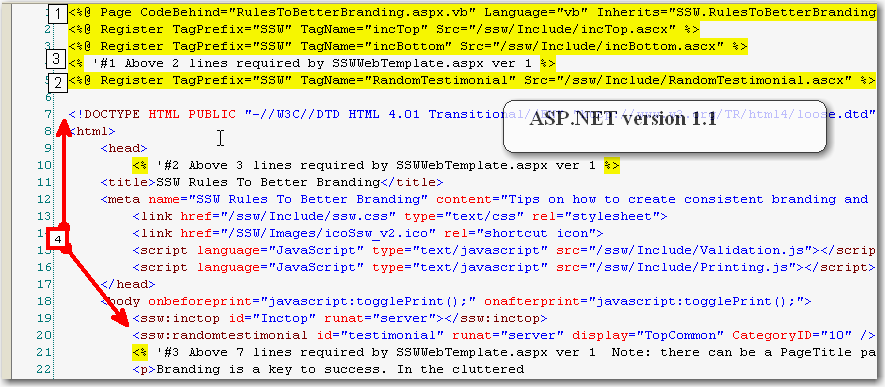
Figure : ASP.NET version 1.1 - Top section
(Before Code Auditor Migration)

Figure : ASP.NET version 1.1 - Bottom section
(Before Code Auditor Migration)

Figure : ASP.NET version 2 - Top section
(After Code Auditor Migration)

Figure : ASP.NET version 2 - Bottom section
(After Code Auditor Migration)
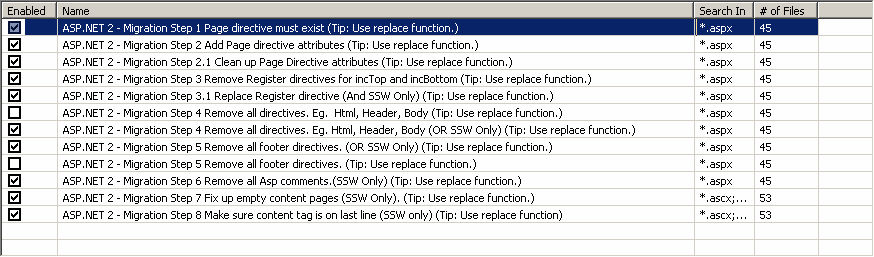
Figure : Code Auditor rules that we run