SSW .NET Toolkit
>
User Guide

Handling and storing exceptions in a central location
Key Features of LadyLog
-
Provides a slick way for your users to report bugs
in your applications and solves the rule
Do you include Exception Logging and Handling?
so you get no more nasty windows like
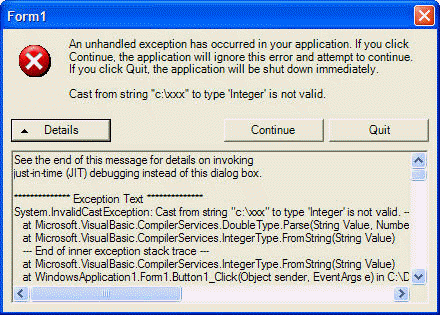
Figure: This is bad a user should never see this
Instead of the above windows when the application
crashes, the SSW Exception Reporter kicks-in and
provides a way to submit this exception back to home
base where it can be investigates and resolved in
future versions of your product. This is somehow
similar to the way windows reports a bug when it
crashes, as it sometimes does.
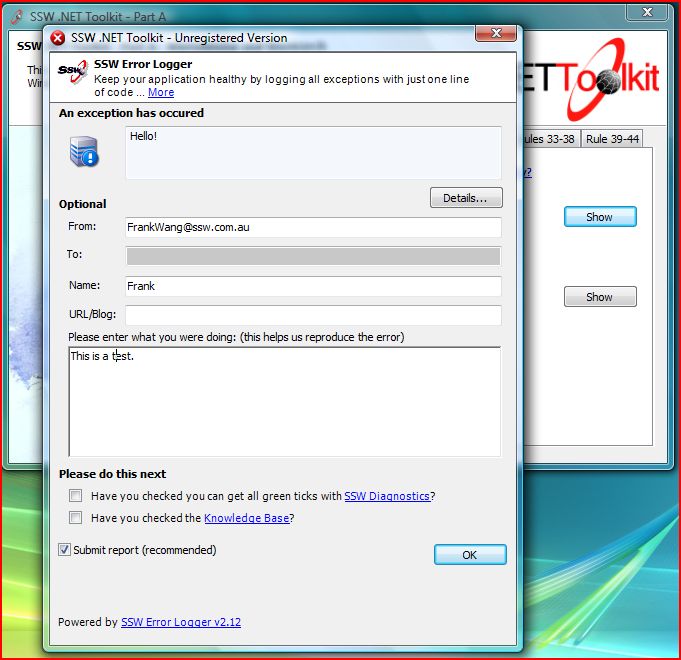
Figure: This is good because it will automatically
submit the stack trace and email the developer so
you will get a response when fixed
-
SSW Exception Reporting Services provides a web-based
system to view bug reports submitted by your users
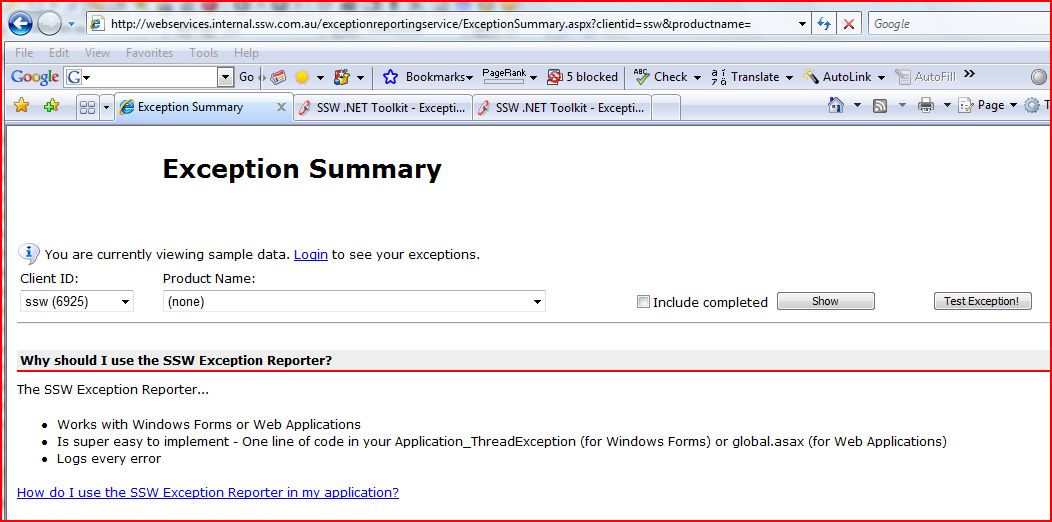
Clicking on view on that page will show a
comprehensive details about the bug report,
including:
-
Product Name which caused the exception
- Product version
-
Internal Notes (.NET Framework version, etc.)
- User email
- User Notes
- User's Operating System
- Error Message
- Full Stacktrace
How do I use the LadyLog in my application?
You can implement the LadyLog in your applications by
following the steps listed below. Any exceptions you
report will be sent to the SSW Exception Database.
Please note that you will only be able to view
exceptions reported with your own Client ID.
You can get your Client ID and see all your exceptions
using the Exception Summary page
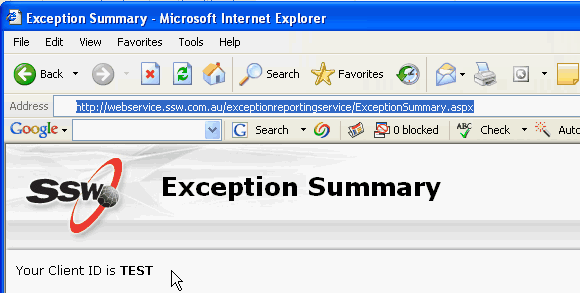
Figure: Getting your Client ID
In order to implement the SSW Configuration Block,
follow these simple steps:
-
Reference the SSW.Framework.ExceptionManagement DLL in
your project.
-
Modify the App.Config file for your application (or
Web.Config), you will need to have some additional
lines
-
<?xml version="1.0" encoding="utf-8" ?>
<configuration>
  <configSections>
    <section
     name="applicationConfigurationManagement"
     type="Microsoft.ApplicationBlocks.ConfigurationManagement.
     ConfigurationManagerSectionHandler,
       SSW.Framework.Configuration" />

  <section
   name="FileSettings"
   type="
SSW.Framework.Configuration.DictionarySectionHandlerWriter,
   SSW.Framework.Configuration" />

  <section
   name="exceptionManagement"
   type="
Microsoft.ApplicationBlocks.ExceptionManagement.ExceptionManagerSectionHandler,
   SSW.Framework.ExceptionManagement" />

  </configSections>

  <exceptionManagement>
   <!--

   mode="on"
       turn it 'off' if you don't want it.

   assembly type
       don't change these.

   exclude = "*"
       this will use this current publisher to exclude any type of exception

   include = "*"
       this will force the publisher to include any type of exception,
       IMPORTANT: include OVERWRITES exclude value, so if you had:
       exclude="System.Exception"
       include="System.Exception"
       System.Exception will still be included.

       A plus (+) can be used to indicate that you want to include this type
       and all the inherited types:

   Exclude="+System.ApplicationException"
       will exclude any of the Exceptions inheriting or is an ApplicationException
       for the current publisher

   IMPORTANT:
       For these types in both Include and Exclude tags, you MUST use the
       correct entire long name. i.e. "System.Exception" is correct.
       "Exception" is NOT correct.

   ...................................................................................

   submit = "true"
       default value for whether the user will submit the exception or not

   interactive = "true"
       default value for whether the process will show a dialog,
       a windows service or asp.net, for example, would not show a dialog and hence
       should be "false". Note that Environment.UserInteractive must be true or
       the dialog won't be shown anyway.

   clientid = "ssw"
       specify the client that the error is logged for, for example, if we also
       sold service for CPF to monitor their bugs then we'd use CPF instead of ssw.

   server1 = "mail.ssw.com.au"
   server2 = "joey"

       because of the way our ISA (chook) is configured, externally, the web service
       publisher must locate "mail.ssw.com.au" whereas internally, it must
       locate "joey". The settings contains information for the publisher to locate
       the webservice webservers.

   jliu 08/2003
   -->
     <publisher
       mode="on"
       assembly="SSW.Framework.ExceptionManagement"
       type="SSW.Framework.ExceptionManagement.Publishers.WebServicePublisher"

       exclude=""
       include=""

       submit="true"
       interactive="true"
       clientid="TEST"
       useremail=""
       server1="webservices.internal.ssw.com.au"
       server2="tuna" />

   <!--
       mode = "off"
       turn off the default publisher, which will try to log to the user's
       event log/viewer

       you should look into the event viewer when developing to see if there's any
       internal Exception Management exceptions - this usually indicates that you have
       some errors in your configuration file.
   -->
   <publisher
       mode="off"
       assembly="SSW.Framework.ExceptionManagement"
       type="Microsoft.ApplicationBlocks.ExceptionManagement.DefaultPublisher"
       include="*" />
   <!--
       This is the EMail publisher, you need to configure:

       SmtpServer = "wolf" or "mail.ssw.com.au"
       To, CC, From = email addresses

       Remember to turn mode="on" if you want to use it.
   -->
   <publisher
       mode="off"
       assembly="SSW.Framework.ExceptionManagement"
       type="SSW.Framework.ExceptionManagement.Publishers.EmailExceptionPublisher"

       SmtpServer="mail.ssw.com.au"
       To="PeterHuang@s*w.com.au"
       Cc=""
       From="Info@s*w.com.au" />
   <!--
       This is the file publisher, you need to configure:

       fileName = "filename.log" (in the current application directory)
       You can also use absolute paths.
       Remember to turn mode="on" if you want to use it.
   -->
   <publisher
       mode="off"
       assembly="SSW.Framework.ExceptionManagement"
       type="SSW.Framework.ExceptionManagement.Publishers.FilePublisher"
       fileName="Exceptions.log" />

  </exceptionManagement>
</configuration>
-
Figure: Modifying the App.Config file for your
application
-
Configure your application to handle exceptions
-
For windows applications
, we will need to add one line of code to catch
thread exceptions
.
A while ago, I had explained that when you are
in a Windows Application, you should use
Application.ThreadException to handle uncaught
exceptions. While this still remains true,
theres some additional notes you need to be
aware of.
Application.ThreadException only handles
uncaught exceptions within the Application
thread. That is, it will only handle exceptions
coming from the forms, etc - inside the
light green
section. Exceptions thrown outside of the
application thread, for example in the
yellow section
, will not raise an Application.ThreadException
event.
You must still catch these exceptions using the
AppDomains UnhandledException event. Shown in
light blue
.
-
// C#
Using Microsoft.ApplicationBlocks.ExceptionManagement;

[STAThread]
static void Main(string[] args )
{
 Application.ThreadException +=
   new System.Threading.
   ThreadExceptionEventHandler(ExceptionManager.ThreadExceptionHandler);

   AppDomain.CurrentDomain.UnhandledException
   += new UnhandledExceptionEventHandler(ExceptionManager.UnhandledExceptionHandler);


   if( args != null && args.Length == 1 &&
        args[0].ToLower() =="/silent" ) {
     CPFIntegratorLib.Integrator integrator =
     CPFIntegratorLib.Integrator.GetInstance();
     integrator.Process();
     return;
   }

   Application.Run(new frmMain());
}

' VB.NET
Imports Microsoft.ApplicationBlocks.ExceptionManagement

Public Shared Sub Main()

 AddHandler Application.ThreadException,
 AddressOf ExceptionManager.ThreadExceptionHandler
 ...
End Sub
- Figure: Exception Management
-
For web applications
, we will need to add one line of code to your
Global.asax
file:
-
protected void Application_Error(Object sender, EventArgs e)
    {
       Microsoft.ApplicationBlocks.ExceptionManagement.
       ExceptionManager.Publish(Server.GetLastError());
    }
- Figure: Global.asax
-
For Outlook/VS.NET Plug-ins
, because these are hosted by another application,
you need to be aware that Exception Reporting
Service will attempt to discover the name of the
application in the following order:
- ExceptionManager.ApplicationName
-
System.Windows.Forms.Application.ProductName
-
AppDomain.CurrentDomain.BaseDirectory
If theres a file named with the same name as
the BaseDirectory in the directory, then that
will be used.
-
The assembly file name of the
Assembly.GetEntryAssembly()
-
The assembly file name of the
Assembly.GetCallingAssembly()
-
The command the application was stated with:
e.g. MyApp.exe arg1 arg2
MyApp?would be used as the application name
-
The assembly file name of the
Assembly.GetExecutingAssembly()
- assembly.FullName
The following code will allow you to specify the
application name used by Exception Reporting
Service
-
ExceptionManager.ApplicationName = strProductName
ExceptionManager.ApplicationVersion = strProductVersion
-
Try not to use code like this - they will hide the
exceptions from you. Only do this if you know what you
are doing. Catch specific exceptions that you ARE
expecting, rather than catch any exception:
-
try
    {
       ...
    }
    catch (Exception ex) // catching all Exceptions
    {
       ...
    }
- Figure: Try to catch specific exceptions
-
(Optional) If you want to be notified when an error is
submitted about your product in the web service, you
need to modify the Email.Config file for the web
service. In our case this belongs in:
\\tuna\c$\Inetpub\wwwroot\ExceptionReportingService\Email.config
and add the following key:
<add key="EMAIL:<your product name>"
value="<your email address>" />
-
<FileSettings>
       <appSettings>
          ... other entries
          <add key="EMAIL:nunit-gui" value="johnliu@s*w.com.au" />
       </appSettings>
    </FileSettings>
-
Figure: Do you want to be notified if an error in
your product is submitted in the web service?
- See the Exception Summary page:
Upcoming Features
- Elmah support
- Minimal size download
- Add support in TFS Smashing Barrier
- Demo video
- Enterprise Library support
-
Silverlight support ?Capture unhandled Silverlight
exceptions
- Convert to WPF and offer a few Skins
Note that our exception management block is part of our
Rules to Better .NET Projects