Home
>
Archive
>
StandardsInternal
>
GeneralAdministration
>
How To Configure The Alarm System
How To Configure The Alarm System
The alarm system is to be turned off by the first person who arrives
in the morning and turned on from the last person who leaves.
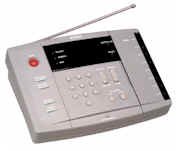
The alarm box is located in the machines room on top of the hub box on
the wall, next to the computer chook, and under the desk, and looks
like
If the alarm goes off while you are entering or leaving the office:
Please ensure you turn off the alarm and reset it, then call Scott on
0428 43 44 22 to let him know that it is a false alarm. Scott will
then text Adam and Anastasia to let them know everything is ok.
When you enter:
-
When you enter you have 30 seconds from when you hear the first beep
to deactivate the alarm. (the sensor in the hall will pick you up
when you enter the office)
-
To disarm, enter in <
See TimePro under SSW
> on the keypad then hit the DISARM button.
-
The ARM light will go off unless the alarm went off during the night
in which case it will flash and the sensors which set it off are
lighted.
When you leave:
-
Walk around the office and ensure that all lights, fans and air
conditioners have been switched off and that all doors are locked as
any movement will cause false alarms.
-
When you leave you hit the "Bypass" then the ARM AWAY button. You
will then hear the same pitched beeps (you have 1 minute to leave
the building.) If you hear 2 different pitched beeps then the
interconnecting door is not shut and the alarm will not activate
until you close the door and reset the alarm.
-
Once you have set the alarm and left the office DO NOT reopen the
front door without resetting the alarm, it will cause a false alarm.
-
Make sure once you have set the alarm and locked up you wait outside
for 1 minute to ensure the alarm is not triggered.
-
Those lucky enough to have the alarm remotes, make sure you listen
for the beeps before you leave to make sure the alarm will actually
go on.
If the alarm went off:
-
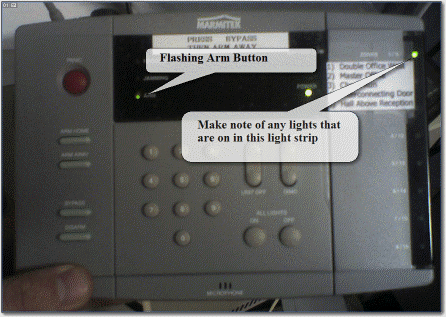
After you have disabled the alarm, you may see the ARM light
flashing. If you did we want to know what sensor was playing up.
Send an email SSWServerEvents and with the date and which lights were on. Each light on the black
strip on the right hand side of the box has a number associated with
it. There is a little reference guide describing what number is what
sensor. Please include this information in the email
Acknowledgements
Daniel Hyles
Scott McPhillips