-
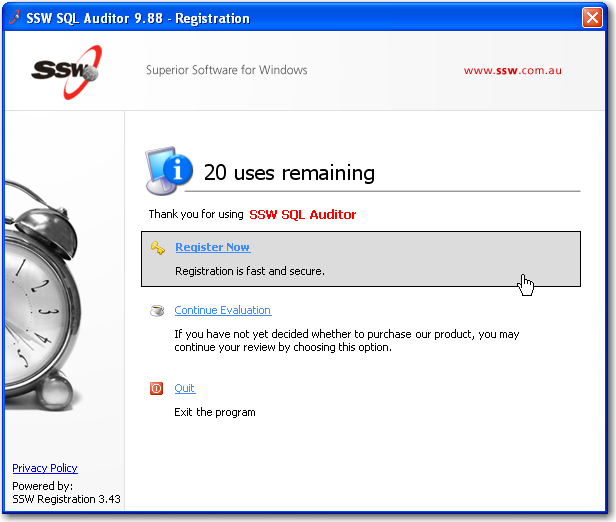
New Look of SSW Registration Wizard
|
Figure: New look of the main page
|
More screen captures
-
Versions
|
Version
|
Date
|
Updated
|
Changes
|
| 1.0 |
14/03/2002 |
JL, JHL |
First Release |
| 2.0 |
16/01/2003 |
DH |
Major changes. Added all info about how to use DLL and ways
to get around it
|
| 2.1 |
31/01/2003 |
RAD |
Changed the image for adding a project reference to
SSWRegistration2002; Added section 'Before Releasing your
Program'; Small changes
|
| 3.0 |
23/02/2004 |
DH |
Added all the auto registration functionality
|
| 3.1 |
23/05/2005 |
DH |
Updated to use new database tables for prod name
|
| 3.25 |
21/07/2005 |
DH |
First relese of new version |
-
Key Features & Benefits
Since .NET and Web Services became available, we wanted to revisit
our problem of registering software that people download from our
website. The New Registration DLL uses this technology to
incorporate our database with client registrations and trials while
making it fail safe and easy to debug.
-
Developer notes and implementation
For developers please read the
Registration for SSW Developers
page
-
How to reset the registration usage information
To reset furiously double click around the area marked by the red
dot
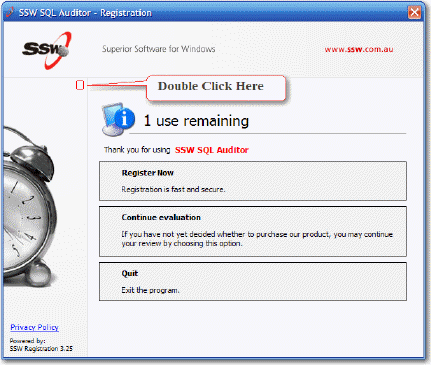
A message box will be displayed confirming that you want to reset
the trail.
-
How to register the product (internal use only)
Add a dummy invoice to the SSW user in TimePro for this product and
then login with your email address and password (preferred)
OR
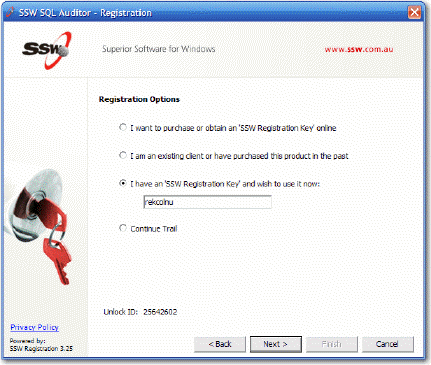
To register the product enter rekcolnu (unlocker backwards) in the
Registration Key field, press [Ctrl] and ] , and then
right click
on the Options label of the window title "Registration Options" at
the top 6 times until the registration Key field changes to the
unlock code. Click 'Next' to complete the process.
More screen shots in the
User Guide
.
-
How to register the product (external)
Once the customer has a a paid invoice they are able to register
the product via the web by simply entering their email address and
password.
The client picks the Register Now option
They then select the "existing client" option and click Next
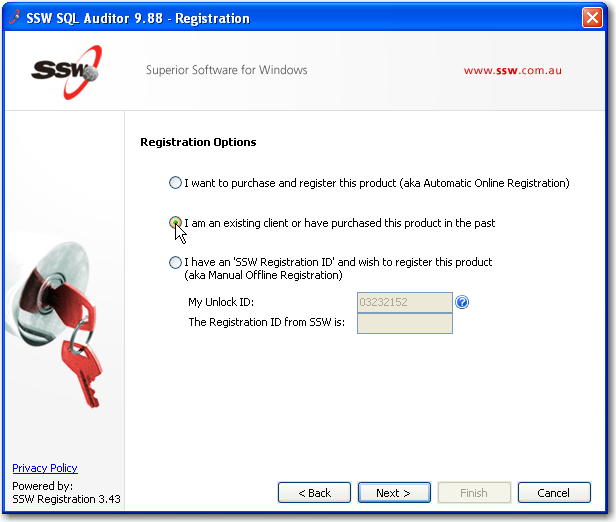
The client will then need to type in their email address and
password and click Next
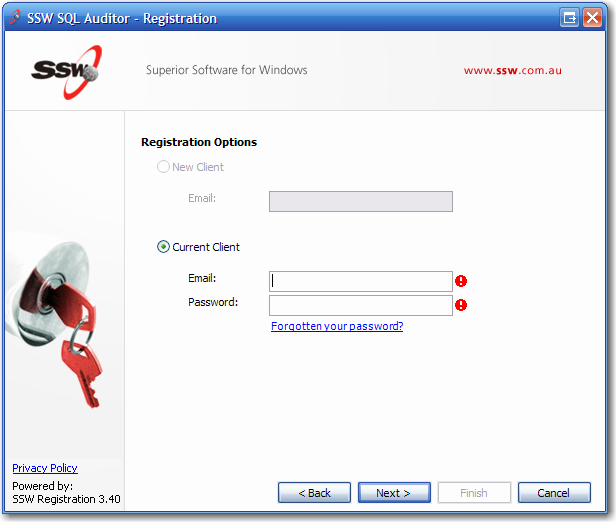
The registration will check SSWData2000 database through
Registration Web Services and activate the product.
Refer to the "How does the auto registration work?" section for
any registration problems.
If the user does not have an Internet connection then as an
absolute last resort you can use the Unlock program.
SSWRegistrationUnlocker.exe
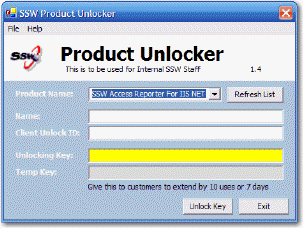
If the product name is not found in the list then click on the
Refresh List button to get any new product names from our
database.
Please Note:
You may have to copy the Unlocker directory to your computer so
you have permissions to refresh the product list.
Please Note:
You can only give a client ONE temporary key. Once they have used
it they cannot get another one.
-
How do I extend user's evaluation period for another 7 days or 10
uses?
Temp key can only extend user's evaluation period once, therefore
we cannot issue another temp key for the same user after the
initial one, which is not good.
From version 3.13, you can use web service and Time PRO client
diary to extend user's evaluation period for multiple times. In
order to use this function, user need to have an entry in Client
table (normally when user download the software, a new entry will
be created).
To do this, you need to find the client record in Time PRO and
click on "Dairy" button on the top:
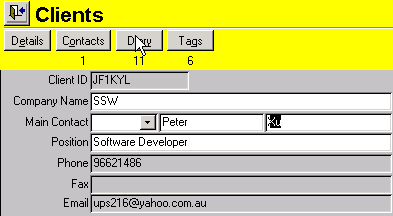
then, add new diary record and choose the category "Registration
Trial Can Be Extended" :
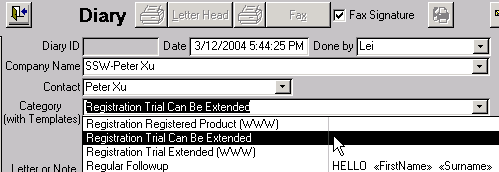
On the client side, they need to use "existing client" option
Then, the client need to type in his email address and password:
The registration will check SSWData2000 database through
Registration Web Services, because we have already add the diary
record to enable extension for this user, his product trail will
be extended.
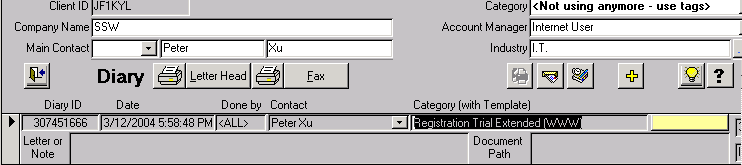
After the user extends evaluation, the record in client's diary
will be replaced with another record, saying "Registration Trial
Extended (WWW)", then we know his evaluation extension has been
done.
For multiple extensions, you just need to add another
"Registration Trial Can Be Extended" record in the client's diary.
Note: After the client extend his evaluation for the 1st time, a
temp key will be added into his local registry and any temp key
will return a "Invalid key" error message.
-
What does the Website/Registration automate?
- Creates the client if one doesn't already exist
- Creates the invoice
-
Emails
info@s*w.com.au
about the new invoice telling you to process it
Admin guy then processes this invoice
manually
-
You process it then reply to customer telling them to:
Install the software if it is not already
(chances are it is as they purchased the software though it)
Tell them to open up the software package and
click on "Register Now"
The user then selects the existing client
option and then enters in their email address and password
The system will detect that that client has
purchased the product and will register the product
automatically
Note: If they dont have Internet Access then the user will have to
go though the old process:
- They click Register
- They email us their PC ID
- We email them their Unlock ID"
- They open the product
- They click Help - Register Now
- They enter the Unlock ID
-
How does the auto registration work?
Users now have the option to auto register their program.
When they do this a couple things get checked:
1) Did that user purchase that product?
2) Are they installing a new version and if so have their free
upgrade time expired?
3) Has the user registered too many times this month?
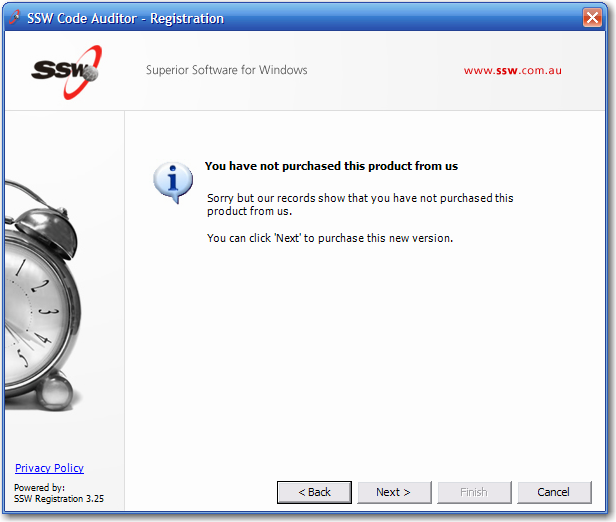
1) Did that user purchase that product?
This will look for a invoice for that client for that
ProdCategory.
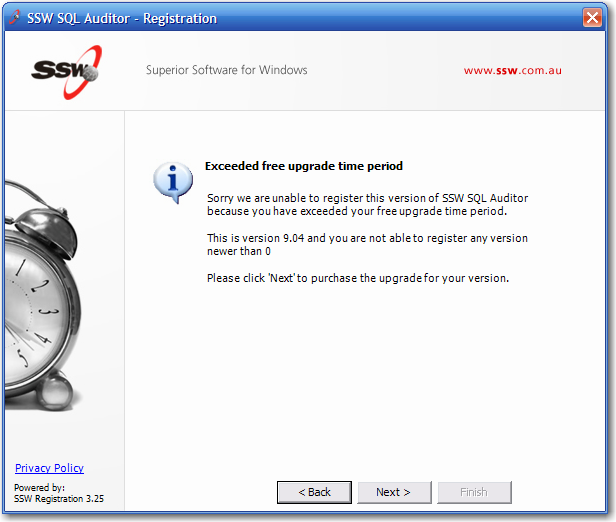
2) Are they installing a new version and if so have their free
upgrade time expired?
We give them 6 months of free upgrades. This is judged by the
'DateCreated' of the invoice for the product. You can extend this
for a client by altering this field. After this period and the
user tried to upgrade or install a newer version that they had
previously installed before this timeout period then they will be
denied. The user has the option to continue and purchase a
'maintenance' product with will allow the user to have another 12
months of upgrades.
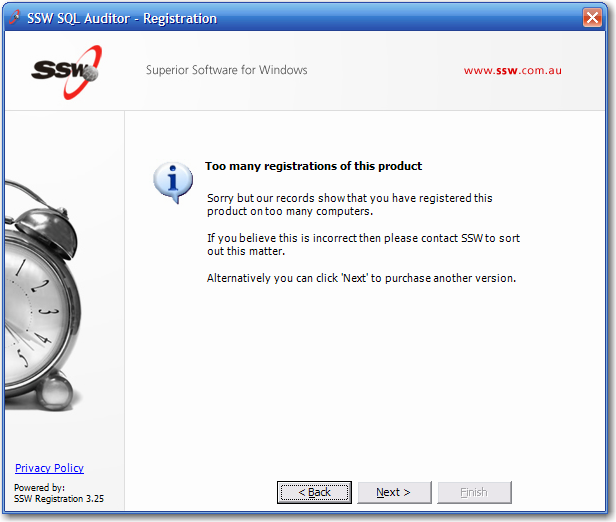
3) Has the user registered too many times this month?
This functionality was introduced so we can monitor and try to
control warez keys floating around the Internet.
We are allowing the client to register the product as many times
as they have licenses for with an additional 2 times every month.
So if I have 2 licenses i can register it 4 times per month.
Every purchase counts for 1 license except if it is a enterprise
product then the purchase will account for 100 licenses.
Every time a client updates the application, or registers a new
application on a new machine, a new entry is made in the
ClientDiary table.
-
The following are some weakness with the registration dll
1) What is SSW goes broke?
Problem:
If SSW goes broke then our web service will stop and clients will
be unable to register their product.
Solution:
Buy source code.
2) I don't have the original image that I had when I purchased the
software. Now I cannot register the latest version!
Problem:
If you try to register a product after 12 months after the date of
purchase then you will be denied and prompted to purchase a
upgrade. We don't keep previous versions of our product so we
cannot supply you with a working version. You should have kept the
download.
Solution::
If they complain then go to their tags in TimePro! and add a
'PRDUPD' tag with the current version of the product. This will
allow the user to register the current version and you have now
given them warning regarding keeping the download.
-
How do I give away free versions for Journalists?
All you have to do is make a dummy invoice for the person for that
product and they will be able to register the product.
If you want to give them 3 months of upgrades then all you have to
do is change the DateCreated of the invoice for the product to a
date 9 months prior to the current date. (The rego dll gives them
12 months of upgrades. So by changing the DateCreated to a earlier
date their upgrade period is reduced).
-
How do I give away free versions in Magazines?
At times we give away free copies of our software as part of a
magazine promotion or some other promotion. When this happens we
supply eligible persons with a code. More information about our
INETA and Practical Web Projects promotions can be found here:
http://www.ssw.com.au/ssw/Products/Pwpmag.aspx
and
http://www.ssw.com.au/ssw/Products/Ineta.aspx
-
What happens when our products are bought through Resellers?
Each product registration is attached to a client ID. This means,
the reseller who bought the product, has the product and its
invoice attached to their client ID. To correct this and hand over
the registration to the 'real' purchaser, you need to alter
invoices. Once the invoice is paid:
Step 1: Set the date back one year so they cannot activate the
software themselves. Put in the notes field that they are a
reseller, the invoice was changed to avoid them being able to
activate the software themselves and getting a free copy.
Step 2: Ensusre you have full details of the company that will be
the registering company (not the reseller). If they have not
registered with SSW yet, create a Client ID and fill in the
details. Make sure you know which person is going to be
registering the software and make them the main contact with their
email address.
Step 3: Create the registering company an invoice for the product
that the reseller purchased for them and set it to zero ($0)
Step 4: To register, the company will need to know the email the
product is now bought under, as well as the password that was
generated to unlock the registration keys. Provide this
information over the phone if possible to avoid sendoing sensitive
information via email. If this is unavoidable, send the email and
password to the one main contact who will be the one registering
the software.