There was an error displaying the testimonials. Please
report this error
to SSW and include the following text:
- A network-related or instance-specific error
occurred while establishing a connection to SQL
Server. The server was not found or was not
accessible. Verify that the instance name is correct
and that SQL Server is configured to allow remote
connections. (provider: Named Pipes Provider, error:
40 - Could not open a connection to SQL Server)

Congratulations, you are eligible for a FREE copy of
SSW Code Auditor and SSW Link Auditor.
(Note: Offer expires 30th June 2005.)
Here is a list of instructions to follow in order to
unlock you FREE copy of SSW Code Auditor and SSW Link
Auditor!
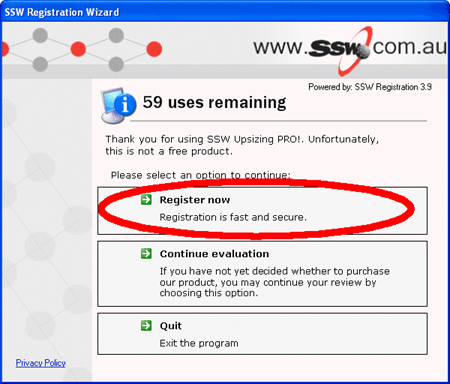
When running SSW Code Auditor or SSW Link Auditor for
the first time, a screen like this should appear.
- Click on the Register now button
-
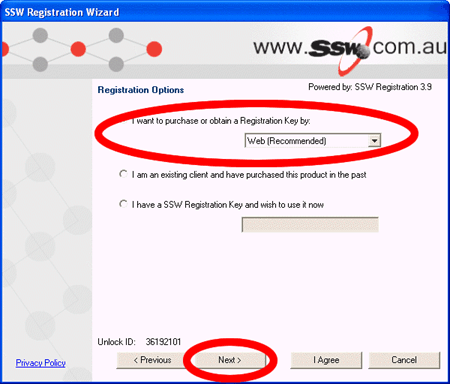
Now Select the register over the web option, then
press Next
-
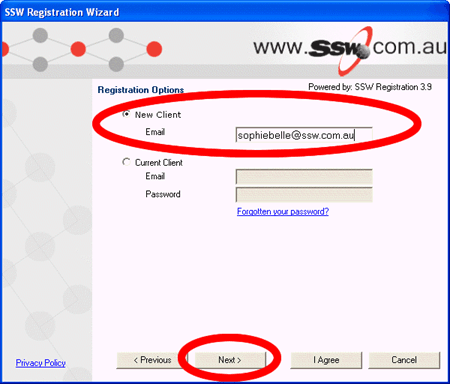
Select New Client, then enter your email address and
press Next
-
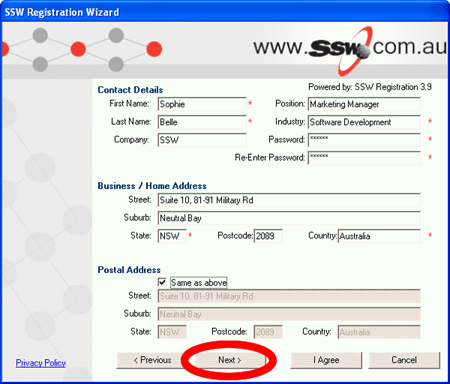
Enter in all your details and a password which you
will need later, then press Next
-
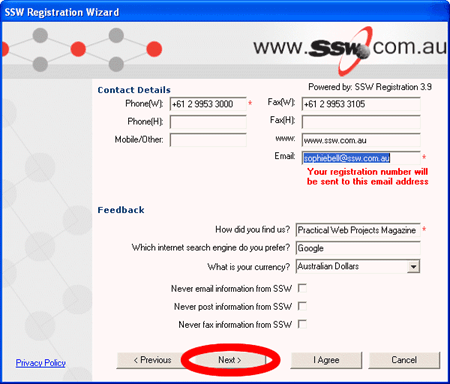
Enter in all your details, make sure your email
address is correct, then press Next
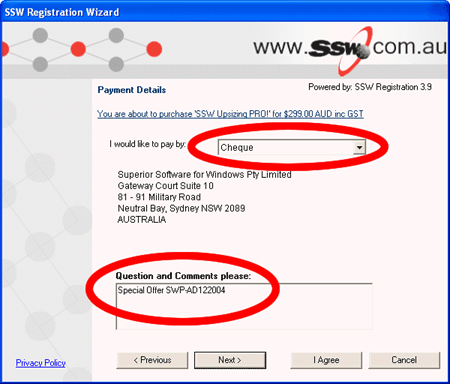
- Select you would like to pay by cheque
-
In the notes field type this code 'Special Offer
SWP-AD122004'
-
Then press next and you should receive your Unlock Key
in the next two days.
We really hope you enjoy using this program and always
welcome feedback.
You can send feedback to
info@ssw.com.au