-
Catch broken redirect statements
When programming today it is common to use code like:
- Response.Redirect("ScottGu.aspx");
The problem here is that if 'ScottGu.aspx' is moved or deleted,
Visual Studio doesn't pick it up. We want it to be strongly
typed. A way to achieve this is to use a class name:
- Response.Redirect(ScottGu); // 'ScottGu' is a class.
Now, when this file is deleted or renamed, it will generate a
compile error (like winforms)
Note we would also need the following overloads:
- void Redirect(System.Type RedirectPage);
-
void Redirect(System.Type RedirectPage, string QueryString);
- void Redirect(string URL);
Sample usage:
- Redirect(ScottGu);
- Redirect(ScottGu, CustomerID=BOLID);
- Redirect(www.google.com.au);
-
V2.0: No Tab Control in ASP.NET
There is no Tab Control in ASP.NET. There are plenty of 3rd
party controls but we believe that this important functionality
will be built into ASP.NET. We need a tab control like the one
used on
www.asp.net
.
-
V2.0: No sort order indicator in GridView
When you enable Column Sorting in a GridView you will
automatically have arrows like this:
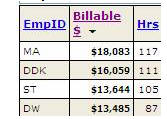
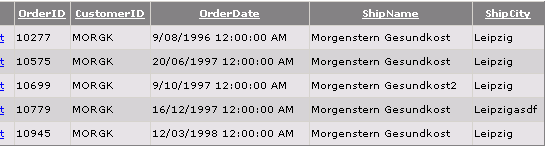
Unlike now, which has no indication of which column is sorting
and what order it's ordered in.
-
V2.0: TreeView Node Editor dialog needs to be resizable
The TreeView Node Editor dialog needs to be resizable, or at
least a bit larger, so you can view the text on the left and the
properties on the right without scrolling up and down
continually.
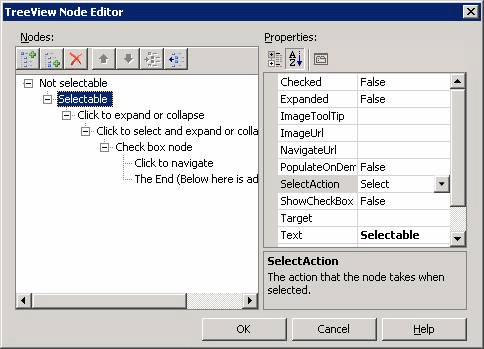
Figure: This dialog is far too small, but there is no way to
resize it!
-
V2.0: PlaceHolders will be able to be resized
ASP.NET ContentPlaceHolders need be able to be able to be
resized. Clearly the "Title" and "Description" below are far too
big.
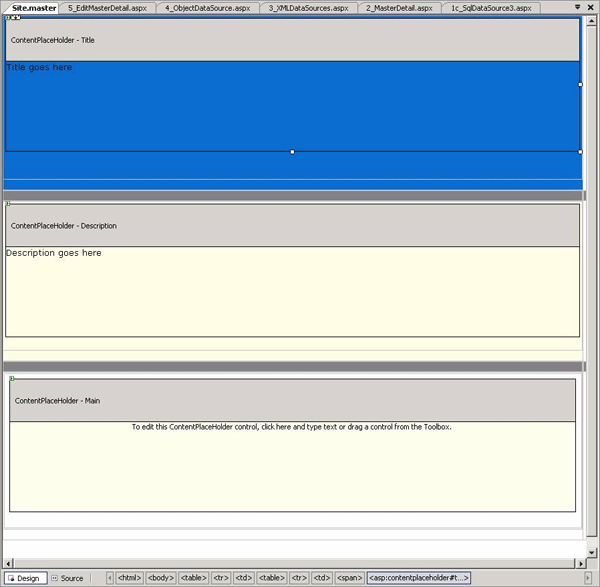
Figure: The "Title" and "Description" ContentPlaceHolders are
much too big, but there is no way to resize them.
-
V2.0: Wizard control default buttons text will be Back and Next
According to
http://msdn.microsoft.com/library/en-us/dnwue/html/ch13h.asp?frame=true
, the commands for navigating through a wizard will be "<
Back" and "Next >".
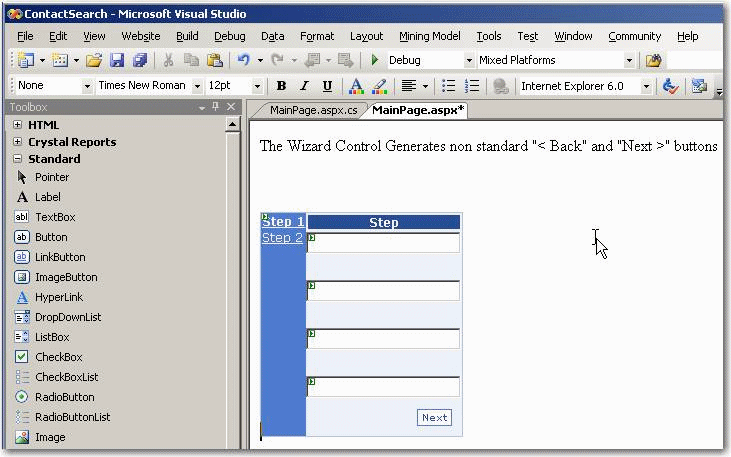
Figure: Wizard Control in ASP .NET 2.0, the button text will
be "Next >"
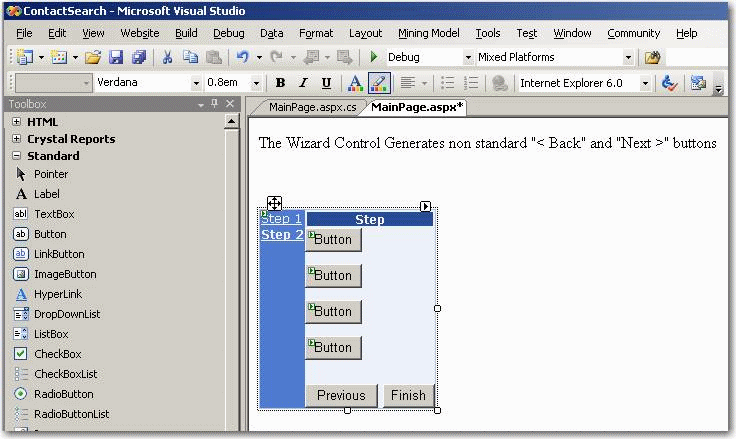
Figure: Wizard Control in ASP .NET 2.0, the button text will
be "< Back"
Tip:
You can change the default buttons text by adding the following
text (highlighted) to your <asp:Wizard> tag:
<asp:Wizard ID="Wizard1" runat="server" ActiveStepIndex="0"
FinishPreviousButtonText="< Back"
StartNextButtonText="Next >"
StepNextButtonText="Next >"
StepPreviousButtonText="< Back"
>
Read more about this on our
Rules to Better Websites
.
-
BLINQ does not work with Timestamp
The reason that Blinq does not work with Timestamps in ASP.NET
2.0 is because the ASP.NET 2.0 datasource does not support byte
array serialization, even though Blinq correctly identifies
timestamps as a version field. As a result, the timestamp value
is null during post back, and fails the concurrency checking.
Ultimately, it throws the following exception:
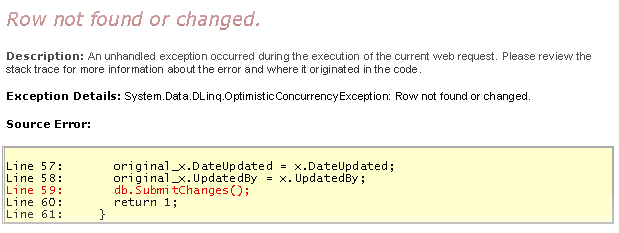
The recommended workaround to current users
-
The following code changes will be rquired in YourDatabase.cs,
which is located in App_Code folder of the BLINQ generated
website:
[Column(Storage="_SSWTimestamp", DBType="rowversion NOT
NULL", IsVersion=true)]
To
[Column(Storage="_SSWTimestamp", DBType="rowversion NOT
NULL", UpdateCheck=System.Data.DLink.UpdateCheck.Never)]
The recommended solution to Microsoft
-
Add functionality to asp.net datasource, so that, it supports
byte array serialization to recognize timestamp as a version
field.
-
Date/Time Picker Control
Yep - this would be a great control to include in the box. You
can simulate it today using a Calendar control with an
PopUpExtender Atlas control - but I agree having one
completely integrated one would be best.
Scott Guthrie, Microsoft
Please provide us with a Date/Time Picker Control. Rather than
having Reporting Services teams find or create their own, they
could use this built-in ASP .NET control. An additional benefit
is that developers, like us, can have standard controls in their
applications.
-
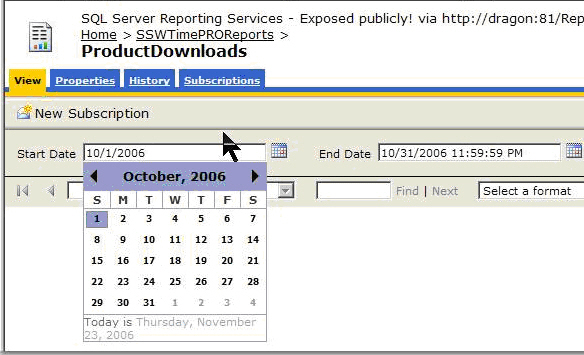
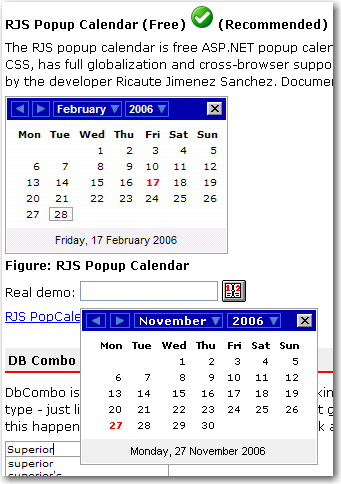
- Figure: Example of SSW's use of the Date Picker Control
Tip: I find myself always using RJS - a free one.
See
http://www.ssw.com.au/ssw/Standards/DeveloperGeneral/WebdevelopmentToolsASPNET.aspx#PopupCalendar
-
-
Figure: It would be beneficial to have a built-in Date/Time
Picker control like the RJS Popup Calendar
Moreover, it would be great to have a DateRangePicker control.
Instead of picking the start date and end date in two separate
controls, we can pick the start date and end date easily in the
same control.
-
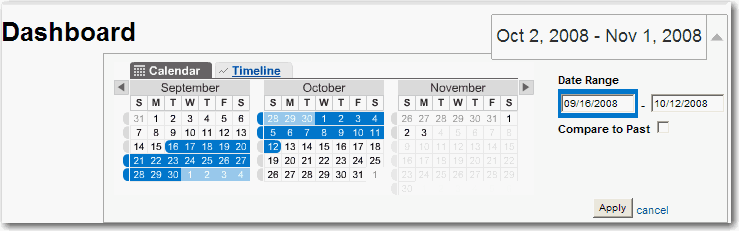
- Figure: DateRangePicker
We also wish to see these types of controls in
Microsoft SQL Reporting Services
 .
.
-
Update Schema to Include Intrinsic Client-Side Events for
ASP.NET Controls
ASP.NET Server-side controls which render elements on the
client-side will have the same intrinsic events as normal HTML
elements.
Currently there is no intellisense / schema support for these
events:
-

-
Figure: No intellisense / schema support for ondblclick event
for ASP.NET ListBox control.
Any ASP.NET control that renders to the client will include the
same core events as a normal HTML element, such as this input
button:
-

-
Figure: Intelligence / schema support for "Input" html
element.
The schema for ASP.NET controls rendering to the client will
include the following, where applicable, as per the W3C-Defined
Intrinsic Events
:
| onload |
The onload event occurs when the user agent finishes
loading a window or all frames within a FRAMESET. This
attribute may be used with BODY and FRAMESET elements.
|
| onunload |
The onunload event occurs when the user agent removes a
document from a window or frame. This attribute may be
used with BODY and FRAMESET elements.
|
| onclick |
The onclick event occurs when the pointing device button
is clicked over an element. This attribute may be used
with most elements.
|
| ondblclick |
The ondblclick event occurs when the pointing device
button is double clicked over an element. This attribute
may be used with most elements.
|
| onmousedown |
The onmousedown event occurs when the pointing device
button is pressed over an element. This attribute may be
used with most elements.
|
| onmouseup |
The onmouseup event occurs when the pointing device button
is released over an element. This attribute may be used
with most elements.
|
| onmouseover |
The onmouseover event occurs when the pointing device is
moved onto an element. This attribute may be used with
most elements.
|
| onmousemove |
The onmousemove event occurs when the pointing device is
moved while it is over an element. This attribute may be
used with most elements.
|
| onmouseout |
The onmouseout event occurs when the pointing device is
moved away from an element. This attribute may be used
with most elements.
|
| onfocus |
The onfocus event occurs when an element receives focus
either by the pointing device or by tabbing navigation.
This attribute may be used with the following elements: A,
AREA, LABEL, INPUT, SELECT, TEXTAREA, and BUTTON.
|
| onblur |
The onblur event occurs when an element loses focus either
by the pointing device or by tabbing navigation. It may be
used with the same elements as onfocus.
|
| onkeypress |
The onkeypress event occurs when a key is pressed and
released over an element. This attribute may be used with
most elements.
|
| onkeydown |
The onkeydown event occurs when a key is pressed down over
an element. This attribute may be used with most elements.
|
| onkeyup |
The onkeyup event occurs when a key is released over an
element. This attribute may be used with most elements.
|
| onsubmit |
The onsubmit event occurs when a form is submitted. It
only applies to the FORM element.
|
| onselect |
The onselect event occurs when a user selects some text in
a text field. This attribute may be used with the INPUT
and TEXTAREA elements.
|
| onchange |
The onchange event occurs when a control loses the input
focus and its value has been modified since gaining focus.
This attribute applies to the following elements: INPUT,
SELECT, and TEXTAREA.
|
-
A top CheckBox to "select all" in web forms
The header of a checkbox column (e.g. in GridView) will contain
a checkbox by default. When this checkbox is checked, all
checkboxes below are checked too. This checkbox is more than a
check box with all things (e.g. properties, methods and events)
applied to a CheckBox control.
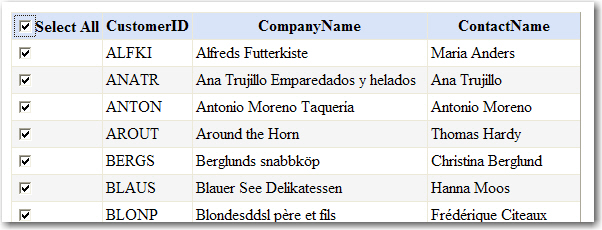
Figure: A top checkbox to select all checkboxes underneath it in
a web form
-
Add support for pasting in screenshots in OWA
Outlook supports pasting an image into the content (when we
create an email like this one)...... It has for more than 10
years.
But I am yet to see this in any other application (correct me if
I am wrong).
Eg. The developers of an application I was reviewing recently
wanted to improve their feedback form to allow users to include
screen captures.
Q:\ How did they do it?
A:\ By adding an 'Attachment' button. This allows the user to
save the image to their PC, click the 'Attachment' button, then
browse to the file they wish to attach.
This is a pain in the neck for the users.
I would like both the Windows Forms and Web Forms teams to
provide a form (out of the box) that will support pasting in an
image from the clipboard...... like you can using Outlook
PS: Do we need an new XHTML datatype field in SQL Server 2008?
-
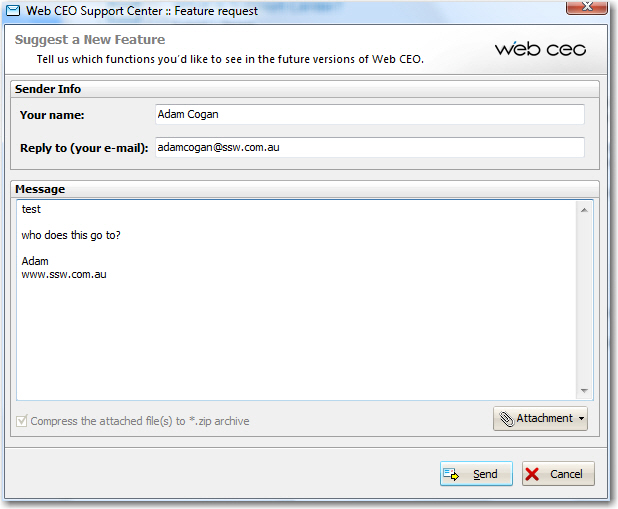
- Figure: The Attachment button will not be needed.
Note: We need the same on Windows forms