This product is no longer supported.
Has your business outgrown your home made Access
database? Upsizing is the process of migrating some or
all database objects (tables and queries) from a
Microsoft Access database (.mdb) to a new or existing
Microsoft SQL Server database. If your business is
growing and you demand a scalable database solution,
upsize from Access Jet to the robust SQL Server
environment. SSW Upsizing PRO! is the tool that prepares
your Access database so you can convert effortlessly to
SQL Server. Upsizing PRO! will prevent known errors,
ensuring a smooth migration.
Microsoft Upsizing Wizard upsizes the mdb (if
successful) and then creates a report that provides a
detailed description of all objects created, and reports
any errors encountered during the process.
Microsoft have had their Upsizing Wizard for a many
years and while it works fine for some, other developers
report to newsgroups that it has a surprising amount of
shortcomings. While some of them are bugs, most of the
issues are simply because Access and SQL Server have
different functionality. We believe the best approach is
to fix errors in the mdb first and this is the approach
that SSW Upsizing PRO! takes.
Our clients often ask us to upsize their database from
Access to SQL Server. With Upsizing PRO, what used to
take us hours can now be done at the click of a button.
Works with SQL Server Versions:
2000, 2005, 2008
Key Features & Benefits
What about the SQL Server Migration Assistant for
Access (SSMA Access)?
SSW Upsizing PRO! is unique in terms of validating
data structure and data before and after upsizing.
SSMA Access has a good set of rules however there are
some issues. See our take on
Microsoft SQL Server Migration Assistant Wizard for
Access
As an Upsizing Tool, SSW Upsizing PRO! checks your
database the way the 'Microsoft Upsizing Wizard' should
have done. After you use the generated reports, and made
the recommended changes, you can upsize to SQL Server
without any worries. Here are some of the useful
features of SSW Upsizing PRO!:
-
Wizards guide you through the upgradation.
- Effective than Microsoft's Upsizing Wizard.
-
Supports upsizing non-unicode datatypes in Access
-
Microsoft Access developers too often use forms and
combos bound to large tables or slow queries. Let this
wizard analyze your Front-End and tell you what forms
are slow and what controls are the culprits in each
form.
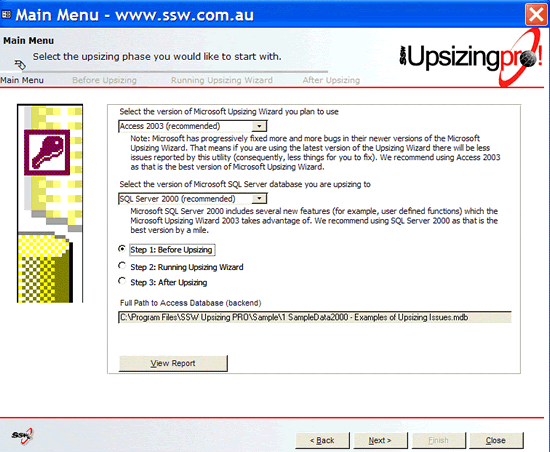 Figure: SSW Upsizing PRO! prepares your Access database
so you can convert effortlessly to SQL Server
Figure: SSW Upsizing PRO! prepares your Access database
so you can convert effortlessly to SQL Server
More screen shots in the
User Guide
Reports
Here are the Before and After Upsizing PRO reports for
the Sample Northwind database included with SSW Upsizing
PRO! You will need the Microsoft Access Snapshot Viewer
to view these links.
Download it here

System Requirements
What does the unregistered version give me?
In respect to the unregistered version we know you want
to see it working before you buy it. We aim for that.
Note: we also give free version targeted to the little
guys
More details see
http://www.ssw.com.au/ssw/KB/KB.aspx?KBID=Q658302
Superior Software provides free phone and email support
to answer queries on registered products.
Getting Support
If you need assistance with our software, please check
out documentation and our
Knowledge Base
.
Please send us
bug reports
and
info@ssw.com.au
so that we can evolve our software into a product that
matches your requirements. We guarantee a response.
I'm Sold... What's next?
Microsoft and the Office logo are trademarks or registered
trademarks of Microsoft Corporation in the United States
and/or other countries.