DTS Problems! - Horror Stories Getting Access Time Data
into SQL Server via DTS
I came across the problem when attempting to perform the
apparently simple task of transferring a table (which
happened to include dates) from an Access 2000 database
to an SQL Server 7.0 database. You may see the included
Access 2000.mdb so that you can duplicate the problem
yourself. The same problem occurred when transferring
from Access 97 to SQL Server 7.0. DTS errors occur when
using DTS to import time format data from an Access 2000
database, to a SQL server 7.0 databases. I have
confirmed this on SQL Server 7.0 (SP1 and SP2), and the
SQL 2000 final version. The Microsoft Upsizing Wizard
does not encounter the same problem.
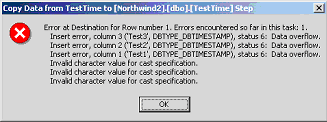
My problem occurred when trying to export Date/Time
fields with a time format (short, medium, long encounter
the same problem). DTS seems to recognise these times
all as a data type of smalldatetime, and tries to copy
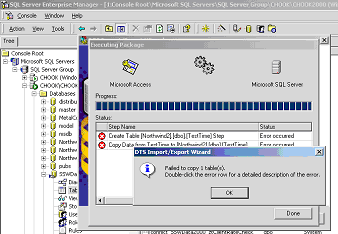
them as timestamps. This obviously causes an error, as
seen in the screen shots below. The solution is to
change them to datetime via a DTS transform, which seems
to work correctly.
Conclusion
For a seamless transition from Access to SQL Server, the
Developer has to use many tools to:
1. Isolate bad data
2. Find structural problems (the source of most errors)
3. Counter problems in the official Upsizing tools
provided by Microsoft.
These tools include:
- Microsoft SQL Server DTS
- Cutting and Pasting in Microsoft Access
- SSW Upsizing PRO!
With the deficiencies of DTS in mind, the Upsizing
Wizard is your best overall solution to upsizing. I
recommend using the Upsizing Wizard as your primary
tool, with DTS as an ancillary tool for troubleshooting
minor problems. In sum, use Upsizing PRO! in conjunction
with the upsizing wizard for a relatively hassle-free
upsizing process.
Without these tools, there is a steep hill to climb,
particularly when you are faced with the upsize of a
large and/or complicated legacy Access database.
David Klein
and
Adam Cogan
December 2000