Do you use an Agentic Development Environment (ADE)?
Loading last updated info...
You have Claude Code fixing a bug in one terminal, Codex building a feature in another, and a third agent writing tests in a different repository. Each one has its own IDE window open so you can read what it changed. One is waiting for your answer, one has opened a pull request with failing CI, and you have no idea which is which until you click through every window.
The tools you are using were designed for a human writing code one file at a time. That is no longer the job.
What is an ADE?
An Agentic Development Environment (ADE) is a workspace built around agents writing the code, with the human directing, reviewing and shipping the work. You may also see it called an "agent development environment" or an "agent IDE".
An Integrated Development Environment (IDE) such as JetBrains Rider, Visual Studio or Visual Studio Code is built around a person typing. Its best features are autocomplete, refactoring shortcuts, a debugger and a big editor in the middle of the screen. AI features were added later, usually as a chat panel on the side.
An ADE flips that layout. Agent sessions are the centre of the screen, and the editor becomes a place to review what the agents wrote.
| IDE | ADE | |
|---|---|---|
| Who writes the code | You, with AI suggestions | Agents, directed by you |
| Unit of work | A file | A task, running in its own session and branch |
| Concurrency | One thing at a time | Many agents across many projects |
| Main screen | Code editor | Agent sessions, diffs and pull request status |
Why IDEs are obsolete
When agents write the code, the bottleneck moves from typing to coordinating and reviewing. An IDE doesn't help with either:
- It assumes one task at a time - Running several agents means several IDE windows, several terminals and constant context switching
- It has no idea what the agents are doing - You can't see which session is working, which is blocked on a question, and which has finished
- Pull requests live somewhere else - You leave the IDE to open a pull request, then check the browser again and again for CI and review status
- Its best features target the wrong person - Autocomplete and refactoring shortcuts are useless when you are not the one typing
Bolting an agent panel onto an IDE doesn't fix this, because the whole layout is still built around a single human editing a single file.
What should an ADE do?
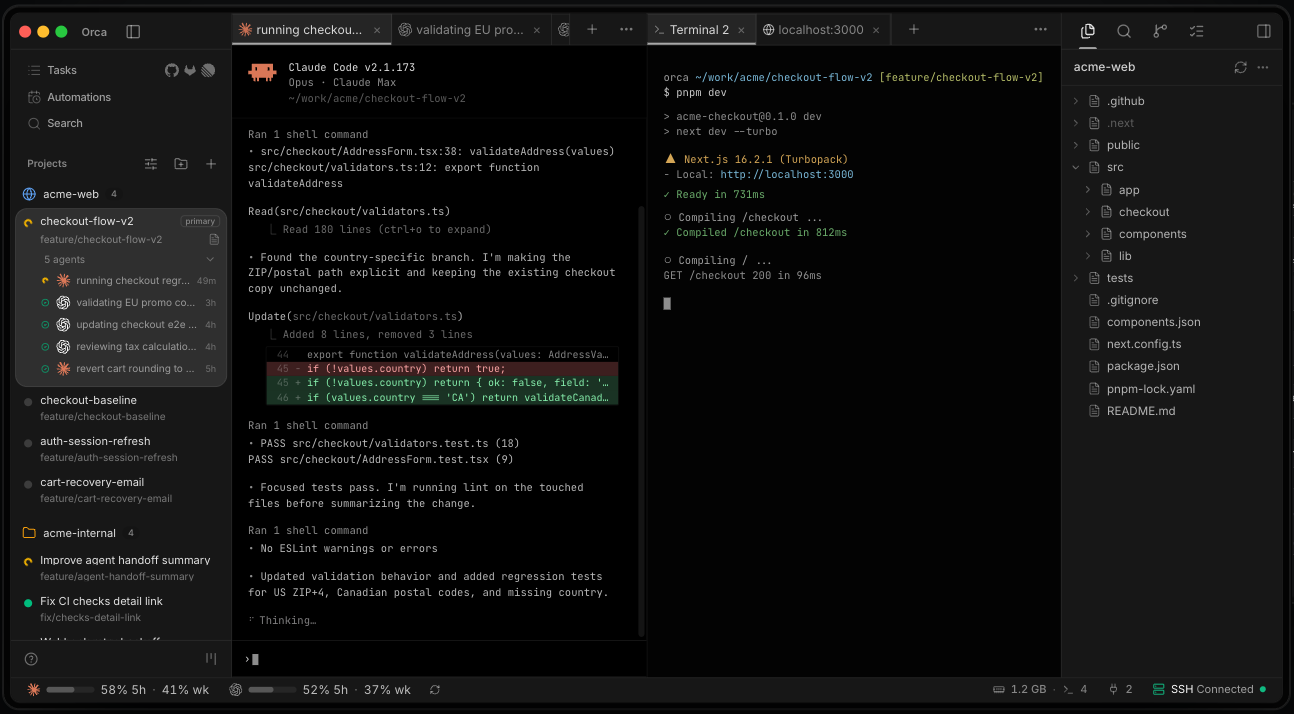
✅ Figure: Good example - Orca running several agents across multiple projects, each in its own worktree, with diff review and a file explorer in the same window
Manage multiple agent sessions across projects
You should be able to run many agent sessions at once, across many repositories, and see at a glance which ones are working, waiting for input or done. A good ADE gives each task its own git worktree automatically, so agents never trip over each other's changes.
Work with agents from any provider
No single model is best at everything. An ADE lets you run Claude Code, Codex, GitHub Copilot CLI and other AI CLI tools side by side, so you can pick the right agent for each task or give the same task to two agents and compare the results.
Create and monitor pull requests
Finished work becomes a pull request without leaving the tool. The ADE then shows CI checks and review status for every open pull request, so you know which ones need attention.
Review the code
You are still responsible for every line you merge. An ADE includes a file explorer and a diff viewer so you can read what each agent changed, comment on specific lines and send that feedback straight back to the agent.
Which ADE should you use?
ADEs are a new category and are changing quickly. Some options:
- Orca (⭐ Recommended) - Free, open source and cross-platform (macOS, Windows and Linux). Supports Claude Code, Codex, Gemini, Cursor, GitHub Copilot, OpenCode and more, with built-in diff review, GitHub integration and an embedded browser
- Superset - Runs any CLI agent in parallel worktrees, with monitoring and diff review
- VS Code Agents - A separate window from the VS Code editor, built around agent sessions rather than files. Runs Copilot, Claude and Codex sessions in parallel across projects, with optional worktree isolation, inline diffs and pull request creation (currently in preview in VS Code Insiders)
Tip: Most ADEs are free or have a free tier. Try a couple with your usual agents and pick the one that fits how you work.