Do you customize your coding agent?
Loading last updated info...
Until recently, the only ways to change how a coding agent behaved were its instructions file (AGENTS.md, CLAUDE.md, etc) and, on most agents, shell-command hooks. If you wanted the agent to display additional information, or to stop doing something it kept doing, you waited for the vendor to ship it.
That has changed. Every major agent now has lifecycle hooks (Claude Code, Codex, GitHub Copilot, Gemini CLI and Cursor), Claude Code has a scriptable status line, and in October 2026 Anthropic shipped mods, TypeScript functions that run inside Claude Code and can rewrite what it does or draw new UI.
Most developers still run their agent stock. That is why people find out about their weekly limit when they hit it, don't know which models their plan includes, and keep re-typing the one rule in AGENTS.md the agent ignores.
So what can you actually customize, and how far should you go?
Video: Claude Code Just Dropped MODS (10 min)
What can you customize?
There are 4 layers. Each one up is more powerful and more work, so start at the bottom and stop as soon as the problem is solved.
| Layer | What it is | Enforced? | Reach for it when |
|---|---|---|---|
| Instructions | AGENTS.md, CLAUDE.md scoped rule files | No - the model reads it and usually complies | Conventions, context, preferences, and agent steering |
| Skills | Reusable prompts and scripts the agent loads on demand | No | Repeatable workflows - "do a PR review our way" |
| Hooks | Scripts or code that run at lifecycle points: before a tool call, after an edit, at session start | Yes - the agent can't skip them | "Every time X, do Y" rules the agent keeps forgetting |
| Mods | Code that runs inside the agent and can rewrite events or draw UI | Yes | The agent needs a feature it doesn't have |
If a rule in AGENTS.md keeps getting ignored, it belongs in a hook. Instructions are advisory. Hooks run every time.
See Do you use skills to standardize AI workflows? for the skills layer.
How do you see your usage limits?
You can't budget what you can't see. Every agent will tell you your model, how full the context window is and how much of your plan you've burned, but only if you ask. Put it somewhere that's visible 100% of the time.
In Claude Code, the status line is a shell script that receives the session as JSON on stdin: model, context window, cost and both rate-limit windows. You don't have to write it yourself:
/statusline show the model, context % and my 5-hour and 7-day usage with reset times
A good status line will help you keep track of your session's context, cost, model, limits and more!

🙂 Figure: OK example - Status Line Shows Some Cool Things

✅ Figure: Good example - Better Status Line Shows Every Usage Window With Its Reset Time, Plus Your Branch and PR
Tip: Sub agents can also have their own status lines too! This is especially useful if you're using swarm workflows or other delegation-based orchestration.
Now the numbers drive the decision:
| What you see | What to do |
|---|---|
| 7-day usage low, 5-hour window fresh | Go nuts. Parallel subagents, the big refactor, the premium model |
| 5-hour window above 80%, resets in an hour | Finish the current task, don't start the next big one |
| Context above 70% | Consider /compact or /clear, as quality may drop and every prompt gets more expensive |
Status line or mod?
You may want your usage stats in the status line itself. Mods can't draw there: the status line's row isn't one of the components a mod can render, so a mod shows usage as a band above the prompt, a pinned line of its own under the prompt, or a toast.
For the status line proper, use the /statusline script, or a tool like goccc, which formats the same stdin data and adds cost history from your session logs. The 2 coexist, and the data is identical: a mod reads it from $.session.usage() and the session.measure event, the script reads it from stdin.
How do you write a hook?
Every major agent has hooks, and they share one shape. Whatever the agent, a hook has 5 parts:
- Trigger event - When it runs: before a tool call, after an edit, at session start
- stdin JSON - What the agent hands you: the tool name and its arguments, the session, the working directory
- Execution logic - The one check or action the hook exists for
- Deterministic exit code - 0 lets the action through, 2 blocks it. There is no "maybe"
- stderr - The message the agent reads when you block it, so it can do something else instead
A PreToolUse hook on Bash reads the command from stdin, matches git push --force, writes "Blocked: no force pushes on this repo" to stderr and exits 2. The agent sees the message and pushes a normal commit instead.
✅ Figure: Good example - The rule in AGENTS.md that the agent ignored once a week now runs on every command
3 hooks worth having on every project:
- Block the command you never want run - Force pushes,
rm -rf, anything touching a production connection string - Run the formatter and tests after every edit - A
PostToolUsehook onEdit|Writeso the agent sees failures immediately instead of you seeing them in the PR - Inject context at session start - A
SessionStarthook that returns the current branch, the ticket it belongs to and the sprint goal, so you stop pasting the same 3 lines into every prompt
Hooks can also shrink what the agent reads. A PreToolUse hook that rewrites npm test to npm test | grep -A5 FAIL turns a 10,000-line log into a few hundred tokens.
| Agent | Where hooks live | Key events | Org-level enforcement |
|---|---|---|---|
| Claude Code | settings.json (user, project or managed) | PreToolUse, PostToolUse, PermissionRequest, SessionStart, Stop, PreCompact | Managed policy settings |
| OpenAI Codex | .codex/hooks.json or config.toml | PreToolUse, PostToolUse, PermissionRequest, SubagentStart/Stop, Stop | Admin requirements.toml |
| GitHub Copilot | .github/hooks/*.json | preToolUse, postToolUse, userPromptSubmitted, agentStop, preCompact | Policy directory, loaded before user and project hooks |
| Antigravity CLI | settings.json | BeforeTool, AfterTool, BeforeModel, AfterModel, BeforeAgent | Via extensions |
Warning: Hooks in Copilot's policy directory (C:\ProgramData\GitHub\Copilot\policy.d or /etc/github-copilot/policy.d) run before anything a developer configures, so a project hook can't undo them.
Gemini's BeforeModel hook goes further than the others: it can rewrite or replace the request to the model itself.
When do you need a mod?
Hooks can block and rewrite, but they can't add a feature or draw on the screen. Mods can, because they open up the Claude Code harness. A mod is a TypeScript function that Claude Code calls from inside its own process, on the same events hooks see, plus every part of the interface it draws.
Your code can run before an event, after it, or instead of it. The built-in /diff command is now itself a mod.
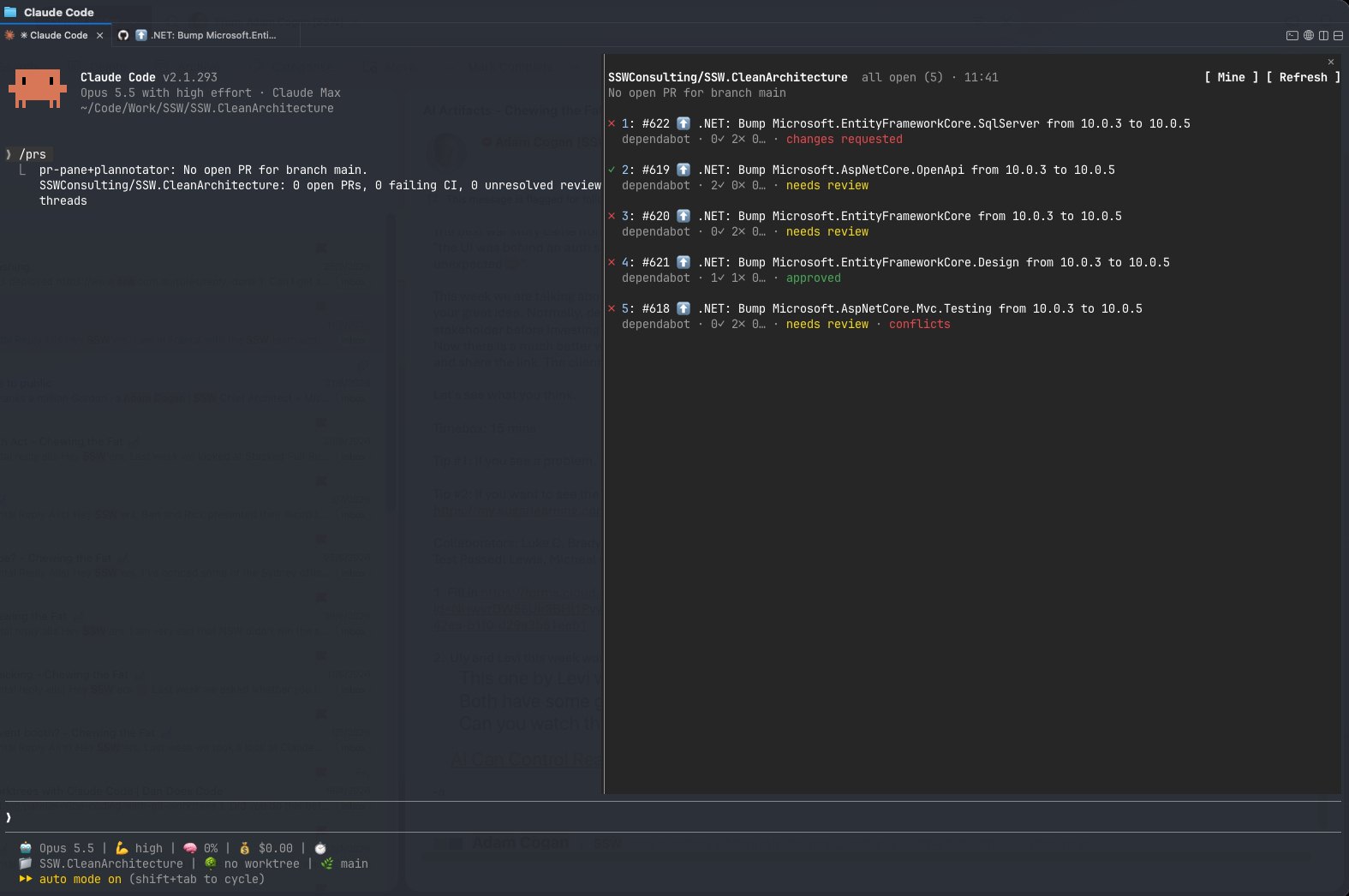
✅ Figure: Good example - A `/prs` mod opens a panel on the right-hand side, listing every open PR with its CI, review and conflict status. All without leaving Claude Code
Think of a mod as a feature you add to the agent yourself. Hooks act on what the agent does. Mods change the agent itself. That makes them useful for 3 kinds of problem:
- Show what you need to see - Your open PRs and their CI status, a chart of how full the context window is, a warning before you hit a usage limit
- Add a step the agent doesn't have - Hold a risky command such as a force push and show what it would change before you confirm
- Fit the agent to how your team works - Your own commands, your review flow, your naming
You don't need to write them by hand. Describe the mod you want and the agent writes it, installs it and reloads it in your session. Mods ship inside plugins, so one developer's mod can be shared with the whole team.
Why treat hooks and mods as installed code?
A hook that can rewrite a tool call or auto-approve a permission is exactly what a malicious hook would do. Anthropic's own wording on mods: they "aren't sandboxed, and you should only install mods from sources you trust, the same way you'd install any code on your computer."
One community scanner's September 2026 snapshot of 72 published mods found that 30 spawned processes, 14 reached the network, and about a third saw every prompt or tool call.
- Read before you install - A mod or hook from a marketplace is code running as you. Apply the same checks as Do you verify the safety of AI skills before using them?
- Prefer org-level enforcement over asking developers to behave - Claude's
sec-defaultmod on Team and Enterprise plans, Copilot's policy directory and Codex'srequirements.tomlall load ahead of anything a developer configures in a project - Put each customization in the right place - Personal ones in
CLAUDE.local.mdorsettings.local.json(see Do you keep personal Claude Code overrides in CLAUDE.local.md?), team ones in the repo, org ones in managed settings (see Do you centralize your team's AI workflows?)