Data Entry - Do you know the quick way to create a Contact, Account, and Opportunity in one go?
Loading last updated info...
CRM 2013 has a nice way of reducing the amount of work needed to create a new Contact, Account and Opportunity. Simply make a Lead, and all three entities will be created in one go.
The process is:
- In CRM, create a Lead.
- Convert it into an Opportunity, Contact and Account using the Qualify button.
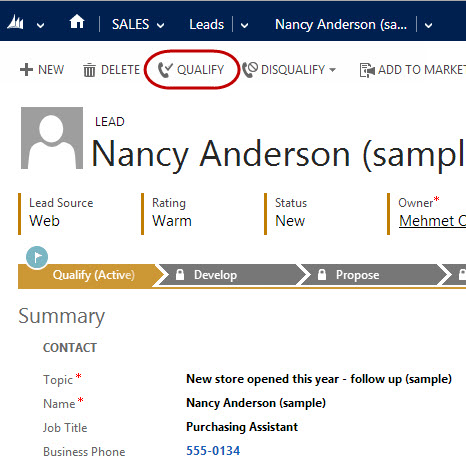
Figure: Create a Lead, then become familiar with the time saving "Qualify" button
Clicking on the "Qualify" button allows the automatic generation of Accounts, Contacts and Opportunities, and also allows you to check for potential duplicates being created.
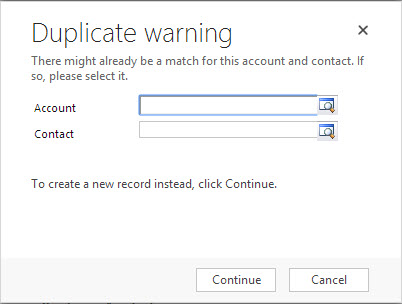
Figure: CRM 2013 also checks for existing records before creating new ones
This will:
- Deactivate the Lead
- Create an Opportunity, Contact and Account
- Automatically link the Opportunity to the Account and the Account to the Contact
- Save you substantial amount of time compared to creating and linking each one manually.
Note: You have just learned that a lead is a transitory thing. There is, however, one other case where you might want to use leads: Do you know the one case where you use a CRM lead?