This rule has been archived
Obsolete - CRM 2011 and SharePoint 2010 are deprecated technologies. See https://www.ssw.com.au/rules/rules-to-better-sharepoint/
Do you know the 6 ways to integrate your CRM 2011 data into SharePoint 2010?
Loading last updated info...
You have data in CRM 2011, so how do you see it in SharePoint? The data that is stored in CRM entities should be available in SharePoint so users can find and use the data in areas such as:
- SharePoint search
- SharePoint reporting (if you are using SQL Reporting Services in integrated mode)
There are many ways to get to this data, let's go through them:
Option 1: SharePoint BCS Adapter (provided by the CRM Team) RECOMMENDED
This BCS Adapter for CRM 2011 is from the CRM team (It does all of the BCS work for you by interrogating the CRM metadata service).
Summary: SharePoint BCS > Pre-built Adapter (.NET Assembly) > CRM web services > CRM database
| Pros | Cons |
|---|---|
| Read/Write. Minimal coding. Easiest to implement. The likely way forward (Best Practice as Microsoft) | Needs to be deployed and published to the web server. Less performance than SQL filter views directly. |
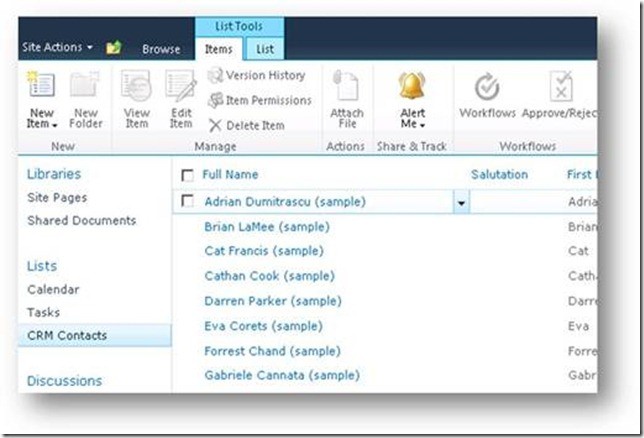
More information:
- Download from Microsoft
- Find and read "Connecting to CRM Online 2011 with SharePoint 2010 Business Connectivity Services"
- Run tool to generate the XML mapping (.BDCM)
- This solution uses a BCS Connector – a .NET Assembly responsible for mapping external data into a form usable by SharePoint. This component is loaded and hosted within SharePoint 2010 and communicates with CRM via the CRM Proxy Service.
Option 2: SQL Server Filtered Views
CRM recommends that you *don't* read from the Tables, so they provide SQL Views for this purpose.
Summary: SharePoint BCS > CRM database
| Pros | Cons |
|---|---|
| Best performance. Codeless | Read-only. Not available for hosted CRM. Security issues as you are exposing the view. |
Filtered Views in Microsoft CRM provide access to the data available that supports providing picklist name and id values (lookup tables).
More information:
If you only want read-only for CRM on-premises data for SharePoint users, this solution is fine. You create the External Content Type directly against the Filtered Views in the CRM database as per Use SQL and Filtered Views to Retrieve Data for Reports.

Option 3: Web Services
CRM provides web services.
Summary: SharePoint BCS > Code calling CRM web services > CRM database
| Pros | Cons |
|---|---|
| Read/Write | Needs lots of code and test work. Needs to be deployed and published to the web server. Less performance than SQL filter views directly #1 |
Note: Performance could be improved by making the reads from the views and the writes through the web service
More information:
- Use BCS in VS 2010
- Write code that calls the CRM web services (that access the CRM data)
- Test
- Deploy
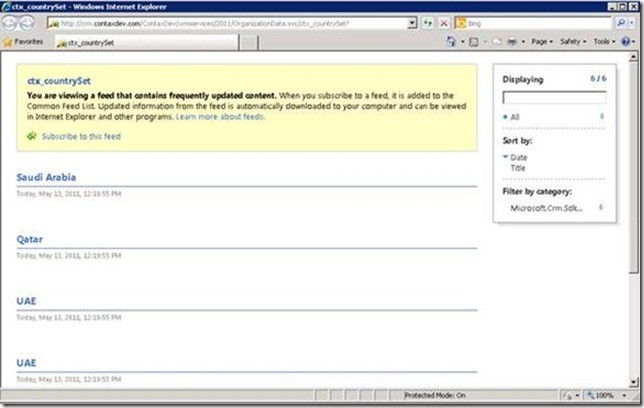
Option 4: Expose OData from CRM as RSS
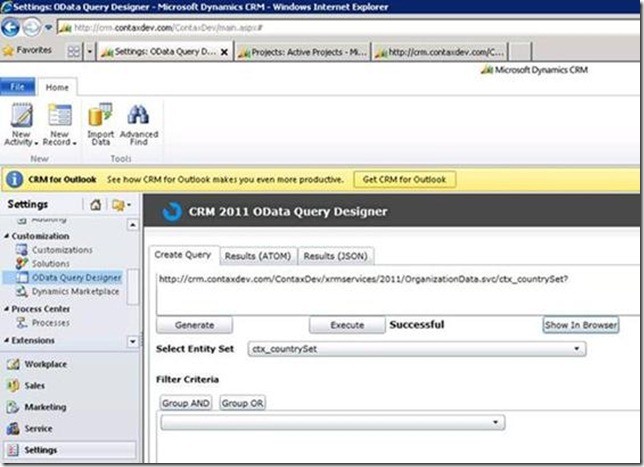
The CRM 2011 OData Query Designer can be used to build queries to expose the data from CRM as RSS
| Pros | Cons |
|---|---|
| Easy configuration | 50 records limit. Need to page through the results. Possible issues with firewalls and proxies because it uses Integrated Security for authentication. Read-Only. No easy way to consume |
Note: You can really only call the OData endpoint from an application that already has an authentication cookie with the CRM server. i.e. you can't impersonate and call it like you can the standard WCF endpoints So it is really only suited to calling from Silverlight and JavaScript web resources that are delivered inside CRM (because they have the cookie)
More information: The first step is to expose the data:
- Make a query
- See the data
The second step (and the problem) is consuming the data
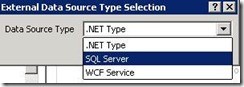
Figure: BCS has no option to consume RSS data. Please Microsoft SharePoint Team, we need a new 'Data Source Type' = OData
In summary, CRM 2011 can expose OData, but SharePoint 2010 BCS doesn't consume OData.
The 3 options to consume the OData/RSS data:
- Consume the OData by SQL Server, via TSQL ??? Then use BCS to call SQL Server. Summary: SharePoint BCS > DataSourceType: SQL Server > OData > CRM database
You would need to be crazy to go down this route Calling a Web Service from T-SQL (Stored Procedure) using MSXML RSS
- Consume the OData by a BCS adapter + code calling web services (same story as above). Summary: SharePoint BCS > code calling OData > CRM database
- Consume the RSS by "SharePoint RSS view web part" directly. Summary: SharePoint RSS view web part > OData > CRM database (not recommended as it could not be used in "SharePoint Search")
So OData is all things horrible because it is hard to eat :-(
Option 5: BizTalk
Biztalk is built for mapping systems together, unfortunately, this solution is only considered for large enterprises.
Summary: SharePoint BCS > BizTalk Database > CRM database
| Pros | Cons |
|---|---|
| Read/Write. The BizTalk data centre can also provide data for any system. Requires little code if users already have BizTalk | BizTalk :-) Deployment - Needs external work to deploy BizTalk server. Licence Cost |
Option 6: OData 3rd Party solutions (doesn't exist)
Today SharePoint 2010 exposes lists and document libraries as OData, but does not natively consume OData.
What does this mean?
- CRM 2011 exposes it data as OData, but cannot consume OData
- SharePoint 2010 exposes it data as OData, but cannot consume OData ...and there are no 3rd party solutions to solve this...