Do you properly maintain your dependencies?
Loading last updated info...
Picking the correct dependency is only half of the job; maintaining the package over time is what makes a dependency safe, stable, and trustworthy. Even the best-chosen package won’t stay reliable forever. Frameworks evolve, security vulnerabilities are discovered, APIs change, and maintainers release updates that your application must eventually adapt to.
Maintaining dependencies the right way means being proactive rather than reactive. Instead of waiting for a breaking change or a security exploit to force you into panic-mode upgrades, you should have a clear, consistent strategy for keeping dependencies healthy.
The importance of dependency maintenance
Dependencies underpin almost every part of a modern application. Keeping them up to date ensures you:
- Receive security patches as soon as they are released
- Avoid massive upgrade jumps that are expensive and disruptive
- Stay compatible with framework ecosystems
- Reduce exposure to supply-chain attacks
- Prevent "dependency-rot", where the entire stack becomes stale and brittle
Automated maintenance tools
Modern applications use too many dependencies to track manually. Automated tools help identify vulnerabilities, outdated packages, code quality issues, and supply-chain risks long before they reach production.
Dependabot (GitHub)
Dependabot automatically scans your repository and raises pull requests when dependencies become outdated or contain known security vulnerabilities.
✅ Pros:
- Integrated directly into GitHub
- Automatically opens PRs with version bumps
- Keeps lockfiles fresh
- Easy to configure and maintain
❌ Cons:
- Can generate many PRs (noise for large repos)
- Focuses on version bumps, not functionality
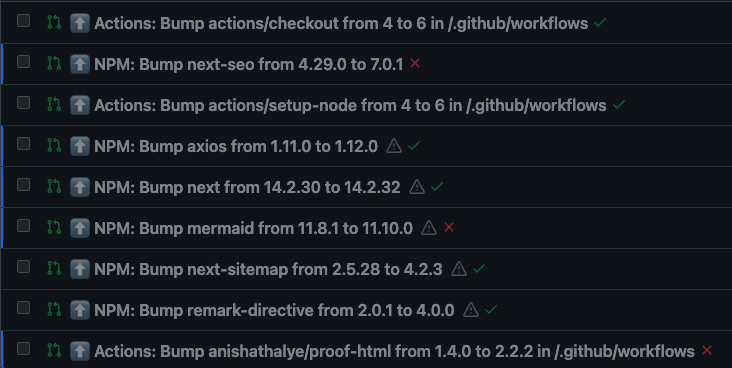
❌ Figure: Bad example - Not resolving Dependabot PRs
Renovate (OSS/ GitHub/ Azure DevOps )
Renovate is a highly configurable dependency management bot that automates updates, groups PRs intelligently, and integrates with multiple ecosystems.
✅ Pros:
- Extremely flexible and customizable
- Can group related updates to reduce PR noise
- Supports many package managers beyond JavaScript
- Actively maintained and open source
- Strong policy controls (scheduling, automerge rules, etc.)
❌ Cons:
- More complex configuration
- Overkill for small repos
- Requires tuning for best results
npm audit (Node/NPM built-in)
npm audit checks your installed dependencies against the public vulnerability database.
✅ Pros:
- Already built into npm
- Fast and simple to run locally or in CI
- Good baseline for spotting known CVEs
❌ Cons:
- High false-positive rate
- Can cause alert fatigue on large dependency trees
- Does not fix underlying technical debt
- Only works for npm — not multi-language stacks
SonarQube (Code Quality & Security Scanning)
SonarQube is a static analysis platform that scans code for bugs, vulnerabilities, security hotspots, and maintainability issues. While not a dependency updater, it detects issues introduced by outdated or risky dependencies.
✅ Pros:
- Deep static analysis across multiple languages
- Identifies vulnerabilities caused by dependencies (e.g., unsafe API usage, insecure patterns)
- Integrates into CI/CD pipelines
- Provides quality gates to block unsafe releases
- Great dashboards and reporting
❌ Cons:
- Doesn’t update dependencies itself
- Requires server setup (unless using SonarCloud)
- Can be noisy if the codebase has many existing issues
- Learning curve for tuning rules and quality profiles
Manual maintenance tools
Automated tools are essential, but manual audits ensure your team understands the real state of your dependency graph.
Periodic audits ensure stable systems.
Node.js (npm, Yarn, pnpm)
List outdated dependencies:
npm outdatedyarn outdatedpnpm outdated
Check for known vulnerabilities:
npm audityarn auditpnpm audit
Identify unused packages:
npx depcheck highlights packages no longer imported, missing dependencies and orphaned dev dependencies.
See more about dependency checking Node.js environments - Do you keep your npm and yarn packages up to date?
.NET (NuGet)
List outdated NuGet packages:
dotnet list package --outdated shows available updates for packages.
Check for vulnerable packages:
dotnet list package --vulnerable flags any known securities with libraries you're using.
Generate a full dependency tree:
dotnet list package --include-transitive is critical for spotting dangerous transitive dependencies.
Commit and preserve lockfiles
Lockfiles ensure reproducible builds by pinning exact dependency versions. Without them, every install may produce a different dependency tree.
Why does this matter?
- Prevents unexpected version drift
- Protects against malicious upstream changes
- Ensures CI, dev, and production use the same dependency graph
Lockfiles are essential for stability and security.
Removing unnecessary dependencies
Fewer dependencies = fewer risks
Before adding or keeping a package, ask:
- Does this solve a trivial problem?
- Could we write it internally?
- Does it introduce a massive dependency chain?
- Does it duplicate functionality