Audio - Do you use sound effects to capture your audience’s attention?
Loading last updated info...
A lot of your audience will not always be looking at your video. A curated sound can make users focus on the changes in a demo.
Sound 1 - “Paste” sound to highlight content additions
When you paste text, code snippets, or configurations during a fast-paced demo, viewers can easily miss where the new content came from. A quick, subtle paste sound draws immediate attention to the change on the screen.
✅ Video: Good example - Audio cue highlights the exact moment content is pasted
Microsoft has plenty of similar built-in sounds for saving, printing and more. It's always better to use audio cues your audience already recognizes.
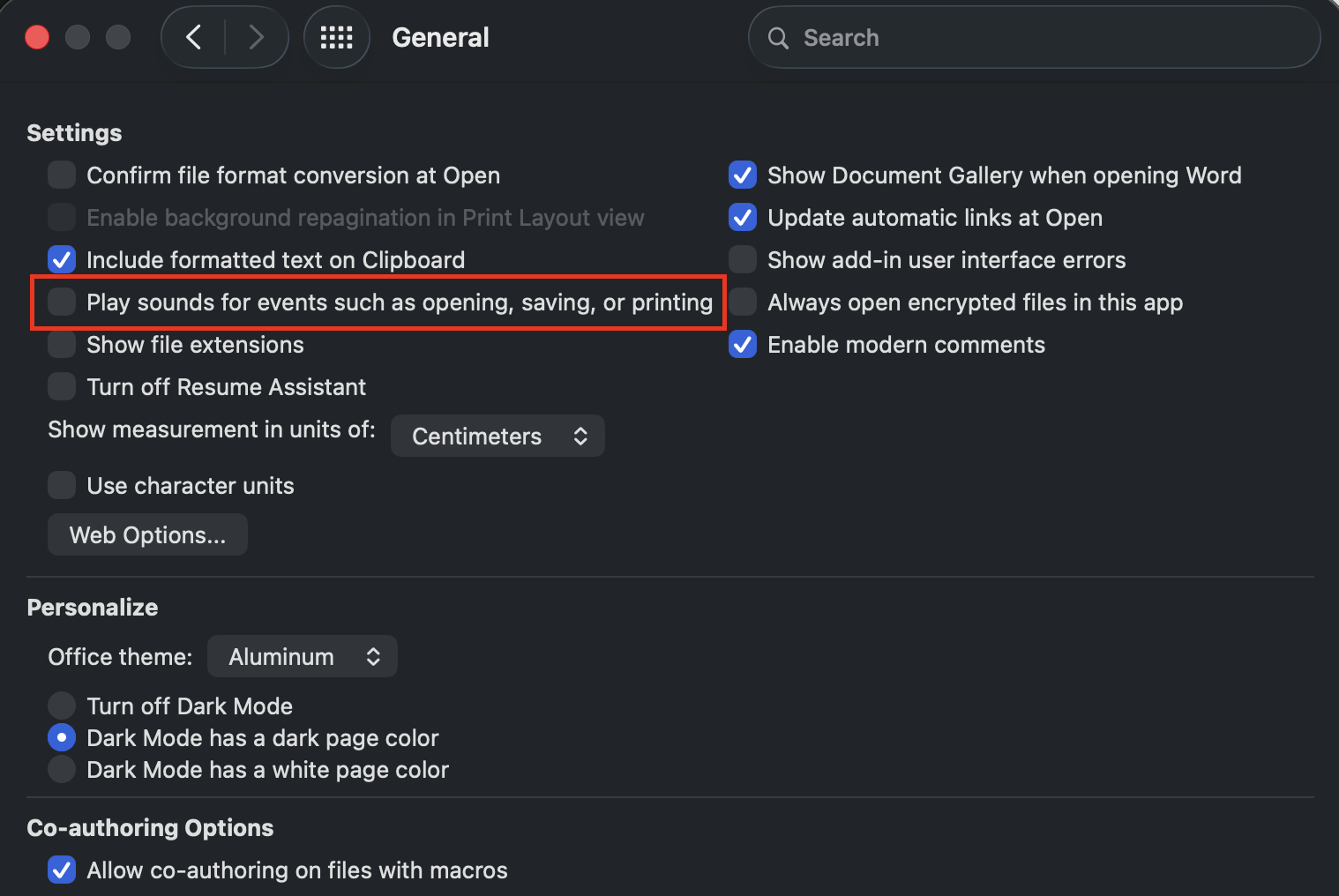
Figure: If yours are silent, turn them on in Word/Excel → Preferences → General → Play sounds for events such as opening, saving, or printing.
Sound 2 - “Typing” sound to make on-screen typing feel alive
When you show someone typing a command, a prompt, or a line of code, silent keystrokes make the screen feel flat and pre-recorded. A light typing sound tells viewers that something is being entered right now, and keeps their eyes on the cursor instead of drifting.
✅ Video: Good example - Typing sound follows the keystrokes as the prompt is entered
Sound 3 - "Pop" sound when a chat bubble appears
When a chat message, AI reply, comment, or notification appears, use a short, soft “pop” to draw the viewer’s attention to it and signal that new information has arrived.
This works especially well for:
- Chat conversations (Teams, Slack, WhatsApp)
- AI assistant replies (e.g. Copilot or ChatGPT responding to a prompt)
- Speech bubbles in animated explainers
- Pop-up notifications or toasts
✅ Video: Good example - At 3:01, a "pop" sound plays as each chat bubble appears
Sound 4 - "Completion" sound when a task succeeds
When a build passes, tests go green, a deployment finishes, or an AI agent completes a task, pair the on-screen ✅ with a short, positive chime. The sound reinforces the visual cue and helps the viewer notice the successful outcome.
✅ Video: Good example - A completion sound plays as the ✅ appears on screen
Sound 5 - Sound Effects to highlight important milestone events
Audio cues are not only useful when text appears. They are also powerful when highlighting important milestone events during a demo or tutorial.
Viewers are often multitasking or looking away from the screen. A short sound effect acts as an attention trigger, letting them know something meaningful has just happened. This is especially valuable when the event involves executables or results, rather than simple navigation.
Use audio cues primarily for milestones or meaningful outcomes, not for simple navigation (such as clicking menus). Overusing sounds can make them distracting instead of helpful.
Examples of milestone events include clicks to:
- Deploy to release an application
- Submit to send data or complete a form
- Generate to create a report, document, or artifact
- Build to compile a project
- Create when a new resource (project, repository, environment) is being created
- Connect or Authenticate to establish a service connection
- Start recording or Start demo in a tutorial
- Install to start installing software
These moments represent milestones in the story of the demo. Adding a subtle audio cue reinforces that something important occurred.
Tip: Sound effects can help direct the audience's attention, and it can also be used to signal the passing of time this can complemented with the use of animations.
✅ Good Example: Using music and animation during AI processes
Sound 6 - Lower third sounds that match the message
Lower thirds can use audio cues too. A short sound when a lower third appears pulls back viewers who look away. When the sound matches the message, viewers know the type of message before they read it.
Use a different sound for each type of lower third:
| Lower third type | Sound |
|---|---|
| ✅ Good example | A short, positive sound |
| ❌ Bad example | A short warning sound |
| ℹ️ Information or caution (e.g. a speaker name or a tip) | A neutral, soft "ding" |
Keep every lower third sound very subtle, and much quieter than the speaker's voice. Use the same sound for each type of lower third in every video. Then viewers learn what each sound means.
For good and bad example lower thirds with sound, see Do you use ticks and crosses in video examples?.