Do you use eSignature solutions?
Loading last updated info...
The age of printing, signing, scanning, and sending documents manually is far behind us. You've just been emailed an important contract and are expected to sign it within the hour. The issue? You're nowhere near a printer or scanner. This is where eSignature solutions come into play. They help expedite such processes with increased efficiency and security.
Let's talk about pros and cons of eSignature solutions.
When to use eSignatures
- Employee contracts
- Consultant or contractor agreements
- Client contracts
- Terms and conditions
- Legal documents
- Vendor onboarding forms
Compare DocuSign vs Adobe Sign vs DocSend
DocuSign, Adobe Sign and DocSend are leading eSignature platforms, but they have distinct features and benefits:
| Features | DocuSign (Recommended) | Adobe Sign | DocSend |
|---|---|---|---|
| User Interface | ✅ Great user-friendly interface | ✅ Great user-friendly interface | ✅ Great user-friendly interface |
| Template Support | ✅ Custom templates for repeat docs | ✅ Can save editable templates | ❌ No reusable templates |
| Integrations | ✅ Most integrations with business software E.g. Dynamics 365 | ✅ Many integrations with business software E.g. Dynamics 365 | ✅ Many integrations with business software E.g. Dynamics 365 |
| Cost (AUD) | ❌ $63 per standard user per month $444 annually when prepaid | ✅ $24 per standard user per month $288 annually when prepaid | ❌ $100 per standard user per month $828 annually when prepaid |
| Branding | ✅ Included in the standard license | ❌ Not included in the standard license | ✅ Included in the standard license |
| PDF Editing | ❌ Cannot edit uploaded PDFs but supports template fields | ✅ Full PDF editing included | ❌ No PDF editing on platform |
| Real-Time Collaboration | ❌ Not included in Standard | ❌ Not included in Standard | ✅ Commenting and markup tools |
| Automated Signing Workflows | ✅ Yes – supports basic workflows (e.g. sequential signing and reminders) | ❌ No – no automated workflows, only manual processes | ❌ No – manual sharing and tracking only |
| Granular permissions | ✅ Per user visibility of documents | ✅ Per user visibility of documents | ❌ Not included in the standard licence |
Northwind Pty Ltd wanted to integrate an eSignature solution into their workflow. After comparing features, they chose DocuSign for its broader integrations with their existing business software and robust workflow support.
✅ Figure: Good example - It’s essential to choose an eSignature solution that aligns with your business needs.
If you don’t have access to a paid eSignature tool, a more cost-effective workaround is to print the document to PDF, sign it digitally, and return it via email. While this approach doesn’t offer tracking or automation like DocuSign, it's still far more efficient than printing, signing by hand, and scanning.
Benefits of eSignature Solutions
- Speed - Eliminates the delay caused by printing, signing manually, and scanning
- Efficiency - Streamlines processes and reduces the need for physical paperwork
- Security - Ensures encrypted digital signatures, making it more secure than physical signatures
- Accessibility - Sign documents from anywhere at any time using any device

❌ Figure: Bad example - Handwritten signatures cause delays and inefficiencies
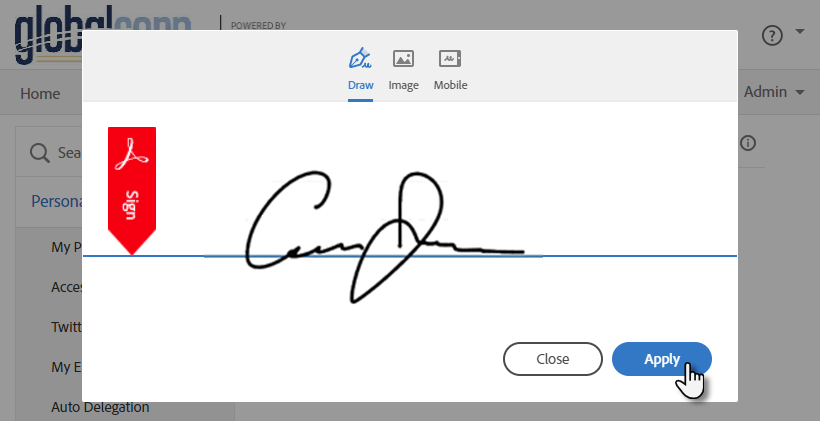
✅ Figure: Good example - ESignatures are efficient and easy
Implementation Process
When implementing an eSignature solution:
- Choose the right platform - Based on your business needs, select between solutions like DocuSign or Adobe Sign
- Identify Use Cases - Determine all the instances and departments within your organization where eSignature solutions can be used. This can range from HR and legal to sales and external communications
- Determine User Needs - Estimate how many users will need access to the eSignature platform (E.g. in a company of 100 people, you might only need 2 users)
- Cost Estimation - Once you've determined the number of users, assess the cost implications (E.g. 2 users are around $700 per annum)
- Setup - Follow the step-by-step guidelines provided by the chosen platform. Consider registering the license on a shared email account (E.g.
Projects@Northwind.comorAccounts@Northwind.com)
Note: Do not share sensitive documents on a shared email account without ensuring data confidentiality - Integration - Integrate the solution with your existing software and tools for seamless operation (E.g. Microsoft Teams and Dynamics 365)
- Internal Documentation - Create detailed internal documents or guides on how to use the app. This ensures consistency in usage and helps new users get onboarded quickly