Calling - Do you warn then call?
Loading last updated info...
It can be very jarring when somebody is called out of the blue and they are not expecting it. They might be deep in a task or talking to a client and by calling them their focus is getting disrupted. test
Before calling someone, be sure not to just say 'hello'.
A good way to initiate a call is to warm them up by giving a warning (e.g. “Calling you in 1 min to talk about the Northwind production site being down 💀.”).
Hot Calling - The only good reason not to give a warning before calling is when the person is already expecting your pre-arranged call.
✅ The benefits of a warm call
- Prioritization - The other person can see what the call is about and can determine if it is a priority. For example, if you mention that you want to talk about an email from several years ago, they might think it isn't that important. Conversely, if you mention the production server is down, they will almost definitely answer you!
- Consideration - It gives the other person the time to prepare. They might be busy or in another call
- Easier Responses - It puts you into their chat history, so even if they decline the call, they can easily write back to you to explain why
- Availability - Giving someone even a 1 minute warning is a good idea even if you see their Teams Status is on green ‘available’. Remember it is not easy to always change their status to ‘busy’ - they could be on a mobile phone, on a WhatsApp call, in a physical meeting, etc
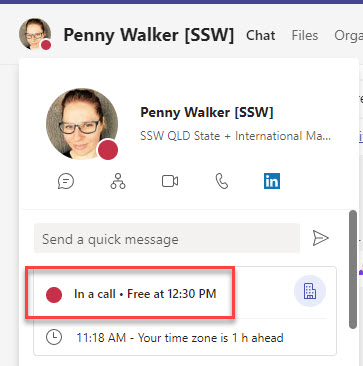
Warning: First check the persons Teams status is not "Do not Disturb", "Presenting", or "On a call" make sure not to call them unless it's a high priority item or a scheduled meeting. E.g. a Sprint Review
Giving context
If the conversation has history, like a PBI/Issue or email, then it's important to include the context.
Option A: No context
Calling in 1 minute.
❌ Figure: Bad example - The recipient has no idea what you are calling about
Option B: Generic context
Calling in 1 minute about the SysAdmin candidate.
🙂 Figure: OK example - Includes context although the other person can't easily find out more
Option C: Specific context
Calling in 1 minute. See the PBI/Issue:
{{ URL }}
✅ Figure: Good example - Includes PBI/Issue link for reference and doesn't leave anyone waiting
Tip: For the example above, PBIs often have long URLs. Include a line break for better readability.
Calling in 1 minute about this email thread:
{{ EMAIL SUBJECT }}
✅ Figure: Good example - Includes email subject for reference
For cross approvals, pinging the approvers with their priority order number shows how many you have attempted to contact before them, and how many are after if they can not take the call.
Calling you in 2 minutes to review a code change - Code Master (3/5)
✅ Figure: Good example - Includes priority order numbers to share how many other approvers you have attempted to contact
Option D: Add a screenshot
If you need to give more context than just text, sending a screenshot is a good option. If your call relates to an email, include the subject line.
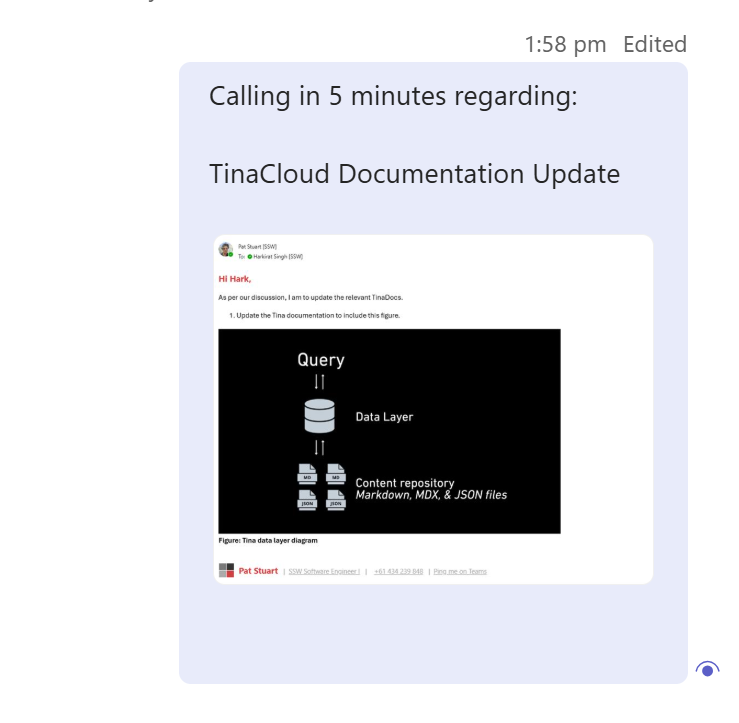
✅ Figure: Good example - A screenshot and subject includes context and makes it easy to search a inbox
Option E: Include email header/content in text
Calling in 5 minutes regarding:
From: Pat Stuart
Sent: Tuesday, 14 October 2025 12:35 PM
To: Harkirat Singh
Subject: "Warn then call" rule - add good example
Hi Hark,
As per our conversation,
- Please update https://www.ssw.com.au/rules/warn-then-call rule with a good example
✅ Figure: Good example - Forwarding then copying an email includes context by sharing the email and providing participant details
Option F: Use "Share to Teams" button
If you want to be extra clear, include the email with thread participants or a link to the email, especially when the thread includes multiple people or has similar subjects.
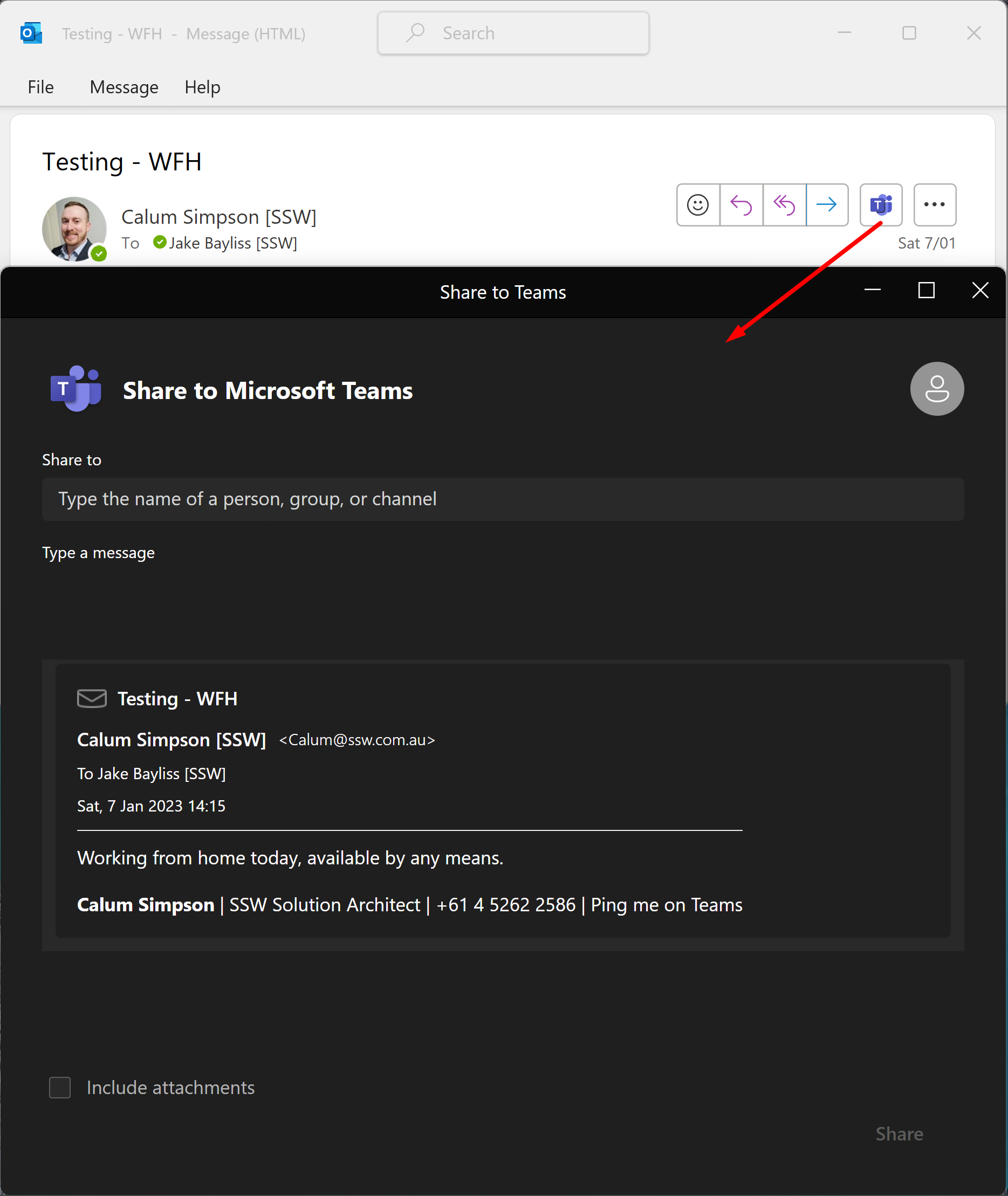
Outlook can do some of the heavy lifting for you! You can directly paste an email into a teams message with one click.
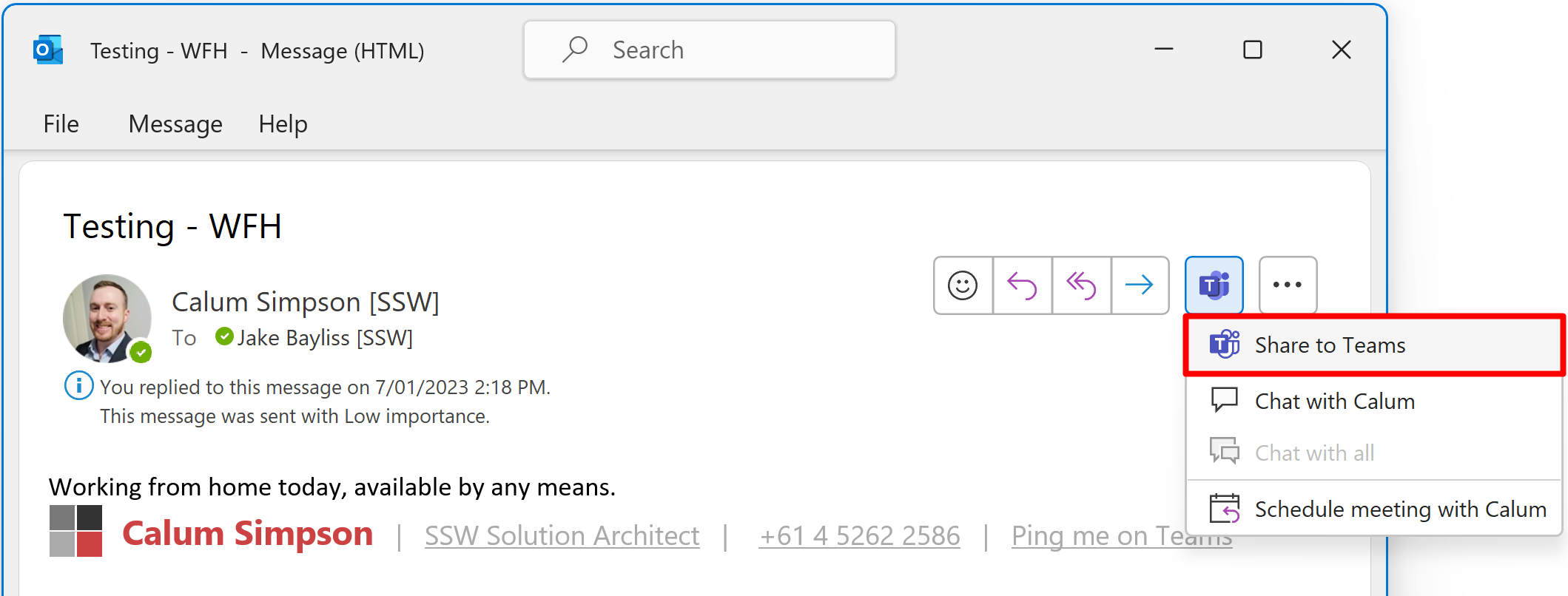
Figure: In Outlook | Share to Teams
✅ Figure: Good example - Includes a task, and gives context by sharing the email to a teams chat using Outlook | Share to Teams
What if your call is declined/not answered?
When a call is declined, it is important to follow up in order to ensure the task remains a priority and does not get forgotten.
It is better to try and fail, than not try.
You should follow up twice after the first call.
"Tried to call - will try again in 1 hour"
✅ Figure: Good example - Send them a message indicating you will try again later
Tip: The follow-up effectively rule will help you remember to call.
What if you are ❌ blocked and can't reach the person for a whole day?
If you still couldn't get hold of the person, and a decision needs to be made (aka blocked), you should write your recommendation, get a cross-approval and inform them.
"Tried to call with no luck. Since I'm ❌ blocked, I will move ahead with {{ THE RECOMMENDATION }} tomorrow. (checked by {{ APPROVER }}).
Please get back to me if you prefer another way."
✅ Figure: Good example - Send them a message explaining how the next steps will move forward