Priorities - Do you complete work in order of importance?
Loading last updated info...
With a mountain of emails and PBIs, it is difficult to make sure the most important tasks get done first. You want to keep your clients happy while still removing roadblocks for others.
"The difficult we do immediately; the impossible takes a little longer" — French Proverb

Figure: Is it urgent or important?
The order in which you should work
- Urgent/Important emails & PBIs/tasks – Make them visible in the Backlog, communicate, and action
The word "Urgent" is more important than the word "Important".
If you see the keyword "URGENT" (or ⚠️ emoji) in the subject/title/body, it automatically becomes the top priority and is to be resolved immediately. E.g. "⚠️ URGENT - The website is down"
If you see the keyword "IMPORTANT" (or ❗ emoji), that PBI should to be treated as high priority and is to be resolved ASAP. E.g. "❗️ IMPORTANT - Broken link"
Call your Product Owner and Scrum Master when "URGENT/IMPORTANT" issues arisen, and inform them you will be working on it (immediately if "URGENT") instead of other items in the Sprint.
Note: The fire 🔥 emoji is no longer used to indicate something bad, as it can be misinterpreted. Often these days the 🔥 emoji is used for "hot topics".
Instead, the ⚠️ warning emoji should be used to indicate an issue of concern.
- Emails about timesheets or invoicing issues
- Your calendar - keep your calendar up-to-date, so people know where you are
- Your existing clients - Planned client work and client administration (preferably working on a Sprint Backlog and doing Daily Scrums)
- Other client work - Ask others if you can help with their client work
- Prospective clients - Project management, answering questions and setting up meetings
- Internal work - All of the following might have their priorities ordered by the Daily Scrum
- Quick Important emails to 0 (emails with an important flag < 1 hour and not something that can go into a release plan)
- Incomplete Sprints. E.g. Normal planned internal work
- Important emails to 0
- Help others get their important emails to 0
- Get your inbox to 0
- Ping others to see if they need help completing their Sprint
Phew... Done!
Double check before changing the priority order
It's common that priority orders change, but clients don't always mean to, so confirm before proceeding.
When someone is asking you to do a new task while you are still working on another task, then ask:
"I'm currently working on... Do you want to change the priority order and get this new task done before the current task?"
✅ Figure: Good example - Confirming the priority order with the client
Tips
- Efficient people keep a priority list (often written)
- Don't move an important task out of your inbox unless someone else is going to do it right away
- The most recent task assigned is not necessarily the most important (e.g. an air traffic controller does not deal with the newest plane that has popped up on his radar when he has 4 lined up to land)
- You can use inbox subfolders to group and prioritize tasks\
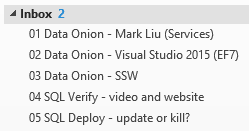
Figure: Group by subfolders under your inbox