SSW .NET Toolkit
>
User Guide

The standard way we do database searches
What is SSW WinSearch?
SSWSearch provides a standard search functionality to
your application that solves rule
Do you know how to design a user friendly search
system?
.
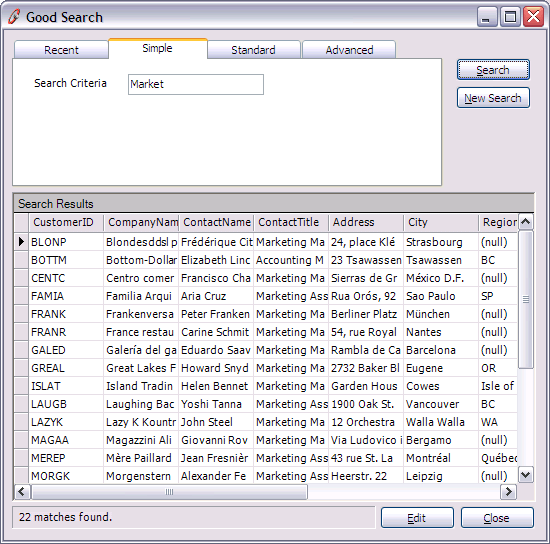
Figure: SSW WinSearch - Simple Keyword Search
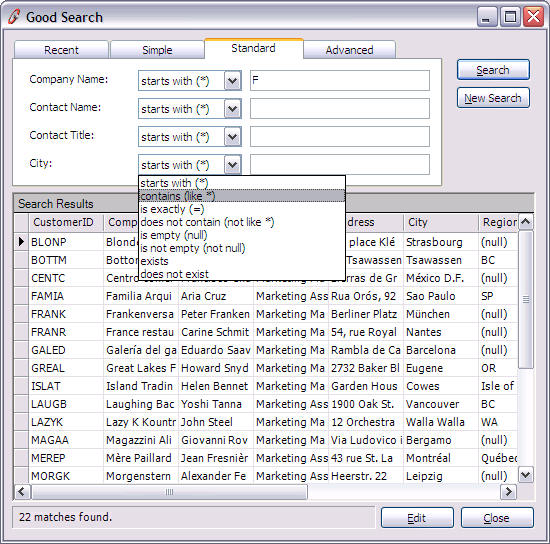
Figure: SSW WinSearch - Standard
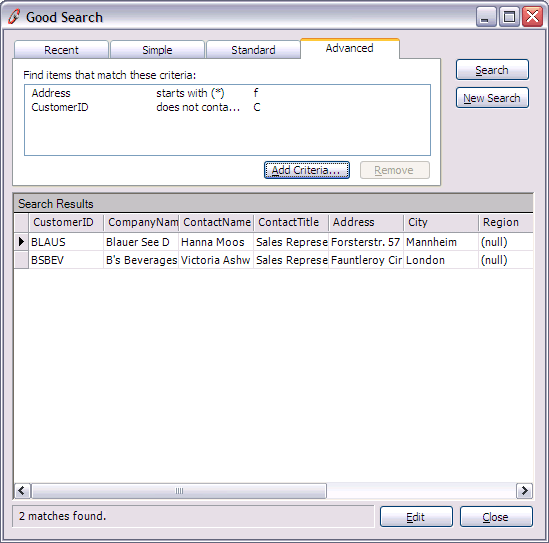
Figure: SSW WinSearch - Advanced
How to use the SSW WinSearch
User interface elements
-
class SearchPanel
The main user control which you can drop onto the
form. You can interact with this control through a
series of events:
-
OKButtonClicked
When a search result is selected, you may want to
use this event to open up another form to, for
example, edit the selected record.
-
NewSearchButtonClicked
Allows you to perform actions when the new search
button is clicked.
-
ExecuteSearch
this event provides a set of event arguments, which
contains an array of SearchCriteria the user has
specified. This is where this set of SearchCriteria
should be read, and converted to a format (e.g. SQL)
which could be used to query the data source.
-
CloseButtonClick
When the close button is clicked
-
class SearchCriteriaPanel
A search user control on the Standard tab of the
SearchPanel
-
class StandardCriteriaPanel
Inherits SearchCriteriaPanel
A standard user control on the Standard tab
consisting of the search criteria name, the search
condition (e.g. Contains, Begins with, etc), and a
text box where the user can enter the criteria
Non-user interface elements
- class Criteria
The concept of a searchable criteria. This is added to
the SearchPanel. SearchableCriteria collection (with
the SearchPanelCriteria wrapper class). The
SearchPanel will populate the advanced tab with all
these criteria in the drop down menu. The user can
then chose which criteria to search with. A criteria
is a "thing" that the user can search. In simple
applications, this is just a column name in a database
table. You can associate a validator with a criteria,
so that you can check the user's input to the
criteria. The CreateSearchCriteria() method takes the
criteria, slots in the user's selection of
SearchCondition, and criteria the user has specified,
and creates a SearchCriteria object. For example:
Criteria firstName = new Criteria(...);
SearchCriteria sc =
firstName.CreateSearchCriteria(Contains, "john");
Design considerations:
The reason for the separation between Criteria and the
specification of a Criteria (SearchCriteria) is that
this allows the user to specify a search criteria
multiple times to narrow the search down. So Criteria
becomes a template, and a SearchCriteria becomes the
data created with the template. It's much better than
having a class which combines both the definition and
specification of a search criteria, with which you
have to ndividually specify the list of
SearchConditions, Validators and Name.
-
class SearchCriteria
Represents the user input values to a particular
Criteria. It has an association with:
- A Criteria object
- A user selected search condition
- A user entered search value
-
class SearchCondition
A search condition, for example, Contains, Between,
Begins with, Is.
-
class SearchConditionCollection
A collection of SearchConditions.
-
class NumericCriteriaConditions
Inherits SearchConditions
Represents a set of search conditions suited for
numeric search criteria.
-
class StringCriteriaConditions
Inherits SearchConditions
Represents a set of search conditions suited for
string search criteria.