This product is no longer supported.
SSW Property and Event PRO! allows you to set values for
properties and events across your whole database with an
easy-to-use interface. You can also apply conditions
based on any property to alter the affect of your
changes. Anything that you can do in Access application
development, SSW Property and Event PRO! can do across
your whole database.
You can select the forms or controls you wish to update
by specifying criteria based on any property that is
normally available to you in design view.
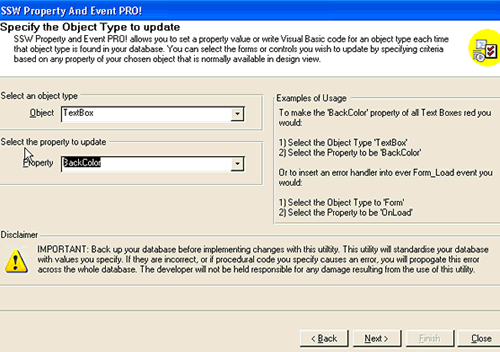
Figure: SSW Property and Event PRO! allows you to set
values for properties and events across your whole
database with an easy-to-use interface
Key Features & Benefits
-
Make changes to any property in the access database.
-
Make changes to any event in the access database.
-
Provide conditions to only change certain properties
and events.
More screen shots in the User Guide
User Guide
Welcome to the
User Guide
. This help facility is designed to quickly get you up
and running using our software.
Demonstration Options
-
If you are in Sydney,
call
today for a free no-obligation demonstration at your
office!
-
If you are not in Sydney, please take advantage of
our SSW Phone Walkthrough. The SSW Phone Walkthrough
is a service where we will call you, anywhere in the
world and once you have installed our product we
will guide you over the important features of the
software. Saves you time, playing around with the
software trying to work out all the useful features,
please
email us
today.
How it works
SSW Property and Event PRO! helps you develop
consistent, user-friendly applications in Microsoft
Access.
Your Access database consists of many objects such as
forms, command buttons and text boxes. Each of these has
many properties and events that define the way they look
and function. E.g. the textbox object has a backcolor
property, a fontname property and an OnClick event,
among others.
SSW Property and Event PRO! allows you to set these
values across your whole database with an easy-to-use
interface. You can also apply conditions based on any
property to alter the affect of your changes.
Here are some practical examples of what you can achieve
in less than 1 minute:
- Make every label in your database bold.
-
Position a common object such as your close button in
the same place on every form.
-
Make your database play a warning sound when a user
presses delete on a selection of your forms.
-
Cause a calendar to pop up when a user double clicks
in any text box that contains a date across your whole
database.
System Requirements
Microsoft Access
What does the unregistered version give me?
Unregistered versions of SSW Property and Event PRO!
provide full functionality for 10 uses. SSW provides
free phone and email support to answer queries on
registered products.
Support
Please send us
bug reports
and
feedback
so that we can evolve our software into a product that
matches your requirements. We guarantee a response.
If you can't find it in the product documentation then
check our
knowledge base
for further information and tips about this product.
I'm Sold... What's next?