SSW Exchange Team Calendar extracts calendar information
stored on your Microsoft Exchange Server and makes it
available on the web. Managers and staff have an
up-to-date schedule of appointments for all mailboxes on
Exchange simply by using their web browser.
Key Features & Benefits
-
You can see how busy everyone in your office is.
- You can see where and what employees are doing
-
You can assign/edit calendar events to employees that
they will see in there MS Outlook calendar page
-
Employees only have to keep their Outlook calendar up
to date and the results are instantly available in
Exchange Team Calendar.
-
Supports palm pilot, Win CE, Outlook Web Access,
Outlook.
-
Private calendar items and Free time items are not
displayed.
- No client settings are required.
If someone rings for an employee, instead of running
around the office to see whether a employee is in, out
to lunch, available or not; you can quickly and easily
open up SSW Exchange Team Calendar and view where
everyone in the business is. Furthermore if you are a
manager and wish to assign some work to an employee,
then you can see what an employee is doing, and what
they have planned, then make a informed decision to who
is able to complete the set work.
Employees can easily configure and manage their calendar
using Microsoft Outlook or on the web. As soon as the
user has entered the task in their calendar, it is
available in SSW Exchange Team Calendar.
Previous methods of displaying such information was
using:
- graphs and lists in Excel
- a database in Access
- a public calendar in Exchange Server
Regardless of the method, keeping an employee task list
on track and up to date has always been a time consuming
practice as most methods involve re-entering data.
This tool allows you to see everyone in the office's
calendar all at once so there is no need to go fumbling
though each users calendar to see who is free.
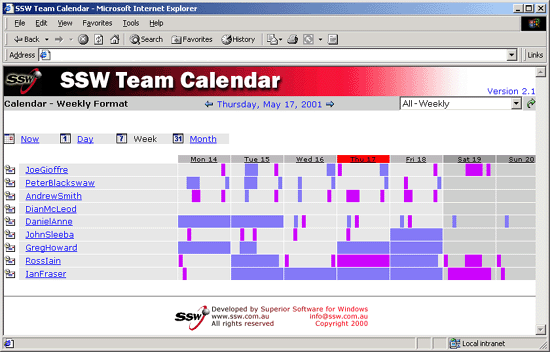
Figure: SSW Exchange Team Calendar extracts calendar
information stored on your Microsoft Exchange Server
and makes it available on the web
More screen shots in the User Guide
User Guide
Welcome to the
User Guide
. This help facility is designed to quickly get you up
and running using our software.
Demonstration Options
-
If you are in Sydney,
call
today for a free no-obligation demonstration at your
office!
-
If you are not in Sydney, please take advantage of
our SSW Phone Walkthrough. The SSW Phone Walkthrough
is a service where we will call you, anywhere in the
world and once you have installed our product we
will guide you over the important features of the
software. Saves you time, playing around with the
software trying to work out all the useful features,
please
email us
today.
How it works
Get rid of "I don't know" from your office
"Where is Dan?"
"I don't know"
"Look in SSW Exchange Team Calendar."
There are two main ways to track people's calendar items:
-
Every time someone creates an item in Outlook, you
could run a piece of code that takes the calendar item
and copies it to a global calendar store. The store
you use could be a folder in the Public folders or a
database like SQL Server. Once in there you can
create a page to query this data source and display
the results. Having the code on the client in Outlook
and not on the server in Exchange also gives issues.
Problems occur trying to keep this data up-to-date as
you are limited to just using outlook (no updating
entries via Outlook Web Access, no PDA or Mobile phone
submissions). You are also duplicating the data so
data can get out of sync easily.
-
The other option is to just query the user's mailbox
directly. This is the simplest method as the user can
add and update their calendar from any source and it
will show the users current data and never go out of
sync. The problem with this is that security is
normally compromised because you will have to give
someone or everyone permissions to view your mailbox
SSW chooses the second option and addressed the security
issue by adding an additional user
'SSWExchangeTeamCalendar'. This user has all the
permissions required without needing to open up
mailboxes unnecessarily.
The SSW Exchange Team Calendar web page resides on the
same server as Microsoft Exchange Server 2000 or 2003 is
running. Whenever a request is made to the SSW Exchange
Team Calendar page, the page queries Exchange Server and
returns all the events to all users for that particular
time period. You have to make a new user that will have
read/write permissions on peoples calendar therefore
security is still controllable is not compromised.
System Requirements
-
Microsoft Exchange Server 2000 with Service Pack 3 or
Microsoft Exchange Server 2003 (running on the same
machine as the SSW Exchange Team Calendar .asp pages)
-
Microsoft IIS running the SSW Exchange Team Calendar
.asp pages.
-
Employees using Microsoft Outlook for their Calendar
OR Microsoft Outlook 2000 or 2003 Web Access via a
browser.
-
A single Exchange Server setup. Multiple Exchange
Servers are not supported.
What does the unregistered version give me?
In respect to the unregistered version we know you want
to see it working before you buy it. We aim for that.
Note: we also give free version targeted to the little
guys
More details see
http://www.ssw.com.au/ssw/KB/KB.aspx?KBID=Q658302
SSW provides free phone and email support to answer
queries on registered products.
Getting Support
If you can't find what you are looking for in the product
documentation then check our
knowledge base
for further information and tips about this product.
Please send us
bug reports
and
feedback
so that we can evolve our software into a product that
matches your requirements. We guarantee a response.
Links
I'm Sold... What's next?
Microsoft and the Office logo are trademarks or registered
trademarks of Microsoft Corporation in the United States
and/or other countries.