Tales from the Battle Field
This article refers to one of several problems I came
across when attempting to upsize from Access 2000 to SQL
Server. Hopefully, you will pick up a few tips that will
save you a heap of time.
There are 3 things I will discuss:
1. Microsoft Access 2000 Upsizing Wizard
2. SQL Server 7 and 2000 DTS (Data Transformation
Services)
3. SSW Upsizing PRO!
When transferring data from Access to SQL Server, most
people use and recommend using SQL Server DTS because
the Microsoft Upsizing Wizard does have its problems. By
the end of this article, you will see that the Microsoft
Upsizing Wizard has a place equal or greater than DTS in
this transfer process.
Before starting you can check out these links and read
this article from Microsoft
http://www.microsoft.com/SQL/techinfo/migrate.htm
. A plethora of articles are also at
http://www.ssw.com.au/ssw/upsizingpro/frmLinks.htm
BUT STOP! Don't follow those links! It will take you at
least a week to understand and check all that stuff. I
recommend using the Microsoft Upsizing Wizard, and SSW
Upsizing PRO! which will only take 5 minutes to
understand, and a few hours to implement.
Only a few days...
Let me tell you about a situation I encountered a while
ago (Names changed of course). I was working for a very
short-tempered man (ST for short), CEO of Backyard
Accounting Corporation. He wanted his 100MB database
moved to SQL Server. He told us that he just didn't have
time for a long-winded conversion process. Upon further
investigation I discovered that his database was
stitched together by his son, Mr ST Junior - so that the
company could save money.
Mr ST called me in the office and said "Can you start
transfering the data? My son has heard on the newsgroups
that SQL Server DTS is the way to go." I say "Fine".
Ho hum, I sit down and take a look at Mr ST's database -
the usual assortment of Clients, Accounts and Invoices.
Yawn. This is going to be a walk in the park.
An hour or so later I see Mr ST with my conversion
schedule in hand. We go through it together:
I tell Mr ST that it shouldn't take more than a day to
convert the database. He grins, and his gold teeth light
up the room.
I add "Unless there are problems of course." I get that
ghastly look but he says "Excellent! Begin the
conversion process. I will tell my workers that they
will be off-line tomorrow."
A few days later, I am sweating like a pig at 3:00am in
the morning. I have given up on DTS, as it constantly
gave errors that I just could not isolate. I have also
discovered that it doesn't transfer the hundreds of
relationships - maybe I should have made time to read
through the 50+ page articles on Microsoft's esteemed
web site. Mr ST is getting very upset. What can I do?
Microsoft Upsizing Wizard
I tell Mr ST that Microsoft also has an Upsizing Wizard.
He sounds impressed and I decide to take that approach.
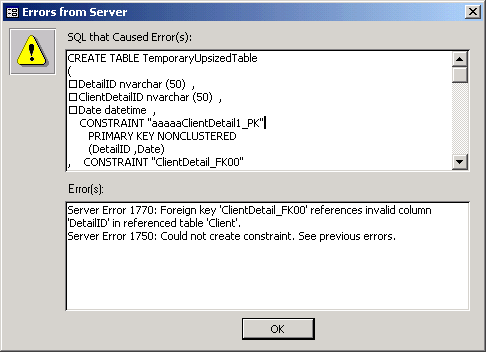
Unfortunately there were also problems with the
Microsoft Upsizing Wizard. It turns out the conversion
process of a backend Access mdb to SQL server is no
small task if you have a database any more complicated
than Northwind (which Microsoft must have done all their
testing on).
Please Give me an Explanation
Access and SQL Server talk the same language most of the
time... Most of the common field types can are
translated fine. For example, a "Memo" field in Access
would be a "Text" field in SQL Server. Most
relationships translate 1:1 from Access to SQL Server.
However, there are subtle differences between the two.
The "Text" fields in Access can only be 255 characters
long, whereas the equivalent data types of "Varchar" and
"Nvarchar" can store 8000 and 4000 characters
respectively. Another element of difference is that
Access and SQL Server have different default behaviours.
For example, by default, Microsoft Access disallows
fields with blank strings i.e. "Allow Zero Length" = No.
However, SQL Server allows such fields by default.
Differences like these have to be kept in mind on the
winding road to upsizing heaven.
Please give me a solution
So wouldn't it be good if there was a utility that would
tell you all the things in your Access database, that
are going to cause SQL Server problems. Aka cause the
Microsoft Upsizing Wizard to fall over. Well there is.
It is called SSW Upsizing PRO! available at
www.ssw.com.au
Today I use SSW Upsizing PRO! whenever I start an
upsizing job. The report it generates gives me a quick
idea of how complicated this job is going to be in the
first place. It incorporates the recommendations of many
upsizing documents into one easy-to-use utility. It also
compares your old mdb file with the newly upsized SQL
Server database so that you can be assured that the
conversion was accurate. Read on to find out more about
making an 'upsizing' as painless as possible.
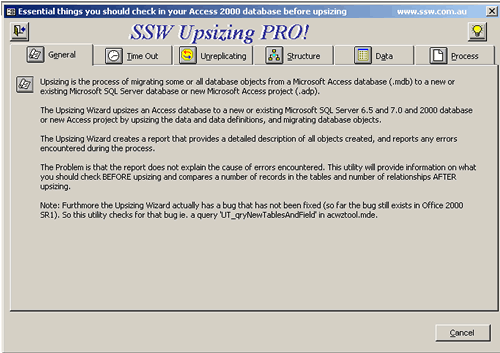
As much as we love the Microsoft Access 2000 Upsizing
Wizard, it still has deficiencies. These range from
missing constraints to complete tables being skipped
without any significant warnings. SSW Upsizing PRO!
highlights these problems, so you can be prepared for
such issues. These problems include (but are not limited
to):
-
The Microsoft Upsizing Wizard allows tables without
unique constraints. Tables with this problem cannot be
modified.
-
SQL Server and the Microsoft Upsizing Wizard allow
spaces in table and field names (e.g. "Order
Details"), but this is not a good idea.
- Validation rules are not upsized.
-
If a unique index is set on a field, and the required
property is set to "No" in Access, the Microsoft
Upsizing Wizard will fail.
-
If you have created a table and then reordered the
fields after you have saved it (everybody does this),
the Microsoft Upsizing Wizard will often fall over.
-
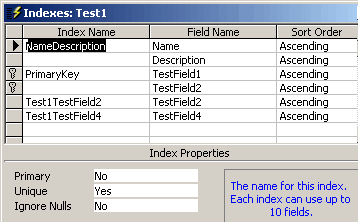
Multiple Key Foreign Key Relationships on tables that
map to fields of a different name will fail. (As
below)

-
Tables with invalid dates will be skipped without
warning (SQL Server smalldatetime can only store from
the years 1900 to 2079. Dates outside this range will
fail.) For example, Access will allow data entry
errors such as '1/1/199'.
-
Fields with multiple-key indexes cannot be upsized if
the total size of the fields adds to more than 450
characters.
Running SSW Upsizing PRO!
All you need to do is to select the data .mdb file and
it will give you a report on all problems that need to
be fixed. For example, it will inform you of the columns
with invalid dates, and how to isolate the culprit
records. After upsizing, it will compare the SQL Server
Database, so you can be assured that your data and all
relationships have been transferred correctly.
DTS is still useful, but...
I wouldn't use DTS to upsize my data to SQL Server,
because it doesn't convert relationships, and is not as
robust with some data types, such as time and date
fields. But it is still useful for diagnosing problems
with data. For example, suppose you have a table that
will not upsize with the Microsoft Upsizing Wizard. If
there is a problem, it will skip the data, and sometimes
the remaining table structures as well. What is really
useful is that you can use DTS to find the problem by
telling you the line number where it is falling over, so
you can correct the erroneous data.
However, it is not useful for importing time-related
data. See
DTS Horror Stories
for more detailed information on the example problem.
Conclusion
Sometimes you wish you had the time to build the
database schema from scratch! This is not practical in
the majority of cases, and this is where the SSW
Upsizing PRO! fills the gap - to tell you the problems
that exist in you mdb file, to make your experience with
the Microsoft Upsizing Wizard as smooth as possible.
For a seamless transition from Access to SQL Server, the
Developer has to use many tools to:
- Isolate bad data (usually date data)
-
Find structural problems (the source of most errors)
-
Counter problems in the official Upsizing tools
provided by Microsoft.
These tools include:
- SSW Upsizing PRO!
-
Microsoft SQL Server DTS
-
Cutting and Pasting in Microsoft Access
With the deficiencies of DTS in mind, the Microsoft
Upsizing Wizard is your best overall solution to
upsizing. I recommend using the Microsoft Upsizing
Wizard as your primary tool, with DTS as an ancillary
tool for troubleshooting minor problems. In summary, use
SSW Upsizing PRO! in conjunction with the Microsoft
Upsizing Wizard for a relatively hassle-free upsizing
process. Of course, Mr TW will be much happier!
Without these tools, there is a steep hill to climb,
particularly when you are faced with the upsize of a
large and/or complicated legacy Access database.
Adam Cogan
and
David Klein
December 2000