Are you looking to eradicate bugs and ensure
consistency?
SSW Code Auditor is a code analysis tool that allows
developers to take control of your code, ensuring
large, complex source code can be simplified, cleaned
and maintained. The built-in rules focus on the most
popular .NET languages (C#, VB.NET) for both Windows
Forms and ASP.NET; however, the flexibility of SSW
Code Auditor allows the developer to add their own
rules to target any language in any text file.
As a project or company grows, managing code standards
throughout your team becomes virtually impossible.
Consistent code is crucial to future development and
maintenance. SSW Code Auditor lets you take control of
your code and automatically review your web apps and
projects - giving you more opportunity to spend time
where it really matters.
Here at SSW, we face the problem of maintaining our
standards across nearly five thousand web pages, over
twenty active projects in both Visual Basic (6 and
.NET) and C#. There comes a point where a tool to
check our work is needed, this tool is SSW Code
Auditor.
SSW Code Auditor utilizes the power of Regular
Expressions to audit your code. This powerful feature
permits the user to write their own set of rules and
have different rules for different projects.
2 methods to keep your code healthy!
Free version
(download from the Visual Studio Gallery)
|
Pro version
(purchase simply and quickly)
|
-
Seconds to install and use the extension
-
Quickly scan your solution with just one
click
-
Enforce quality control of your source code
|
- Rich and powerful UI
- Customize your code audit
- Include into your build process
|
| Step 1 - Install extension |
Step 1 - Install exe |
-
-
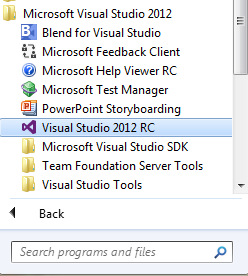
Figure: Step 2 - Start Visual Studio 2010,
2012 or 2013
|
-
-
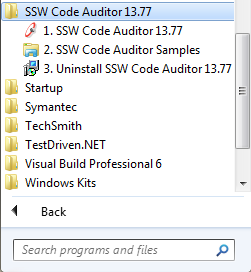
Figure: Step 2 - Launch SSW Code Auditor
|
-

-
Figure: Step 3 Open your project and click
"Audit" on your VS Extension toolbar
|
-
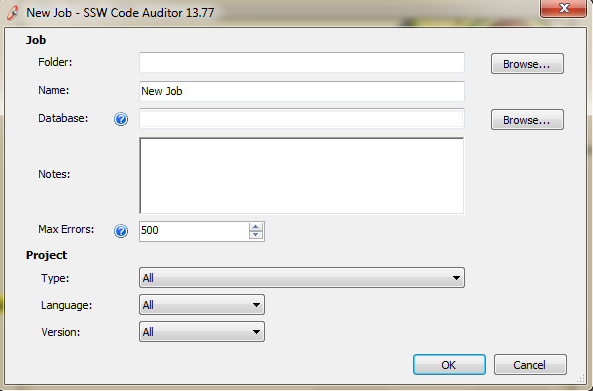
- Figure: Step 3 Add a job
|
|
More screenshots (Free version – VS
Extension)
|
More screenshots (Pro version)
|
Key Features & Benefits
SSW Code Auditor allows you to:
- Verify that coding standards are maintained
- Prevent bad coding practices
- Seamlessly integrates with VS.NET
|
Great, user-friendly wizard style interface.
With our
standards compliant
user interface, you are sure to have a
consistently great operating environment with
SSW products.
|
|
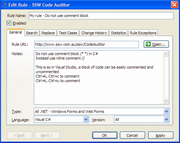
Make your own rules!
With our powerful regular expression enabled
parsing engine, you have the flexibility to scan
any text file for any kinds of rules. Rules can
check specific filetypes and have exceptions
based on other regular expression matches.
|
|
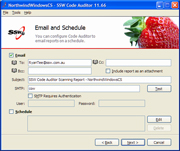
Stay on top of things.
Code Auditor has in-built scheduling and email
notification functionality so you can have
regular reminders of what needs attention in
your projects!
|
|
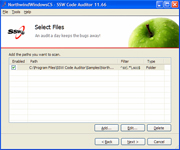
Spanning the big picture.
Scan any number of directory trees with
extensible path selection. As many development
projects can be covered by your rules as you
wish.
|
|
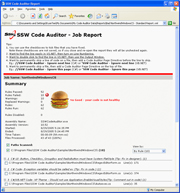
Report Output.
|
|
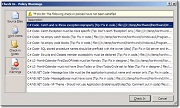
Visual Studio Team Foundation Server Add-in.
Automatically adds an additional Check-in policy
that runs SSW Code Auditor and stops developers
from check in code that violates rules.
|
|
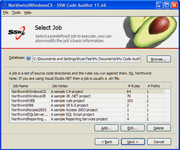
Built-in sample projects & sample
database.
We offer a sample database and kinds of sample
projects to help you run a professional demo
scan.
|
More Technical Features
Code Auditor includes the ability to:
-
Scan TFS Pending changes (Only if using VS 2012)
- Check any text file
- Check file names
-
Scan project directories for code that violates your
rules
- Perform deep traversal of directories
-
Scan websites for HTML that violates your rules -
including the information served by the web server!
-
Validate HTML code by using the Tidy HTML engine
-
Use the report that is written to an .mdb, or to
export to XML
- Organize separate projects into jobs
-
Allow exceptions to rules, thus ignoring files that
you are aware of
-
Full scheduling abilities with email alerts,
providing regular automated checks on your code base
- Use Regular Expression to define more rules
- Regular Expression builder included
Upcoming Features
-
Tatham Oddie Happy
(done)
-
Robert MacLean Happy
(done)
-
Mike Fourie Happy
(done)
-
Upgrade from VS 2008 to VS 2010
(done)
-
Paul Usher Happy - Use Telerik Grid (for filtering
rules)
(done)
-
Product Wiki
(done)
-
Internal Web site to add/update rules - remove the
pain of using SQL Scripts
- Replace the setup+package from wise to WIX
-
The reference problem of 2 .sln - Development time
when there are changes the Extension's interfaces
- Migrate to SQL Azure
- Share your rules with others
-
Upgrade to LINQ - first need to allow a developer to
associate to a company's rules, the use SQL Compact
-
Auto update rules from our webservice + web page to
show version history
- Use VS Task List (like StyleCop)
- Easy way to Ignore Rules
-
Change from IE report to a pdf that can be emailed
(even better a URL on SQL Azure + need a checkbox
[x] Public)
-
Right click on a project and "Scan with Code
Auditor" (auto detect type of project)
-
Document hacks on how you debug stuff in
SSW.Framework
-
Review SSW.Framework to see what can be removed
- Designer UI refresh
-
In VS instantly detect and highlight errors as you
code, right in the editor (like Resharper)
-
Take advantage of Multi-core processors on scan
(using PLinq)
- Own web site (like SSW SQL Deploy)
- From Regex To Code DOM/Parse Tree
System Requirements
- Windows 8
-
.NET Framework 4.5 or later
- VS 2010 (VSIX extension)
- VS 2012 Update 2(VSIX extension)
-
VS 2012 Update 2/TFS 2012 Update 1(if using TFS
Pending changes scan)
- VS 2013
Predefined Rules - examples of rules you can define
Do they go in Code Auditor or Link Auditor?
Top 5 rules
-
FONT tags must not be used
-
FONT and BASEFONT tags are deprecated by W3C.
Reference:
w3.org
-
Google File Size Limit
-
Did you know? the search appliance indexes up to
2.5MB of the document, caches it, and discards
the rest. Reference:
Google Crawler documentation
-
Table tags should not specify the width
-
Use Standard width for Ellipsis button. Look
at
Do you make common control with certain width?
for more details
-
Windows Form should have a minimum size to avoid
unexpected UI behavior. See
Do you keep a minimum size in the window forms?
for more details.
See more Rules...
What does the unregistered version give me?
In respect to the unregistered version we know you
want to see it working before you buy it. We aim for
that.
Note: we also give free version targeted to the little
guys
SSW provides free phone and email support to answer
queries on registered products.
How to show your application is 'SSW Code Auditor'
Compliant?
To show your users that you have taken the care to
create a 'healthy' code, you may display this image on
any web pages and applications that are validated by
Code Auditor.

Here is the HTML to add this icon to your web page:
<a href="http://www.ssw.com.au/ssw/CodeAuditor">
<img
src="http://www.ssw.com.au/ssw/Images/codeauditorcompliant.gif"
alt="Code Auditor compliant" /></a>
Where should I put this icon?
We recommend the image to be placed on the footer (for
websites) or in the "About Box" (for WinForm
applications).
Getting Support
If you can't find it in the product documentation,
then check our
knowledge base
for further information and tips about this product.
If you think that one of our rules is incorrect,
please tell us about it.
Please send us bug reports and feedback so that we can
evolve our software into a product that matches your
requirements. We guarantee a response.