 Manage email and network setup from one location with
Exchange Server 2007
Manage email and network setup from one location with
Exchange Server 2007
When another employee joins your company what is the
current scenario? Most likely you firstly get your
network administrators to
create a new logon username and password. You then
contact your ISP, and after a few days the new employee
has a new email address, at the additional monthly cost
to you. Then another network guy will configure the new
Outlook service on the new users machine while your new
employee has been using some old employees email address
for the last week and the .pst file somehow disappears!
- Chaos.
Using Exchange Server 2007, in one step you can add a
new user onto the network, create a new mail box, and
you don't even need to configure Outlook on
the users machine. The User can log on to the network
and have access to their mail immediately using
Microsoft Outlook Web Access.
What is Exchange?
A visitor to my web site recently asked for an
explanation of Microsoft Exchange, highlighting how much
we sometimes take for granted that people who use
Outlook know what Exchange is all about. Given some of
the messages I've seen in the public newsgroups, I doubt
that even all the organizations that have installed
Exchange know why they're using it, so perhaps an
explanation is in order.
First of all, Exchange is a mail server. It can handle
POP, IMAP, and web clients, as well as its own preferred
client, Outlook.
But as just a mail server, Exchange is a rather
expensive and complicated choice. It's the collaboration
features that make Exchange more than a mail server.
Exchange allows people to share information, either
using Outlook on the desktop or to a lesser extent,
Outlook Web Access through a browser.
Typical collaboration scenarios include maintaining
shared address lists that everyone can contribute to,
scheduling meetings that include not just people but
also conference rooms and other meeting resources, and
sharing other types of information either in public
folders or by granting access to folders in your own
Exchange mailbox. You can also use Exchange to store a
central library of commonly used Outlook forms. In fact,
if you require maximum collaboration potential with
Outlook clients, Exchange is your best choice.
So why doesn't everyone who wants to share data with
Outlook just install Exchange? The answer is: cost and
complexity. Exchange is a server-based application and
requires an Active Directory infrastructure in place
before you can even run setup. It costs considerably
more than a shareware POP server and takes more effort
to configure, especially when you want to support such
features as access to Outlook Web Access from the
Internet.
Exchange may look awfully complex to a small
organization that just wants basic mail and
collaboration, but that complexity includes features
essential to supporting hundreds of thousands of users
on a global network of Exchange servers.
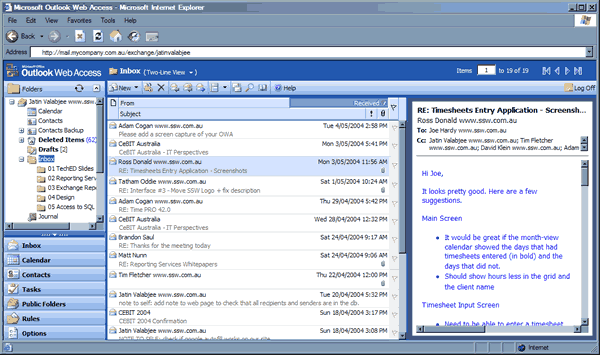
Microsoft Outlook Web Access
One of the biggest PC problems users have is too many
email addresses. I had one friend who had 35 accounts!
Contacting him was a nightmare! This problem occurs
mainly because people can't connect to their work email
from home, they move across the country and their ISP
doesn't offer a service, or they just couldn't be
bothered configuring their software properly.
It makes me furious when I email companies who say
"sorry it took so long to get back, but we don't check
this account very often." As if it's a hassle to close
down their Outlook and open another account.
Web Access means that from any PC in the world with an
Internet connection you can access your Outlook email
account, plus you can have numerous accounts open at
once.
The Web Storage System (WSS) - "More than Mail"
A distinct advance, from a developers point of view, in
the capabilities of Exchange as a "more than mail"
program is the Web Storage System.
The Web Storage System makes the old .PST file system
redundant. It means that mail and yor calender becomes a
managable, programable, scalable, developers paradise.
XML, ASP, ActiveX Data Objects and OLE DB are all
supportable features.
But what does this mean to you?
If you manage a significant proportion of your business
through email (and let's face it, who doesn't spend 30%
of the day in Outlook?) you are generally pretty stuck
if you don't manage your inbox very well. And even if
you do, it's a hassle locating old emails, which you
probably deleted, using the Advanced Find feature, as
good as that might be.
Using the WSS can build an app that will query the data
in your email and calendar "folders" and do whatever you
like with it as VB, VBA or VBScript permits.
Mail will change from being a service that sits
uncomfortably with your business applications into a
fully integrated data management environment.
Check out
SSW eXtreme Emails!
to see how we've exploited the possibilities.
|
Hardware Requirements for Setting Up Exchange
Server 2007
|
| Router |
Web Ramp (analog connection); or CISCO router
(ISDN and others)
|
| Real IP Address |
Available from your ISP |
| Domain Name |
http://mail.yourcompanyname.com.au
|
| Permanent Internet Connection |
A dedicated modem, ISDN, cable, or DSL
|
|
Dedicated Exchange Server Machine
|
800 Mhz Processor; 256 MB RAM; 18GB hard drive
space with a Raid-Array
|
If you're interested in finding out more about
implementing Exchange Server 2007 please contact
SSW