This product is no longer supported.
Manage email more effectively with SSW LookOut! for
Outlook
Did you ever hit the send/receive button only to realize
that you forgot the attachment, or didn't 'reply all'?
Email is a fundamental corporate communications tool
used every day to manage staff, establish contacts and
communicate with clients. Use SSW LookOut! to organize
and manage your email and help ensure email is always an
advantage to your business and not a liability! With
tons of rules and auditing checks, SSW LookOut! also
notifies the user whether emails are from people within
their corporate Access or SQL Server database.
Key Features & Benefits
Email Management Too Important for CIOs
High-profile scandals such as Worldcom and
Enron shown that email management is too
important for business to be left to CIOs
who are more worried about rising costs.
Details

|
|
Never Send An Email In Anger
Chris Sells says "One of the most
important things that I've ever learned
about high-tech communications is to
never, ever write an email in anger. Or,
to be more precise, never *send* an email
in anger"
Details
LookOut! catches angry words and give you
a second chance before sending them!
|
|
-
Cover yourself and automatically obey good email
etiquette with a multitude of rules and checks
such as:
- Forgetting to add the attachment
- Sending large emails
-
Including inappropriate words in the body of an
email
-
Forgetting to include a body or subject in the email
- Forgetting to Reply to All
-
Forgetting to include a signature for external
emails
- Optimise your Outlook settings
-
Set the database connection. When a new mail arrives
in your Inbox it is automatically tagged with Contact
information.
- Sort email by Contacts
Figure: Use SSW LookOut! to organize and manage your
email and help ensure email is always an advantage to
your business and not a liability!
More screen shots in the
User Guide
Advanced Options - How it works (Programming Required)
SSW LookOut! for Microsoft Outlook adds a Client ID
field to your Outlook view. This allows you to clearly
see which emails are from contacts in your corporate
database, which emails are from within your own
corporate Intranet, and which emails are from people not
currently in your database (potential new clients which
you must add to your database!).

Figure: SSW LookOut! lets you clearly see which emails
are and are not from contacts in your corporate
database
LookOut! uses the email address to search and match
people from your database. It is designed to work with
any popular database, but currently has only been tested
extensively with Microsoft Access and Microsoft SQL
Server. If you are interested to try out on other
database(s),
let us know
!
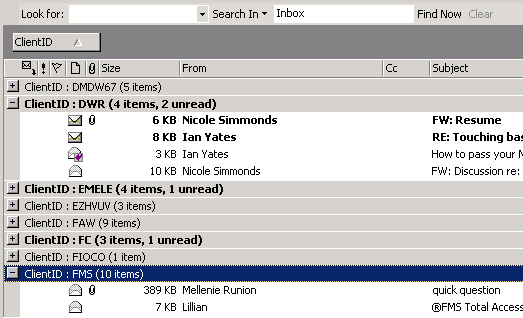
Figure: Your Outlook items can be sorted or grouped
with the Client ID
LookOut! operates in two modes, Online and Offline mode.
-
Whenever LookOut! is certain that a connection to your
corporate database can be made, it will switch to
Online mode. A probe test is run to check before the
mode switches.
-
Similarly, whenever there's an error in trying to
connect to your database, LookOut! will switch to
Offline mode.
While in Offline mode, LookOut! will not try to scan any
new incoming emails for their client ID. Contrary to
what the name may seem to indicate, LookOut! does not
keep an open connection to your database, all
connections are closed as soon as LookOut! is done with
them. LookOut!'s Online and Offline modes are also not
related to Outlook's Online and Offline modes. There is
an option for LookOut! to automatically try to go Online
when it starts.
Upcoming Features
- Adding MS CRM (4 and 5) support
System Requirements
What does the unregistered version give me?
In respect to the unregistered version we know you want
to see it working before you buy it. We aim for that.
Note: we also give free version targeted to the little
guys
More details see
http://www.ssw.com.au/ssw/KB/KB.aspx?KBID=Q658302
SSW provides free phone and email support to answer
queries on registered products.
Support
If you can't find it in the product documentation then
check our
knowledge base
for further information and tips about this product.
Please send us
bug reports
and
feedback
so that we can evolve our software into a product that
matches your requirements. We guarantee a response.
Links
Microsoft and the Office logo are trademarks or registered
trademarks of Microsoft Corporation in the United States
and/or other countries.