Thank you for taking the time to report a bug or to
request an enhancement to either an SSW product, or
custom designed software (Please read the
Terms and Conditions
). We manage projects using
SSW eXtreme Emails!
hence we would appreciate feedback in the form of a
simple email. Whilst sending your support email could
you please use the following guidelines.
At SSW we endeavour to provide you with the best support
we can. Before answering your support questions we
require that you perform some simple tasks:
-
Have you checked that you're able to meet the system
requirements? (e.g. does the product require the .NET
Framework installed?)
-
If you're not sure if you meet the system requirements
we've created software that will check that you've got
the most current service packs installed on your
machine. SSW Diagnostics will check for and also
provide links to the updates. Before sending support
emails please install and run
SSW Diagnostics
.
-
Email us the SSW Diagnostics report and a description
of the errors you are receiving and
screen shots
of the error messages you are getting, and
the steps you followed
before the bug happened. A great screen capture
utility that we use is
Fullshot
which gives you a great range of capture options.
-
Subject <Application Name> <Version>
<Category> (But why are email
subjects
so important?)
-
From: Ulysses Maclaren
Subject:
Possible Bug: IStopWatch: Weekly report negative
number
Hi Frank,
I got a negative number as the total for the 13th
of Oct in the weekly report.
...
- Figure: Bad Example
-
From: Ulysses Maclaren
Subject:
Possible Bug - IStopWatch 1.15 - Weekly report
negative number
Hi Frank,
I got a negative number as the total for the 13th
of Oct in the weekly report.
...
-
Figure: Good Example - there is a version number
next to the applicaiton name, and the developers
can go to this version directly.
-
We also provide remote support if needed as per our
Remote Support Standard

SSW Consulting Support
-
Address the email to
info@s*w.com.au
-
Subject <Application Name> <Version>
<Category> (But why are email subjects so
important?)
-
Use one of the following Categories to determine when
the work will be completed:
-
Describe your request, and include a
screen shot
if possible. The best way to do this is by using a
fantastic utility called
Fullshot
. To minimise the size of your attachments, here are
some
simple rules
.
- Your Name and Phone
-
Please also run
SSW Diagnostics
which automatically emails us an analysis of software
on a machine. Diagnostics requires the .NET Framework.
If you cannot install the .NET Framework
From: Gary Hanley
Subject: Access Reporter - Version 6.9 - BUG
Dear SSW Support,
I installed SSW Access Reporter for .NET and I got
this error message (Screen Shot attached). SSW
Diagnostics has already emailed you its analysis
of the software on my server.
Thanks,
Gary
|
Give us steps to reproduce the bug
It'll be easier and more efficient to reproduce the bug
with your steps than without any instruction. Then we
can investigate it and reply to you much quickly.
Here's a good example.
-
I clicked 'Configure' button to configure the sample
database.
-
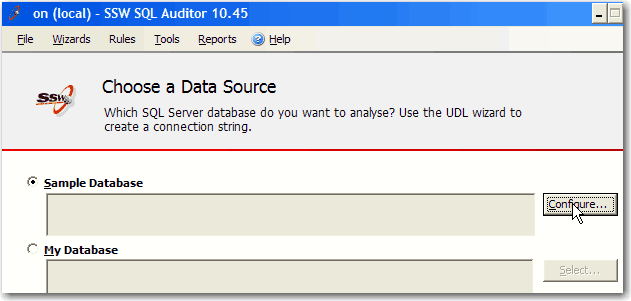
- Figure: Step 1 to reproduce the bug
-
In the following window, I clicked 'Select' button.
-
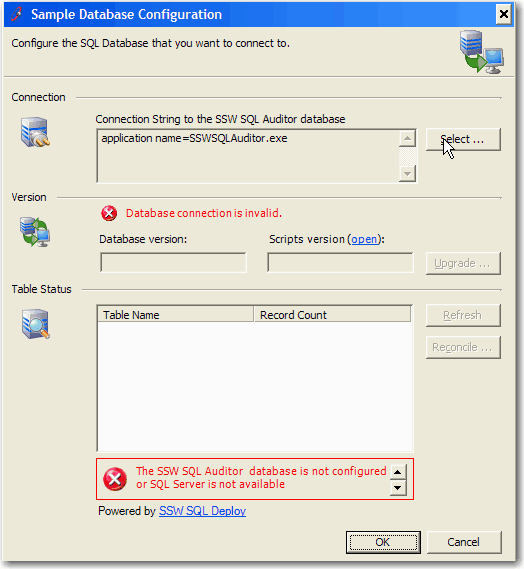
- Figure: Step 2 to reproduce the bug
-
Then I made settings for the New Database, and clicked
'Test' button. It showed me 'Connection Successful'.
-
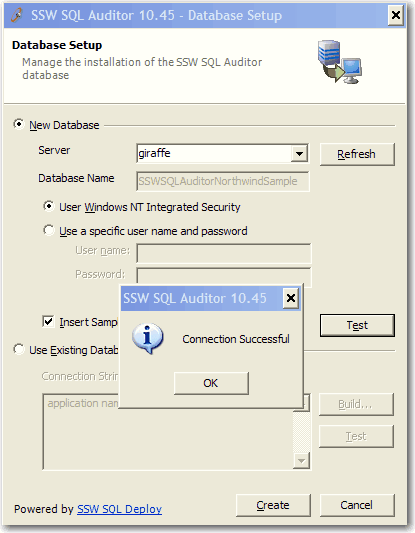
- Figure: Step 3 to reproduce the bug
-
After that, I clicked 'Create' button and the error
happened.
-
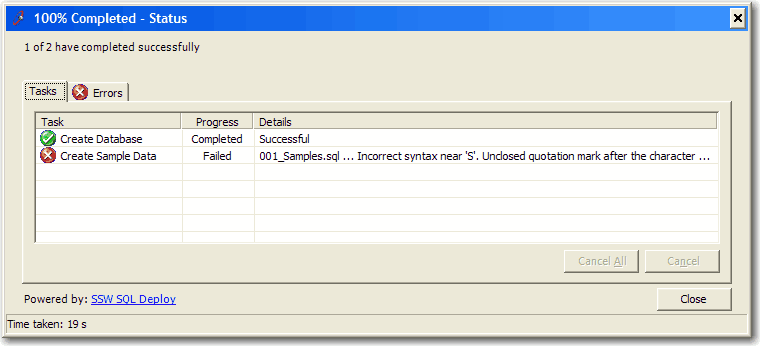
- Figure: The bug happened
Screen captures are always good
An image is worth a thousand words, that's true. So
please add some screen captures in your Bug or
Suggestion email.
Better than a written description with screenshot is a
screen recording
. This should be followed for a more detailed bug
report. Use Snagit (preferred) or Jing to record your
screen.
More Info... Bug Reporting with .NET Applications
.NET applications can sometimes produce a stack trace of
an error, these error messages are all we need to figure
out what has happened.
Please do not send us this screen shot
, instead, select the top section of what's within this
box and paste it in an email that you can send back to
us.
The text within the 'Details' button is more useful for
debugging and locating the problem.
-
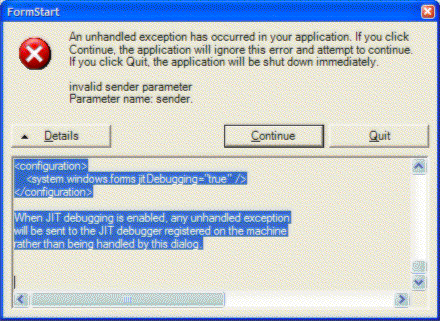
- Figure: Bug details window
See the end of this message for details on invoking
just-in-time (JIT) debugging instead of this dialog box.
We really want this part:
************** Exception Text **************
System.ArgumentException: invalid sender parameter
Parameter name: sender
at WindowsApplication3.FormStart.button5_Click(Object
sender, EventArgs e) in
c:\datajohnliu\datavs7projects\windowsapplication3\formstart.cs:line
143
at System.Windows.Forms.Control.OnClick(EventArgs e)
at System.Windows.Forms.Button.OnClick(EventArgs e)
at System.Windows.Forms.Button.OnMouseUp(MouseEventArgs
mevent)
at System.Windows.Forms.Control.WmMouseUp(Message&
m, MouseButtons button, Int32 clicks)
at System.Windows.Forms.Control.WndProc(Message& m)
at System.Windows.Forms.ButtonBase.WndProc(Message&
m)
at System.Windows.Forms.Button.WndProc(Message& m)
at
System.Windows.Forms.ControlNativeWindow.OnMessage(Message&
m)
at
System.Windows.Forms.ControlNativeWindow.WndProc(Message&
m)
at System.Windows.Forms.NativeWindow.Callback(IntPtr
hWnd, Int32 msg, IntPtr wparam, IntPtr lparam)
This part is quite useful sometimes too.
************** Loaded Assemblies **************
mscorlib
Assembly Version: 1.0.3300.0
Win32 Version: 1.0.3705.288
CodeBase: file:///c:/windows/microsoft.net/framework/
v1.0.3705/mscorlib.dll
----------------------------------------
WindowsApplication3
Assembly Version: 1.0.1129.31301
Win32 Version: 1.0.1129.31301
CodeBase: file:///C:/DataJohnLiu/DataVS7Projects/
WindowsApplication3/bin/Debug/WindowsApplication3.exe
----------------------------------------
System.Windows.Forms
Assembly Version: 1.0.3300.0
Win32 Version: 1.0.3705.288
CodeBase:
file:///c:/windows/assembly/gac/system.windows.forms/
1.0.3300.0__b77a5c561934e089/system.windows.forms.dll
----------------------------------------
System
Assembly Version: 1.0.3300.0
Win32 Version: 1.0.3705.288
CodeBase: file:///c:/windows/assembly/gac/system/
1.0.3300.0__b77a5c561934e089/system.dll
----------------------------------------
System.Drawing
Assembly Version: 1.0.3300.0
Win32 Version: 1.0.3705.288
CodeBase:
file:///c:/windows/assembly/gac/system.drawing/
1.0.3300.0__b03f5f7f11d50a3a/system.drawing.dll
----------------------------------------
System.Xml
Assembly Version: 1.0.3300.0
Win32 Version: 1.0.3705.288
CodeBase: file:///c:/windows/assembly/gac/system.xml/
1.0.3300.0__b77a5c561934e089/system.xml.dll
----------------------------------------
These are not really useful
************** JIT Debugging **************
To enable just in time (JIT) debugging, the config file
for this
application or machine (machine.config) must have the
jitDebugging value set in the system.windows.forms
section.
The application must also be compiled with debugging
enabled.
For example:
<configuration>
<system.windows.forms jitDebugging="true" />
</configuration>
When JIT debugging is enabled, any unhandled exception
will be sent to the JIT debugger registered on the
machine
rather than being handled by this dialog.
Related rules