-
Issue management system built on .NET Platform
and Outlook.
- Comprehensive feature-set.
- Pay nothing for Full Version!
Turn your Inbox into a task-tracking system with SSW
eXtreme Emails!
More than simply bug tracking software for Outlook,
SSW eXtreme Emails can help you manage your email
more effectively.
Allocate tasks, set priorities, assign due dates and
get progress reports without re-entering any data,
all while working in the familiar Microsoft Outlook
environment. Written in .NET, this Outlook COM
Add-In lets you take control of your email.
Check
SSW Agile Template
for managing projects within Microsoft TFS.
Key Features & Benefits
SSW SSW eXtreme Emails! enables you to use Microsoft
Outlook as an:
-
intelligent bug tracking and project management
system
-
Email is transformed from an unstructured
information source into a data-centric tool,
permitting reports and data analysis
-
allows you to categorize emails as work tasks (or
'incidents'), and assign properties to permit
tracking of those tasks
-
Especially useful for companies who use email as a
communication tool, you can use Exchange Public
Folders to share information internally or over
the Internet
-
SSW eXtreme Emails! finally allows you to make
sense of your email
|
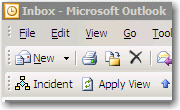
Use Microsoft Outlook emails to manage your
company
SSW eXtreme Emails intergrates directly into
Microsoft Outlook so that you can use your
inbox to manage how your company works.
|
|
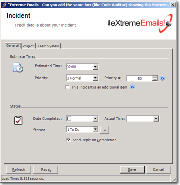
Helps manage projects and their bugs
effectively
Turns all the emails in your inbox into tasks
that you can use as your bug tracking tool.
|
|
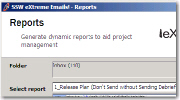
Generates customizable reports for progress
analysis
SSW eXtreme Emails! has several inbuilt
reports that are customizable to allow you to
report on the status of tasks.
|
|
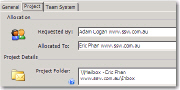
Assigns and manage tasks in each project
With SSW eXtreme Emails! you can assign a task
to a particular person and generate reports on
each project.
|
|
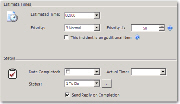
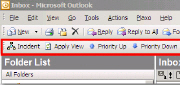
Assign properties to an email (or incident)
using the interface
SSW eXtreme Emails! extends Outlook's mail
items to include properties like:
- Estimated Hours
- Actual Hours
- Status
- Priority
and many more...
|
|
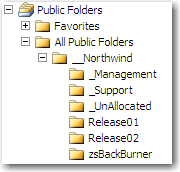
Use Microsoft Exchange Public Folders to
share incidents, or store incidents in your
Inbox directory
SSW eXtreme Emails! integrates with Microsoft
Exchange Server to provide you with a powerful
tool to manage your projects and share tasks
between different staff all in the one
centralized location.
|
|
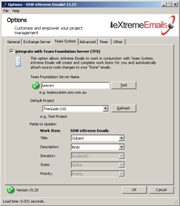
Integration with Team Foundation Server
SSW eXtreme Emails! integrates with Team
Foundation Server (TFS) to enable you to
manage your project progress by easily emails.
|
|
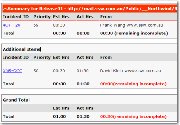
Manage projects, provide estimates, enable
debriefs
The built in reports allow you to sent clients
estimates, debriefs and Test Please emails on
the project, providing you with a great tool
for communication with your clients.
|
|
Built using Microsoft Visual Studio Tools
For Office (VSTO)
-
Eliminates notorious bugs from the
previous interop assemblies
- Plugins built using a .NET library
|
![Partial Screen Shot 10]()
|
Perfect for software developers using
eXtreme Programming or any Time Billing
company
SSW eXtreme Emails is the perfect tool for use
with XP - that's why we created SSW eXtreme
Emails!
|
User Guide
Welcome to the
User Guide
. This help facility is designed to quickly get you
up and running using our software.
Demonstration Options
-
If you are in Sydney,
call
today for a free no-obligation demonstration at
your office!
-
If you are not in Sydney, please take advantage
of our SSW Phone Walkthrough. The SSW Phone
Walkthrough is a service where we will call you,
anywhere in the world and once you have
installed our product we will guide you over the
important features of the software. Saves you
time, playing around with the software trying to
work out all the useful features, please
email us
today.
Why have we developed another Bug Tracking Tool?
Believe me, we didn't want to. There are many
decent tools out there, but nothing good enough.
We have tried others including:
Red-Gates Aardvark
- Nice web based solution
- Nice reports
-
Web interface - constant roundtrips to server
- No offline ability
-
Very slow to enter bugs online - so many fields
FogCreek's FogBugz
- Simplicity
-
Easy to enter bugs (not many fields to fill out)
-
A customers email is transferred to the database
-
Web interface - constant roundtrips to server
- No offline ability
-
The fact that they have include email
functionality - why take me away from Outlook
-
When you reply to the email, the email you send
to the customer is not the same as the one they
sent to you (different format, missing screen
captures)
-
The way it allows "Public Submissions" - we
prefer customers to email us, and we first try
and resolve with a KB, otherwise we decide if it
goes into the 'bug database' (public folder) for
fixing
-
The "Attach a File" feature - Uploading files is
a pain
-
When you resolve a bug it stays on the list,
with little indication it has been resolved. I
think it would be an improvement if they used
strike-though for resolved bugs.
-
The feature that the developer resolves a bug
and the customer closes the bug. They try to
make this system work with warnings like
"Remember, it is your responsibility to check if
the resolution is satisfactory and close the
case after it is resolved." Developers should
close - clearly the system breaks down because
only conscientious customers are going to bother
to close bugs.
-
Don't like the noisy dashboard. When I click OK,
I don't want to see the same screen again.
-
Only Administrators can enter new project and
areas
Seapine Software's TestTrack Pro
- Well Architected
- Very flexible (custom fields, etc.)
-
Provides both Rich Client and Web-Based front
ends
- Very Confusing
- Difficult/tedious to enter a bug
- Inefficient tab-based UI
Major Problem
: Bugs come from users in Emails...
All of these systems either require you to enter
the email in the system or they read the email and
make a duplicate in their bug tracking system (and
usually store them in a database of some kind)
The approach we took with SSW eXtreme Emails! was
not to make a duplicate but to add properties onto
the mail item within Outlook to manage and track
bugs. This has the additional benefit of keeping
users in the familiar Outlook environment.
How it Works
As a bug tracking tool for Outlook, SSW eXtreme
Emails! takes advantage of the most commonly used
means of communication - email. Utilizing the User
Properties extension within Microsoft Outlook, SSW
eXtreme Emails! assigns extra properties to email.
This permits querying against your email similar to
querying against SQL Server or Access. eXtreme
Emails! does away with two common problems of
incident tracking systems, duplicate data entry and
uploading images over a slow connection. Just by
using HTML format in your email, sending screen
shots becomes a breeze!
Reports
SSW eXtreme Emails comes with some
great reports
(which you can customize)
System Requirements
Getting Support
If you can't find what you are looking for in the
product documentation then check our
knowledge base
for further information and tips about this product.
Please send us
bug reports
and
feedback
so that we can evolve our software into a product
that matches your requirements. We guarantee a
response.
Links
OL97:
Using Hyperlinks to Access Outlook Folders and Items
(Q158135)
Microsoft Support Page

Programming Microsoft Outlook with Visual Studio
.NET
Microeye Web Site
151241 XCLN:
How to Work with Public Folders Offline
KBAlertz
Video Demo
See SSW eXtreme Emails in action.Download the SSW
eXtremeEmail Video Demo (27MB)
-
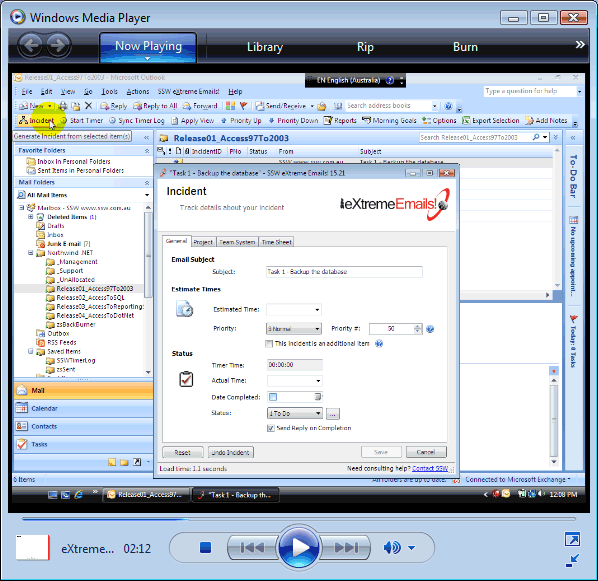
- Figure: SSW eXtreme Emails Video Demo
I'm Sold... What's next?
Microsoft and the Office logo are trademarks or
registered trademarks of Microsoft Corporation in the
United States and/or other countries.