Do you use AI to speed up frontend design?
Loading last updated info...
AI tools can now generate full frontend UI from a natural language prompt. But without your design system, the output is generic - wrong colors, wrong fonts, wrong component patterns. Feed it your design system and every screen is on-brand from the start.
Video: Claude just got another superpower... (5 min)
Claude Design (Recommended)
Claude Design is Anthropic's design tool. It generates interactive prototypes, UI mockups, landing pages and one-pagers - not static images - from natural language prompts. What sets it apart is that it uses your design system for everything it generates.
You don't need a separate app to use it. Design is built into Claude as a skill, so you can start a design wherever you already work:
- Claude Code - Run the built-in
/designskill with a brief, e.g./design a settings screen for a mobile banking app. Claude draws the design as artboards on one canvas and publishes it as a Design artifact that you can edit in the browser - Claude chat - Select Output > Design in the message box, or pick a Design template from the Artifacts tab
- Claude Design - Start a project directly at claude.ai/design
Claude Design is in beta on Claude Pro, Max, Team, and Enterprise plans. On Enterprise, an admin must turn it on. The /design skill needs Claude Code v2.1.265 or later, signed in with a Claude account, and is not available on Amazon Bedrock, Google Cloud, Microsoft Foundry or Claude Platform on AWS.
How to point it at your design system
Claude builds a design system for your organization by reading your existing assets:
- Codebases - React component libraries, CSS variables, Tailwind configs (from a GitHub repo or your local codebase)
- Design files - Figma files, prototypes, screenshots
- Documents - Slide decks and PDFs that reflect your brand identity
- Individual assets - Logos, color palettes, typography specimens
If your design system lives in a React repo, run the built-in /design-sync skill in Claude Code (e.g. /design-sync Acme DS). It converts your components and uploads them to Claude Design, so designs use your real components. The first sync checks every component and can take a few hours on a large repo.
Once you publish a design system, every new design in your organization uses it - so every generated screen uses your actual brand, not generic defaults. Teams can maintain more than one design system (e.g. for different products or brands), and admins can lock a team to a single approved one.
Tip: Upload finished examples (real landing pages, production screenshots) rather than just specifications. They communicate brand feel more effectively than raw tokens alone.
Claude Code also applies a built-in design skill to every artifact it builds (reports, dashboards, explainers), and that skill looks for an existing design system in your project first. List your design tokens (colors, fonts, spacing) in the project's CLAUDE.md or a theme file so these pages are on-brand too.
Key features
- Interactive prototypes - Generates working, interactive UI rather than static mockups
- Live refinement controls - Adjustment sliders for real-time changes to spacing, color, and layout
- Inline commenting and direct editing - Comment on any element to request a targeted change, edit text directly, or drag, resize and align elements on the canvas without prompting
- Web capture - Grab elements from live websites so prototypes look like the real product
- Collaboration - Share with view, comment, or edit access
- Flexible input - Start from text prompts, upload images and DOCX/PPTX/XLSX files, or point to a codebase
- Export options - Download as .zip, or export to PDF, PPTX, Google Slides, standalone HTML, or send it to apps like Canva, Miro and Vercel
Claude Design to Claude Code handoff
The standout feature is the direct handoff to Claude Code. When a design is ready, Claude packages everything into a handoff bundle for Claude Code. There are two handoff modes:
- Send to local coding agent - Pass the bundle to Claude Code on your machine for implementation in your local repo
- Send to Claude Code Web - Hand off to the cloud-based Claude Code for implementation without a local setup
This eliminates the traditional "mockup to code" translation gap where details get lost between design and development.
v0
v0 by Vercel generates React + Tailwind components from natural language prompts. It's fast for generating individual components or pages, and the output is production-ready code you can drop straight into a Next.js project.
v0 can import a design system from a GitHub repo, Figma frames, docs (such as Storybook) and file uploads, and saves it as a skill. You need to attach it from the prompt toolbar or mention it in your prompt, unless a team owner sets it as the team default.
Google Stitch
Google Stitch is a powerful design tool for prototyping new designs. One of its most useful features is the DESIGN.md file, an agent-friendly markdown file that holds your design rules, such as what each color is for. You can export or import it to or from other design and coding tools. This makes it easier for teams, or other agents, to stay aligned and iterate without losing context.
Additionally, the outputs generated by Google Stitch can be easily copied into Figma, allowing designers to quickly translate structured specifications into visual layouts without rebuilding everything from scratch.
Why this works - the design system foundation
Design systems are more important than ever now that AI is generating our UI. With a solid design system as the foundation, getting AI to build new screens or entirely new products based on it becomes easy - the AI already knows your brand, your components, and your patterns.
Think of it the same way as code architecture. A good solution architecture is more important than ever now that AI generates code - with the right foundation in place, building new features is straightforward. Design systems are the same principle applied to UI.
Without that foundation, every AI-generated screen is a one-off that needs manual rework to fit your product.
For a deeper dive into design systems, see the rule: Do you have a design system?
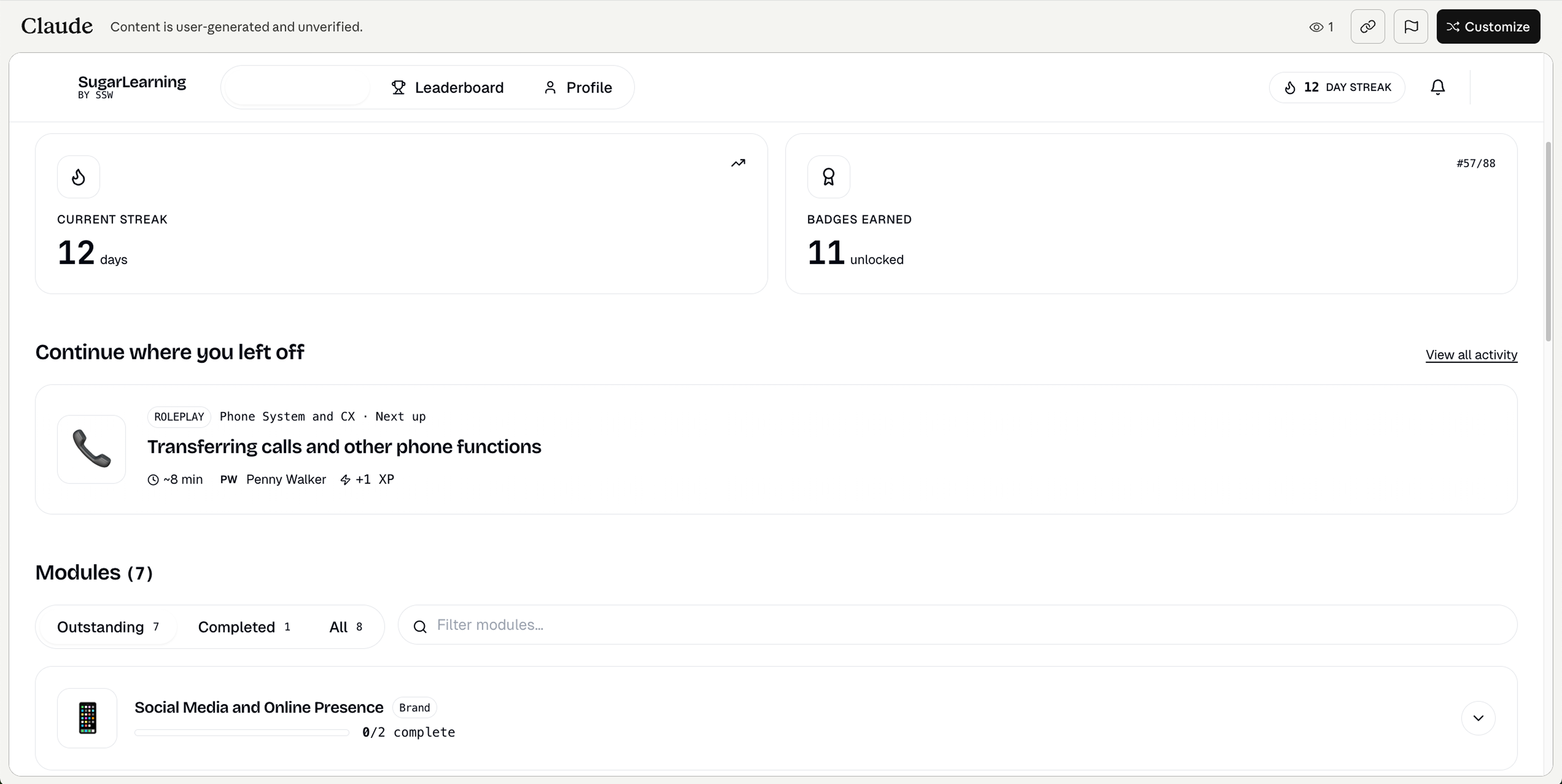
❌ Figure: Bad example - AI-generated UI without a design system - generic styling that doesn't match the product
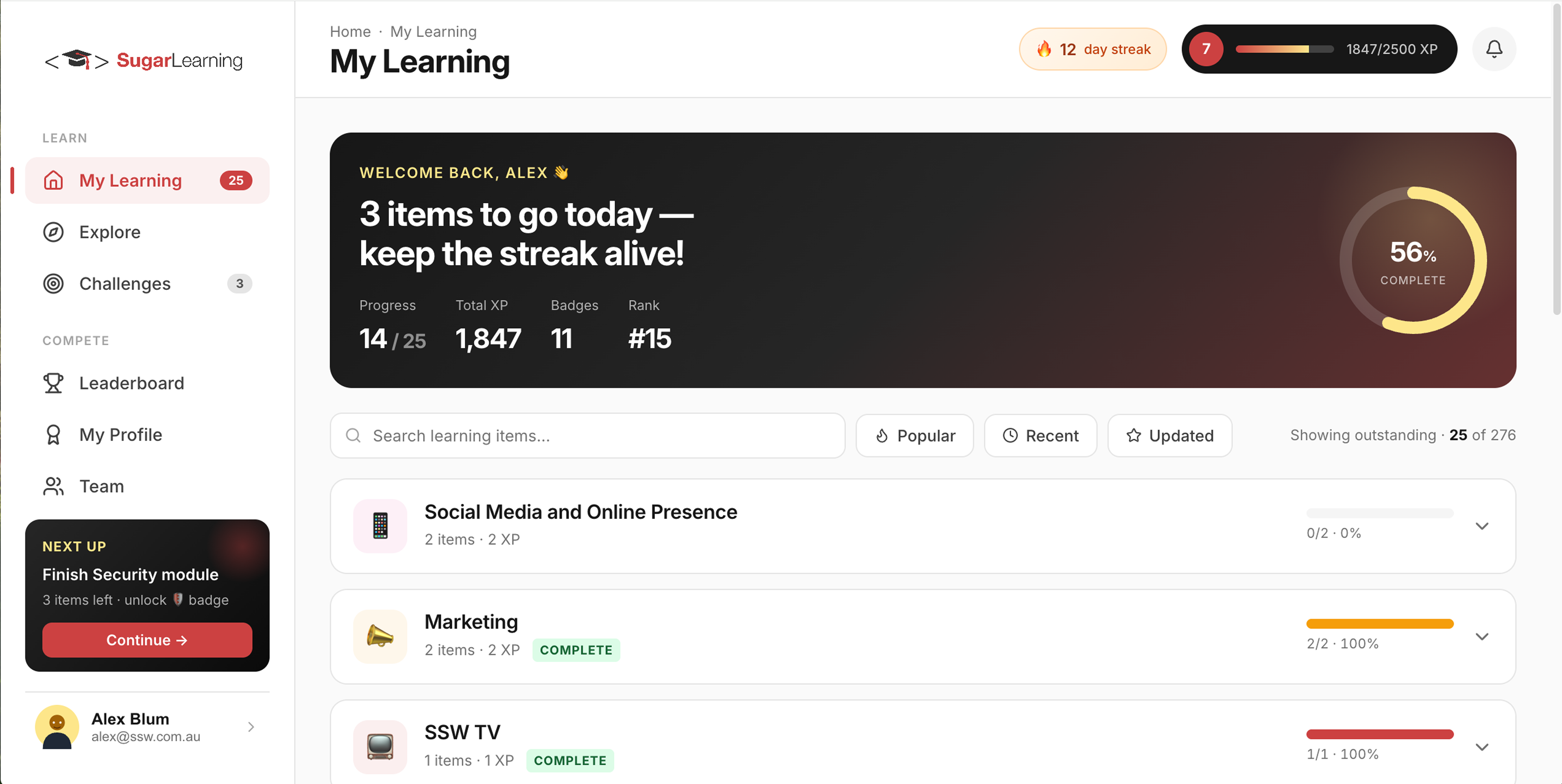
✅ Figure: Good example - AI-generated UI in Claude using a defined design system, keeping the design on-brand from the start
Tools that work alongside AI design
These tools aren't AI design tools themselves, but they play an important role in the workflow alongside tools like Claude Design.
- Storybook - A component development environment where your coded UI components live with documentation and visual examples. If your team has components in Storybook, point Claude Design at the repo that holds them as part of your design system setup, ensuring AI-generated designs match your existing component library
- Builder.io - Offers Figma-to-code conversion and AI-assisted design, useful for teams working within the Figma ecosystem who want a bridge to production code
- Figma MCP server - Figma's official MCP server that connects your AI coding agent directly to Figma, allowing it to read your design files, inspect components, and extract variables (design tokens) without manual copy-pasting
- AI coding agents (Claude Code, Codex, etc.) - When paired with a design tool, AI coding agents handle the implementation side. Claude Code in particular has a direct handoff from Claude Design, but any agent can implement UI from design specs if given the right context
Learn more
- Get started with Claude Design - Official setup guide
- Set up your design system in Claude Design - How to configure your brand and tokens
- Claude Code commands:
/designand/design-sync- How to run the built-in design skills