Do you create a Sprint Review/Retro email 📩?
Loading last updated info...
After any Sprint Review and Retrospective, an email 📩 should be sent to all the stakeholders to update them on the outcome from the Sprint.
Learn more on what happens at Sprint Review meetings and Sprint Retrospective meetings.
Firstly, create a new email copying the information from the previous Sprint Review/Retro.
To:
{{ PRODUCT OWNER }}
Cc:
{{ SPRINT REVIEW ATTENDEES }}, {{ PROJECT GROUP EMAIL }}, {{ SPRINT REVIEW REPORTING EMAIL }}
Subject:
{{ PRODUCT NAME }} - Sprint {{ X }} Review + Retro
Hi {{ PRODUCT OWNER }}
Here are the Sprint Goals and their status at a glance:
Sprint Goals (in priority order):
{{ ✅/❌ }} {{ DONE? }} - {{ GOAL }}
{{ ✅/❌ }} {{ DONE? }} - {{ GOAL }}
Please see below for a more detailed breakdown of the Sprint:
| Sprint in Review: | {{ SPRINT NUMBER }} |
| Summary Recording: | {{ YOUTUBE PLAYLIST URL }} |
| Sprint Duration: | {{ NUMBER OF WEEKS }} |
| Project: | {{ PROJECT NAME }} |
| Project Portal: | {{ LINK TO PROJECT PORTAL }} |
| Test Environment: | {{ LINK TO TEST ENVIRONMENT }} |
| Product Owner: | {{ PRODUCT OWNER NAME }} |
| Attendees: | {{ NAMES OF THE ATTENDEES }} |
| ✅ I have added the relevant stakeholders as per Do you know what happens at a Sprint Review meeting? |
Sprint Review
1. Timesheet data - Who worked in the Sprint?
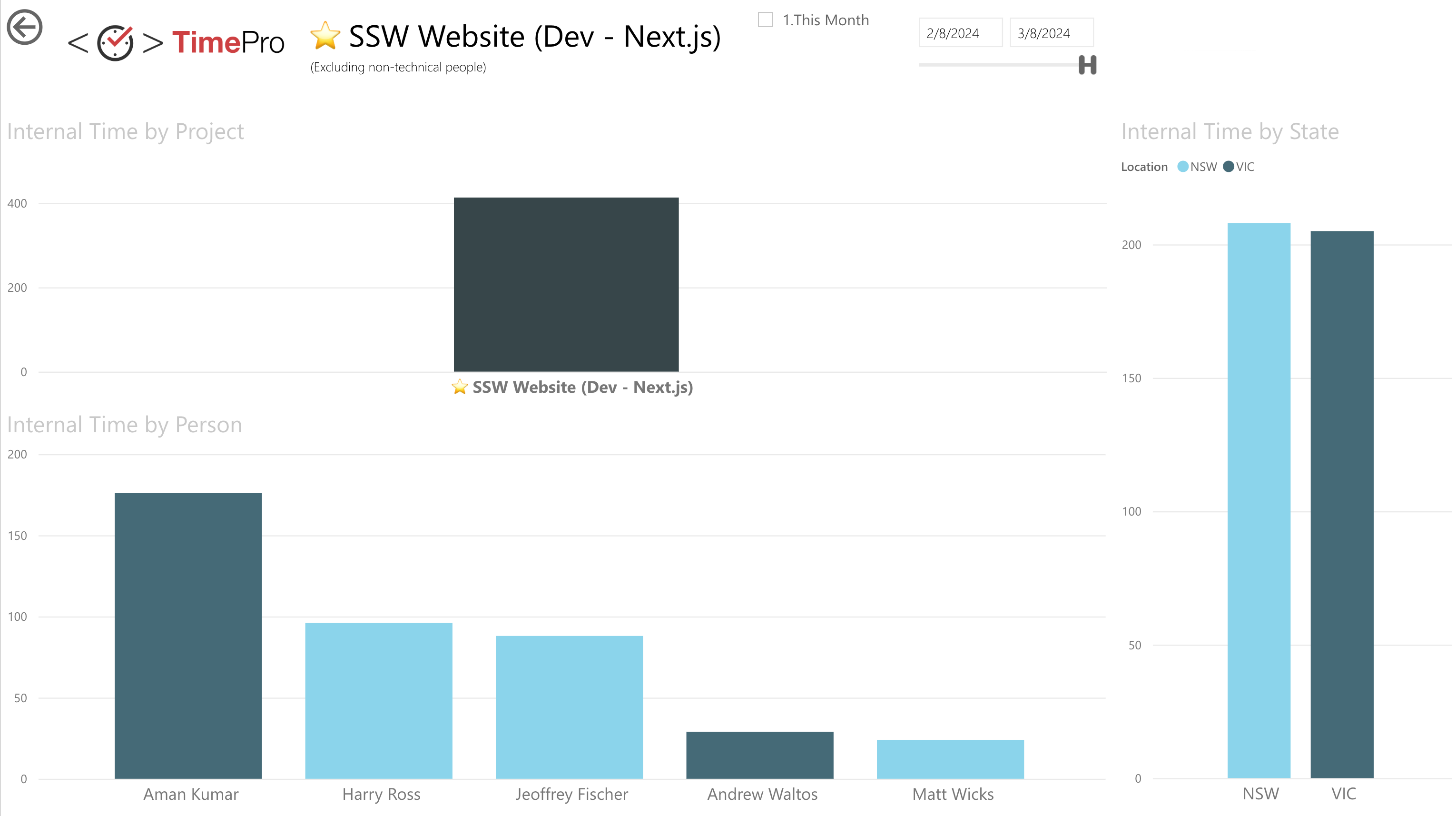
Figure: Timesheet data for the SSW Website
2. What got done?
| ID | Title | Assignee | State | Effort |
|---|---|---|---|---|
| 24124 | UI Improvements | Bob Northwind | ✅ Done | 4 |
| 24112 | Integrate Business Logic to MVC app | Bob Northwind | ✅ Done | 8 |
| 24097 | Styling | Bob Northwind | 🏗️ In Progress | 16 |
| 23120 | UX Improvements | Bob Northwind | 👀 In Review | 4 |
Figure: Sprint Backlog from {{ LINK TO SPRINT BACKLOG }} with the important items bolded
3. Sprint Burndown - A quick overview of the Sprint
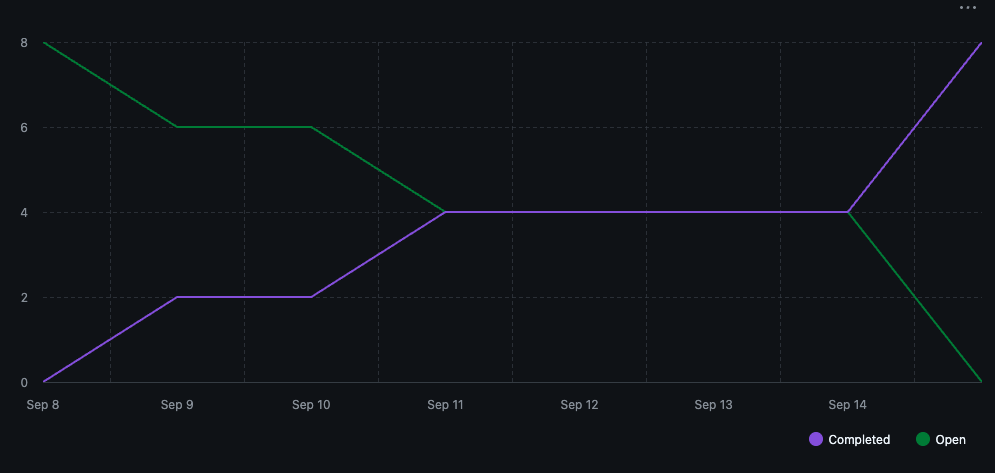
Figure: The Sprint Burndown chart
4. Code Coverage - Hopefully tests are increasing each Sprint
{{ CODE COVERAGE }}
5. Velocity (Optional)
{{ VELOCITY }}
6. Burnup - How are we tracking for the big picture?
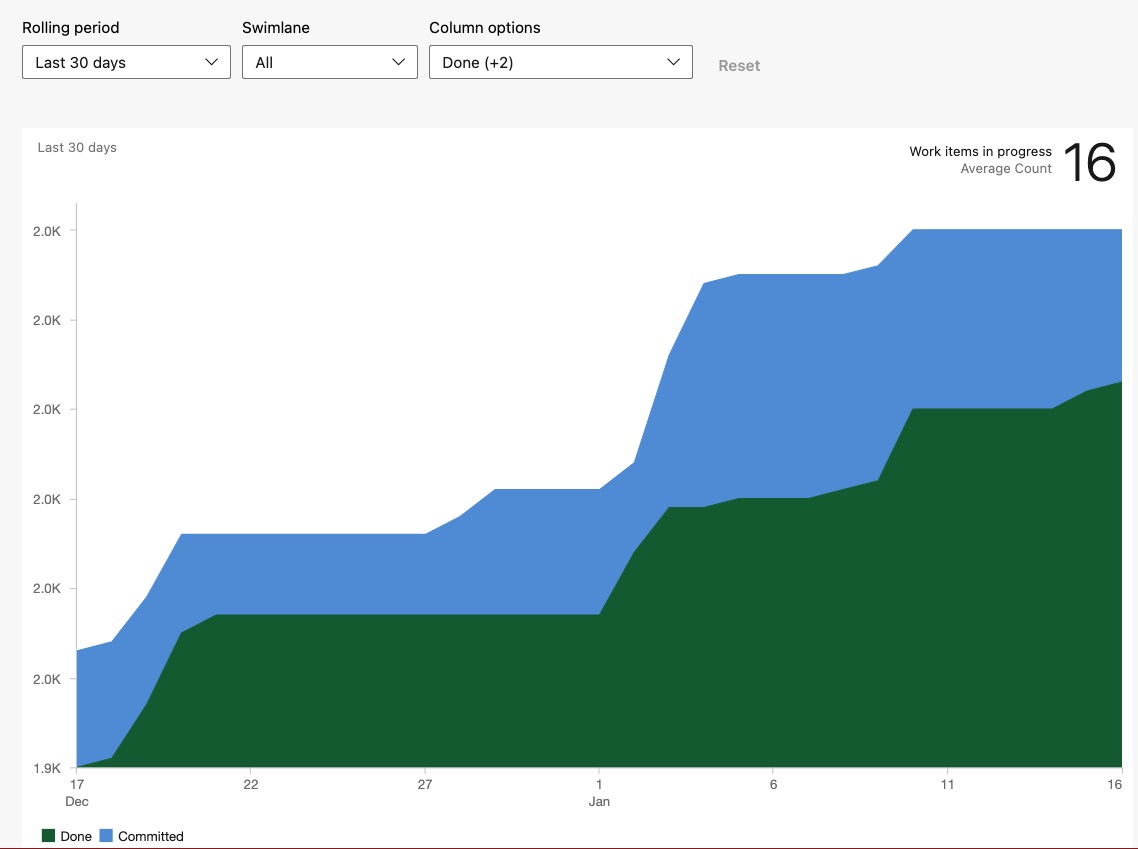
Figure: The Burnup chart
| Metrics – last 30 days | Count |
|---|---|
| New PBIs | {{ NEW PBIS }} |
| AI PBIS | {{ PBIS CREATED WITH AI }} ( {{ PERCENT OF NEW PBIS CREATED WITH AI }} %) |
| Completed PBIs | {{ PBIS COMPLETED }} |
| Net Change in PBIs | {{ +/- OVERALL PBI COUNT CHANGE }} |
Figure: Backlog stats from the stats generator (GitHub only)
Note: Yakshaver.ai has a feature on their roadmap that will do this automatically
7. Build Pipeline Health & Production Deployments - How many times did we deploy to Production?
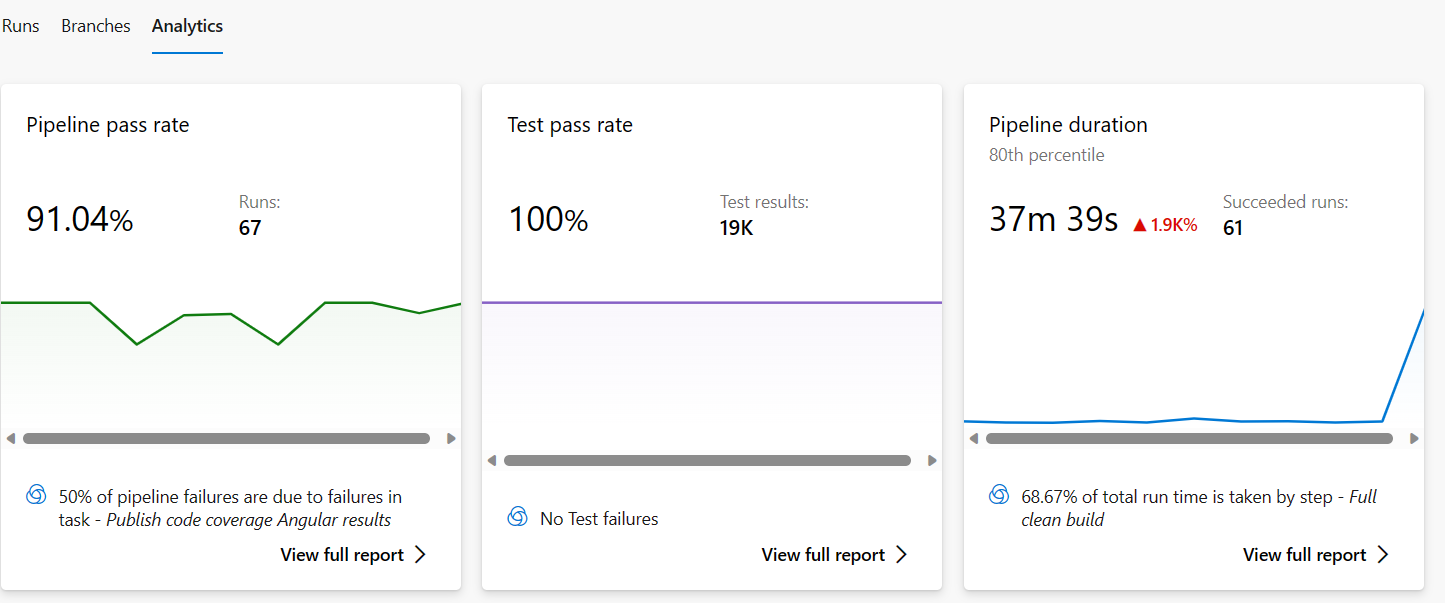
Figure: Health metrics
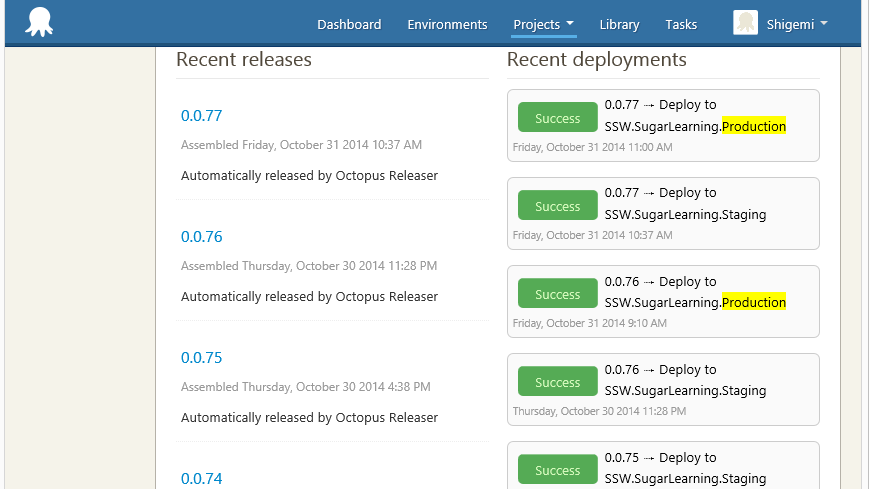
Figure: Deployment health
8. Application Health Overview Timeline - For the entire Sprint
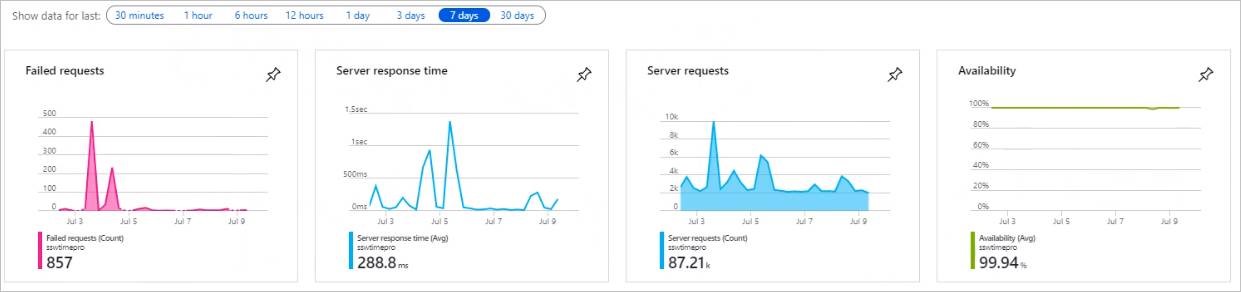
Figure: Application Health Overview Timelines
9. Product Roadmap
e.g. yakshaver.ai/roadmap
Progress:
Epic - UI/UX Improvements
- Currently {{ TOTAL # OF PBIS COMPLETED }}/{{ TOTAL # OF PBIS CREATED }} PBIs completed (there will be more)
- {{ # OF PBIS COMPLETED THIS SPRINT }} Completed this Sprint
- {{ # OF PBIS CREATED THIS SPRINT }} Newly created this Sprint
Add this for each current epic in your backlog
10. R&D - Did we do any experimental work?
{{ INSERT DETAILS of any trial/error processes, and ensure all detail is captured as per https://www.ssw.com.au/rules/do-you-record-your-failures }}
{{ INSERT DETAILS of any problems for which no solutions existed, and ensure detail is captured as per https://www.ssw.com.au/rules/do-you-record-your-research-under-the-pbi }}
e.g. We tried to use Angular and found that it doesn't work for our particular workflow, because AI results are inconsistent.
11. AI use - what tools did you use?
- {{ PERSON }} - {{ TOOLS }}
- Bob Northwind - Claude, Copilot CLI
12. Any Cool Tips?
Did anyone look at /insights? Any suggestions to share with the team?
AI Stats - Claude 🤖
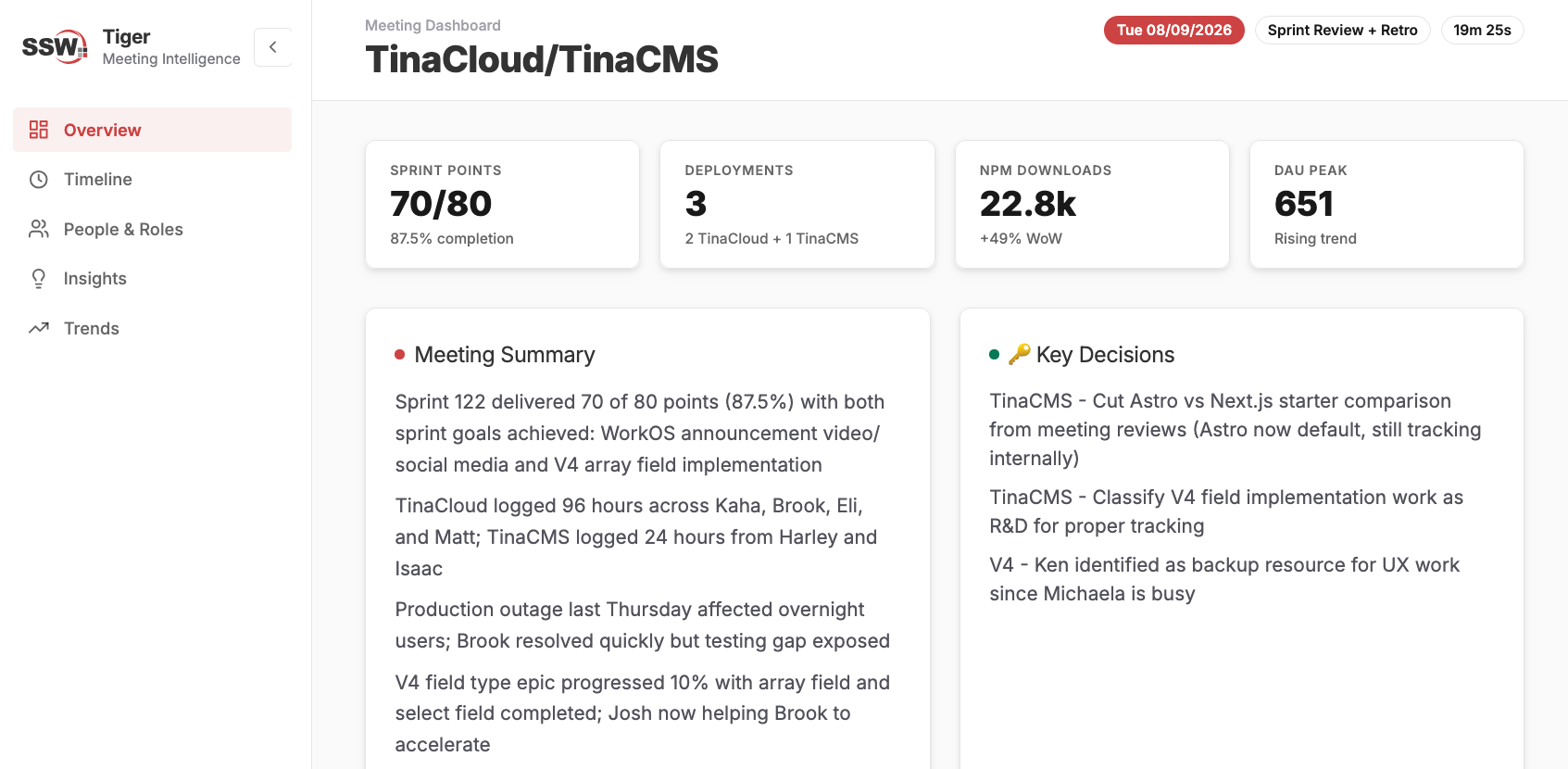
Figure: AI Powered Meeting Intelligence with SSW Tiger 🐅
AI Stats - Copilot 🤖
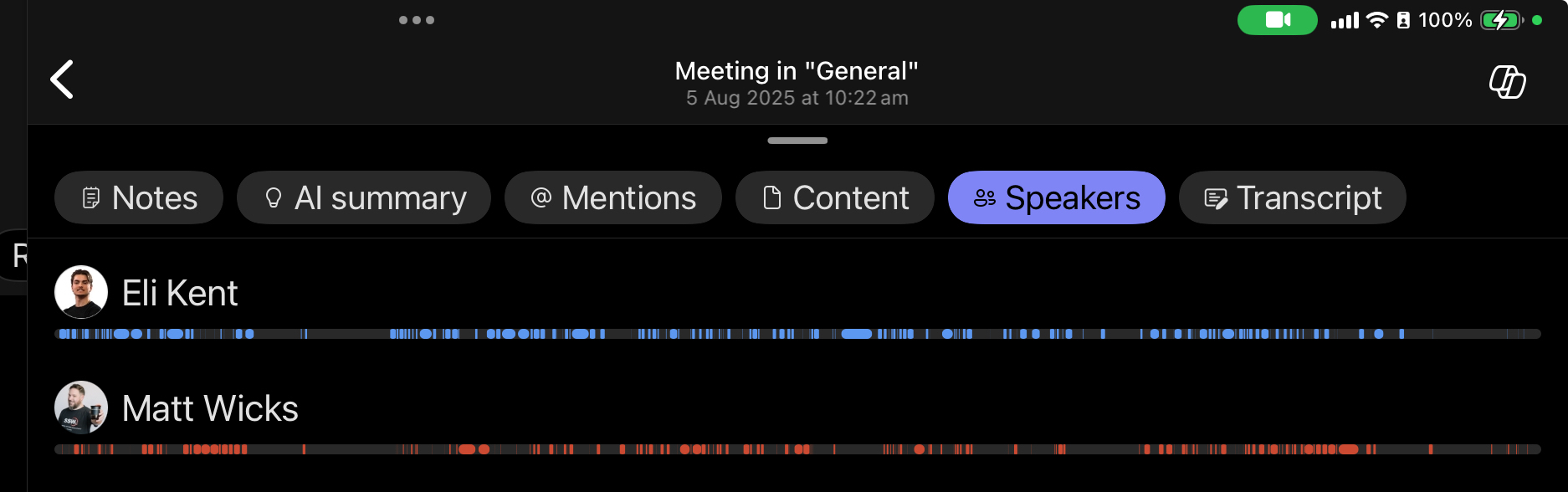
Figure: Copilot speaker breakdown of meeting 🤖
Note: People will show up as "Speaker X" if Captions and transcripts | Automatically identify me in live captions and live transcripts is not turned on.
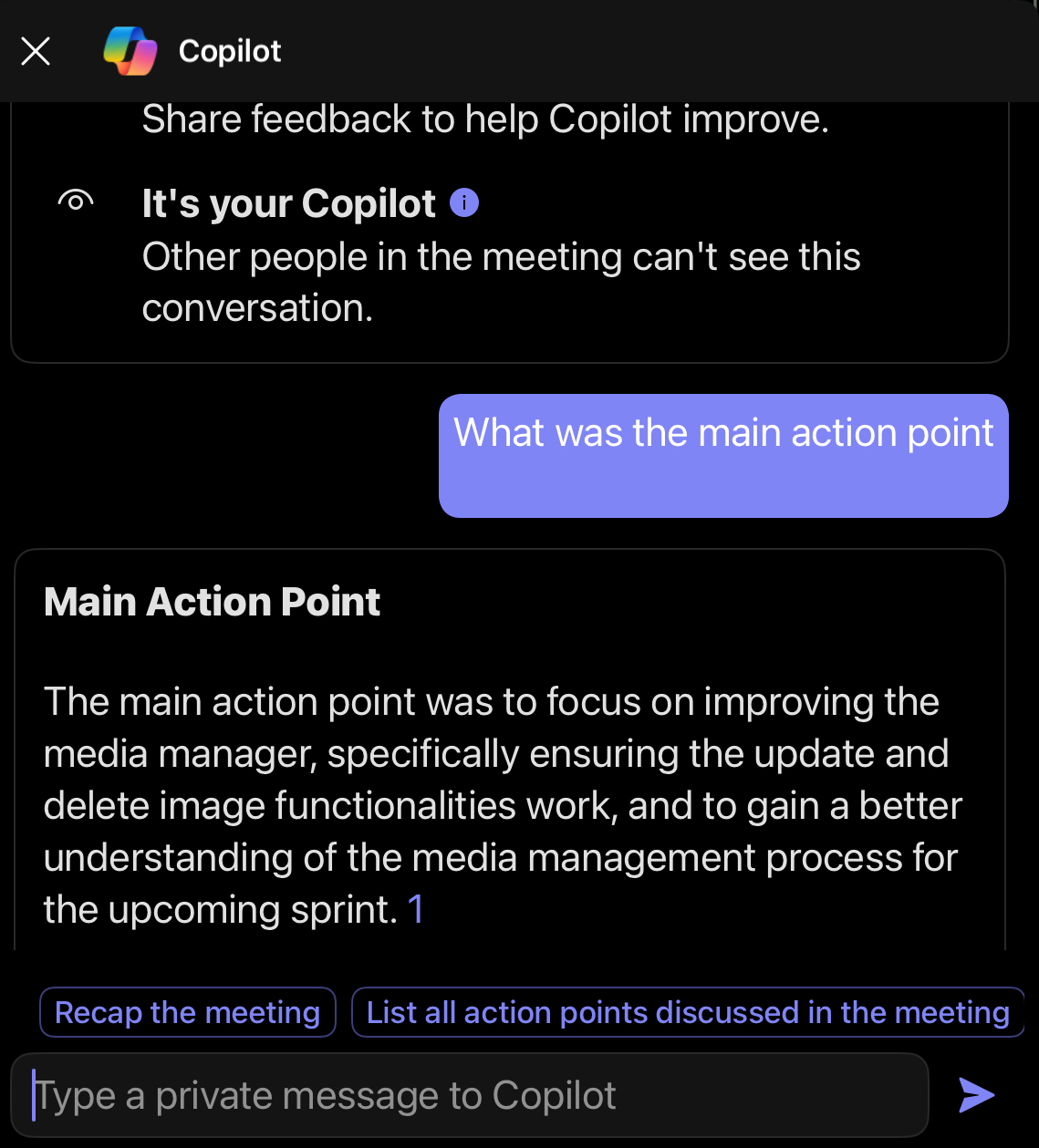
Figure: Copilot generated main item completed 🤖
Sprint Retrospective
As part of our commitment to inspect and adapt as a team we conduct a Sprint Retrospective at the end of every Sprint. Here are the results of our Sprint Retrospective:
✅ What went well?
{{ INSERT LIST OF WHAT WENT WELL from Retro }}
❌ What didn’t go so well?
{{ INSERT LIST OF WHAT DIDN'T GO WELL from Retro }}
💡 What improvements will be made for the next Sprint?
{{ INSERT LIST OF IMPROVEMENTS to be made for the next Sprint }}
⚠️ Do any 'For the Record' emails need to be sent? (Optional)
As per https://www.ssw.com.au/rules/for-the-record/
{{ INSERT LIST OF 'FOR THE RECORD' EMAILS TO BE SENT }}
Definition of Ready (Optional)
{{ INSERT DEFINITION OF READY (Normally saying that the PBIs are sized with Acceptance Criteria added) }}
Definition of Done (Optional)
{{ INSERT DEFINITION OF DONE (Normally saying that it compiles, meets the acceptance criteria, and a test please has been sent if relevant) }}
< This is as per the rule https://www.ssw.com.au/rules/sprint-review-retro-email >
✅ Figure: Good example - Template for Sprint Review/Retro email 📩
Note: It's important that an Email Group is setup for the project, and the Sprint Review is sent to that group, so that anyone who joins the project in future can access these reports from shared inbox as per Do you choose which Microsoft 365 Groups you follow?
Tip: Move all Dones to the top of your Sprint backlog to make it easier to digest the progress for the Product Owner.
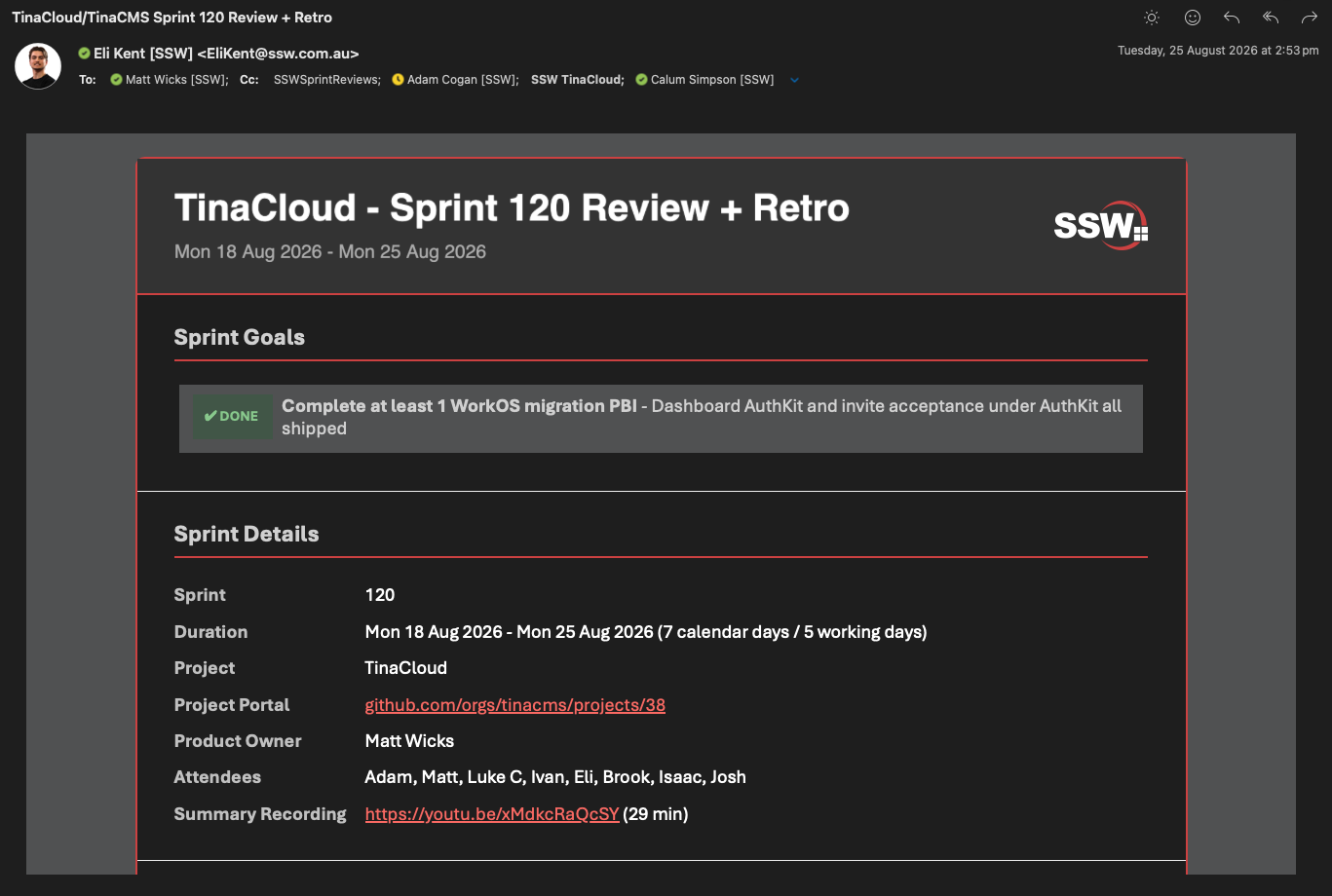
✅ Figure: Good example - TinaCloud team Sprint Review email using SSW Halfback
Recording a Review and Retrospective Meetings Summary
Creating a comprehensive summary and recording of your Sprint Meeting is a great way to communicate changes in a product to the community and stakeholders — especially for those unable to attend.
Tip: The summary should be focused on the Dones and any special highlights. In the email template, bold the most important points so they stand out. These highlighted items should be called out in the summary.
See Do you record a summary of Sprint Meetings? for details.
Video: ✅ Good Example: Nick C in TinaCMS - Sprint 55 Review + Retro and Sprint 56 Forecast (9 min)
Video: ✅ Good Example: Josh B in Tina.io - Sprint Review 48 & Forecast 49 (13 min)