Do you know what happens at a Sprint Review meeting?
Loading last updated info...
The Sprint Review is one of the 3 main Scrum meetings.
This is the meeting where the Product Owner accepts or rejects the Product Backlog Items (PBIs) done in the Sprint. It is a second-to-last meeting in the Scrum cycle and is directly followed by the Retrospective.
The Team, having prepared for the meeting, presents the PBIs to the Product Owner.
One person, often the Scrum Master, presents a summary to the Product Owner of the PBIs committed at the Sprint Planning meeting and the done PBIs being presented for acceptance. The Team seeks to have more PBIs accepted than originally committed. It is important that the Product Owner knows at the beginning whether The Team believes that they have over or underachieved the Sprint Goal.
The Sprint Review can be aided by a great many things, like recording it or using AI tools 🤖 to extract additional value.
Overview
You may notice that the recommendation below does not exactly follow the Scrum Guide. The Scrum ceremonies, as written, do not account for the realities of the workplace. People can be missing, zoning out or have many other reasons not to be fully present. The final artifact of this process is a digestible and transparent email that can be easily shared with any interested parties.
There are a few main steps to the process. Some of them are optional, but they add significant value if you decide to commit. While some of the points below mention hosting a separate meeting, it can all be done in one to keep the context readily available.
- The Team prepares all of the PBIs for review according to the Definition of Done
- Draft the Sprint Review + Retrospective email 📩
- Draft the Sprint Planning email 📩
- Host the Sprint Review meeting with the Team and the Product Owner (Should be around 1 hour, but for some teams it might take longer)
- Record the meeting to capture the discussion and gather AI-generated insights
- Stop recording
- Ask Claude or Copilot to analyse the recording (Optional, but recommended)
- While waiting, host a Retrospective and include the result in the email 📩 above
- Include the AI-generated insights into the email 📩 above (Optional, but recommended)
- Host a Sprint Planning meeting
- Call relevant Stakeholders in. Host and record a Sprint Summary meeting with the Team and Product Owner (aim to spend 15 minutes or less)
- Post the Sprint Summary recording on an internal or public video hosting service
- Send out the email 📩 with the results of the Sprint Review to the Stakeholders
- Send out the Sprint Planning email 📩
If it makes sense to share the video with the general public - upload it to the YouTube channel of your project/organisation. e.g. We have a playlist of our Sprint Summaries for our Open Source TinaCMS.
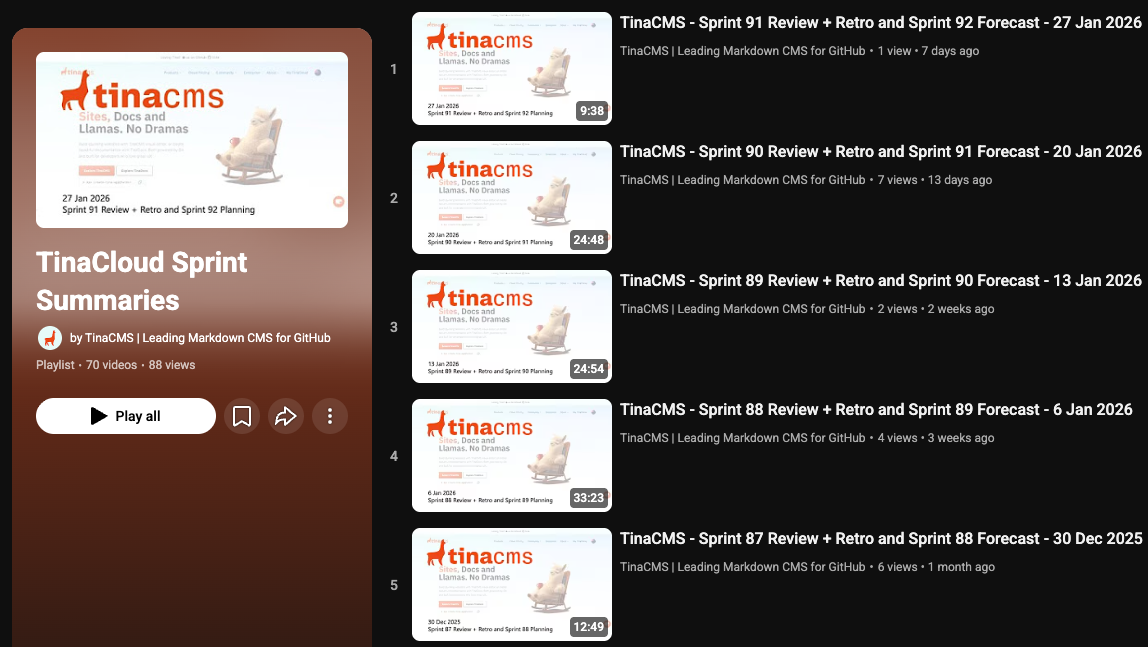
✅ Figure: Good example - YouTube playlist of our Open Source TinaCMS Sprint Summaries
Alternatively, you can post your video to an internal site. e.g. By posting to SharePoint or Microsoft Stream
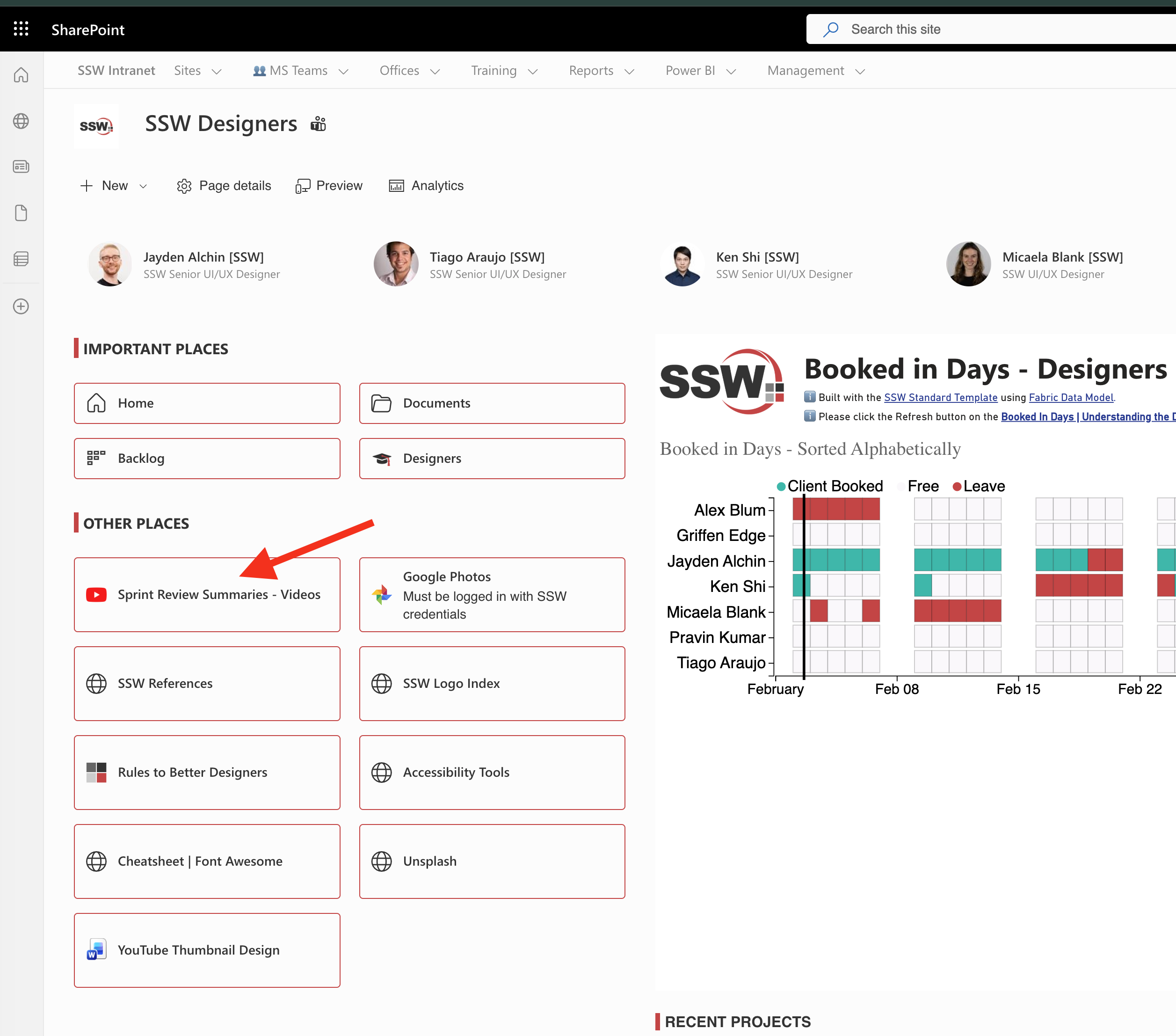
✅ Figure: Good example - Internal Sprint Summaries stored on SharePoint
Main meeting flow
Now, let's jump into the specifics of the Sprint Review meeting.
Starting the meeting
When the Team is ready, they start the recording. This is useful for process improvement and allows external tools to analyse the meeting and extract additional value and insights.
Presenting the PBIs for review
Each done PBI is presented by the Team for acceptance. They aim to get the PBI accepted as quickly as possible (aka tick and flick) while being totally transparent, which includes declaring whether there are any known outstanding bugs (which should already be on the Product Backlog) and adherence to the Team's Definition of Done.
To keep stakeholders informed beyond the Sprint Review, you should record a Monthly Stakeholder Video to share key progress, blockers, and upcoming priorities.
Video: Explaining a PBI to a Product Owner with Jake Bayliss (5 min)
PBI Accepted
When a PBI is accepted with no comments - great. That is how you want it to be.
If there is follow-up work, it needs its own PBI on the Product Backlog. Ideally, by that point in the meeting, those PBIs should have already been created. And the Team is just letting the Product Owner know so that they can prioritise it.
Similarly, if a bug is found during the review, it is a great time to create a PBI for it.
Timeboxing
The Scrum Master keeps the meeting on track and to the Timebox by disallowing discussions not relevant to the acceptance or rejection of the PBI; this is often done by making a note to bring the subject up again in the Retrospective Meeting.
This meeting is normally timeboxed to as many hours as there are weeks in the Sprint. e.g. A meeting for a 1 week sprint would be approximately 1 hour long.
Email Preparation 📩
During the meeting, an email is drafted to be sent with the results of the Sprint and insights collected during the review and Retrospective. You can find out more about the suggested content of the email in the Sprint Review + Retrospective email rule 📩.
Copilot can take a while (approximately 15 minutes) to finish the processing of the Review content. That time is well spent on a Retrospective or a Backlog Refinement session to avoid idle waiting.
Retrospective
Now that the Sprint Review email 📩 is drafted and filled in with the results of the Sprint Review. Host a Retrospective to check what went well and what did not.
What happens at Retrospective meetings?
Sprint Summary 📩
When the Review and Retrospective are done, it is a good idea to host a brief summary meeting.
The purpose of the meeting is to quickly summarise everything discussed in the review and share the most important points.
This provides an opportunity for those who could not make the entire meeting or missed important context to get up to speed. It is also a great connection point for the wider range of stakeholders.
What happens at Sprint Summary meetings?
Sprint Planning
Having finished the Sprint Review, Retrospective and Summary, you are now ready to plan out the next Sprint.
What happens at Sprint Planning meetings?
Additional stakeholders
If there are additional stakeholders, make sure they get called in for the summary so they stay in the loop and up to speed on the current increment.
- Note: Stakeholders often have a lot on their plate. Make their life easier by renaming the group chat so it's clear which project's review is about to start (e.g. "{{ TEAM NAME }} Sprint Review Stakeholders")
When you ping stakeholders, include a message like this:
Hey {{ PROJECT NAME }} Stakeholders:
I'm recording the Sprint Review and Sprint Planning so I can get the Copilot stats. I'll stop the recording to do the Retro to give the recording time to save.
I'll call you and the stakeholders in {{ XX }} mins, {{ PRESENTER NAME }} will run the Sprint Summary.
The stakeholders are:
{{ STAKEHOLDER NAME }},
{{ STAKEHOLDER NAME }},
{{ STAKEHOLDER NAME }}
Let me know if you want anyone else added.
{{ SCREENSHOT OF CURRENT ATTENDEE }}
Tip: (Optional) Ask stakeholders for Copilot AI images 🤖 before the Sprint Summary meeting to include in the Sprint Summary email 📩.
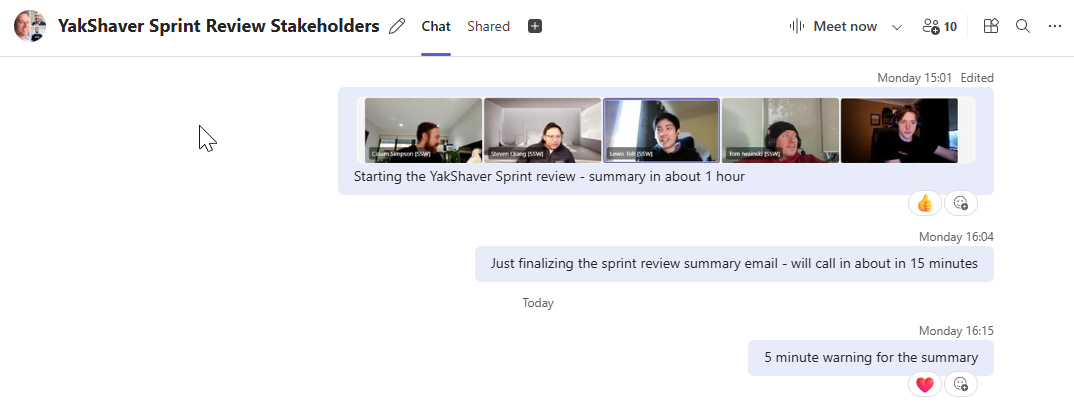
✅ Figure: Good example - Ping the stakeholders with a photo of the meeting starting, then again just before the summary
What if you can't attend the Sprint Review
If you can't attend your team's Sprint Review (e.g. you're on leave, working part-time, or in a different timezone), you should give the team a summary of where you're at, so they can inform the stakeholders on your behalf.
- Send a brief "Sprint Review" email 📩 to the team to provide them with an update on the status of your tasks. This will enable the team to pass on the information to the client.
To:
{{ YOUR SCRUM MASTER }}
Cc:
{{ YOUR TEAM }}
Subject:
{{ YOUR NAME }} - Sprint Review {{ SPRINT REVIEW NUMBER }} Summary
Hi Team
I won't be able to make the Sprint Review because {{ REASON }}. Here's an update on my PBIs:
- PBI {{ PBI NUMBER }} - Done - Done Video in the PBI ready to show the client.
- PBI {{ PBI NUMBER }} - Blocked - Waiting on {{ BLOCKER }}. Details in the PBI. ...
Learn more about the meetings in Scrum:
- Sprint Review Meeting (this rule)
Tip: It can be helpful to finish the Sprint Planning meeting with the first Daily Scrum of that Sprint.
Not doing Scrum?
Even if your client does not want to do Scrum (they might have had a bad experience in the past) you should still do this step, just under a different name. E.g. "Hey Bob, let’s schedule a catch up on Friday. Then I'll show you what I have done this week".