This product is no longer supported.
SQL Server replication is a fantastic piece of
functionality but can lead to a database administration
nightmare. Data conflicts are a common occurrence and
require constant attention. SSW SQL Total Compare
reports the differences between the Publisher and
Subscribers databases and makes the changes necessary to
fully synchronize the data.
Note: This product was developed in VB6 - new
development is on hold.
The source code is available for purchase for $1500US
|
SSW SQL Total Compare is a valuable tool for SQL
Server replication. The amount of conflicts I
had before using SSW Total Compare was huge!! It
made the previously difficult task of achieving
full synchronization as easy as clicking the
'ok' button. Highly recommend this product to
all.
Guy Saunders, Database Administrator, Fast Cue
|
Key Features & Benefits
SSW SQL Total Compare is designed for SQL Server
databases using SQL Server Replication. Total Compare
helps DBA's to resolve conflicts between the two
databases allowing synchronization without conflicts.
Total Compare also compares data between two
non-replicated databases.
- Compare data in 2 SQL Server databases
- Easily identify conflicting data
-
Eliminate conflicts not resolved by SQL Server
Synchronize
-
Add missing records to either the publisher or its
subscriber
- Delete of records
- Update out of sync records
-
Synchronize and Conflict Viewer installed with SQL
Total Compare
-
Use the Synchronize tool to synchronize the changes
you make.
-
Use the Conflict Viewer tool to view any conflicts
(if any arise).
If you have Microsoft SQL Server installed on your
target machine, then you can synchronize the changes
from Enterprise Manager.
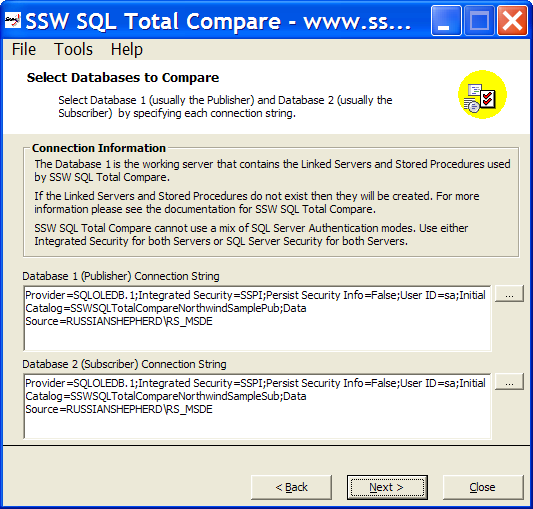
Figure: SSW SQL Total Compare helps DBA's to resolve
conflicts between two databases allowing
synchronization without conflicts
More screen shots in the User Guide
User Guide
Welcome to the
User Guide
. This help facility is designed to quickly get you up
and running using our software.
Demonstration Options
-
If you are in Sydney,
call
today for a free no-obligation demonstration at your
office!
-
If you are not in Sydney, please take advantage of
our SSW Phone Walkthrough. The SSW Phone Walkthrough
is a service where we will call you, anywhere in the
world and once you have installed our product we
will guide you over the important features of the
software. Saves you time, playing around with the
software trying to work out all the useful features,
please
email us
today.
Awards and Ratings
Our SSW Products are also listed on Shareware web sites.
Some of these sites review and/or rate our products.
Here's how our products rated on other third party
sites.
How it works
Four scripts have been included in the installation
directory with SSW SQL Total Compare. These scripts are
used to create four stored procedures that are used by
this tool. These stored procedures are created on the
first or publisher database when the tool is first run
on the publisher database.
The four stored procedures are:
-
ProcSSWSQLTotalCompareMergeReplicColumnsWithoutText
-
ProcSSWSQLTotalCompareMergeReplicDifferencesSelect
- ProcSSWSQLTotalCompareMergeReplicMissingSelect
-
ProcSSWSQLTotalCompareMergeReplicSyncCreateTable
Two linked servers are also created on the first or
publisher database when the tool is first run on the
publisher database. One linked server is created for the
first or publisher server called
SSWSQLTotalCompare_SERVERNAME. A second linked server is
created for the second or subscriber server called
SSWSQLTotalCompare_SERVERNAME.
SSW SQL Total Compare works by utilizing the four stored
procedures that are executed to check for missing
records and/or differences in the records. It also
creates and updates an essential table called
zs_TableSummary.
System Requirements
-
MDAC 2.6

-
SQL Server 7.0/SQL Server 2000
-
SQL Server does not need to be installed on the target
machine, it only needs to be on a machine on your
Local Area Network (LAN)
-
Every SQL Server table has a column of the type unique
identifier (guid)
-
ntext and picture data types and databases that have a
different collation order cannot be compared
What does the unregistered version give me?
In respect to the unregistered version we know you want
to see it working before you buy it. We aim for that.
Note: we also give free version targeted to the little
guys
More details see
http://www.ssw.com.au/ssw/KB/KB.aspx?KBID=Q658302
SSW provides free phone and email support to answer
queries on registered products.
Getting Support
If you can't find what you are looking for in the
product documentation then check our
knowledge base
for further information and tips about this product.
Please send us
bug reports
and
feedback
so that we can evolve our software into a product that
matches your requirements. We guarantee a response.
For
SQL Server consulting
or development, feel free to contact us.
Links
How to apply schema changes on publication databases
using Enterprise Manager
I'm Sold... What's next?
Microsoft and the Office logo are trademarks or registered
trademarks of Microsoft Corporation in the United States
and/or other countries.