This product is no longer supported.
Delivering reports on the web can be expensive and
time consuming, especially when you're faced with the
task of converting existing Access reports. SSW Access
Reporter was designed for the .NET developer moving
from legacy Access Applications to ASP or ASP.NET. If
you are a Access developer and want help to bridge the
.NET migration gap, this utility allows you to deliver
your existing, great-looking Microsoft Access reports
online now!
Question:
Is IIS required?
Answer:
No, just a box with the .NET Framework is all that is
needed.
Question:
Is this an alternative to Crystal Reports?
Answer:
Yes, the majority of our customers tell us that the
Crystal pricing/licensing model makes it prohibitive.
Check out the
Online Demo
Key Features & Benefits
-
Deliver existing reports online with minimal
re-coding.
-
The functionality of Access Reporter is not just for
the web, Access reports can be created from any
application that can call a DLL.
-
Auto run on load: Once your computer has loaded, the
report server is running and ready to dish out
reports. You don't need to log into the computer in
order for this application to run.
- Traps VB errors on report execution.
-
Looks for and resolves common Access startup
prompts.
-
Report Count: Every time a report is generated, the
report count will go up in the databases list.
-
Silent Errors: This application is designed to run
unmonitored; having modal error messages pop up onto
the screen would be a hassle. If the Access Reporter
is unable to process a report request it will write
the error message to the event log where it can be
easily viewed and maintained.
-
Multiple Report Formats: Access Reporter is capable
of serving reports in a variety of formats. These
are: Excel, RTF, Plain Text, HTML, PDF and Snapshot
formats.
-
Multiple Reports: You can setup multiple databases
to monitor and keep open. All of this is easily
maintained though the ReportManager.
-
Remote Execution: The Access Reporter need only to
be active, and because it listens though TCP/IP you
are able run the server on any available machine on
your network, reducing the work load on your web
server.
-
With the GhostScript option users can get PDF
without having to pay for Adobe Distiller.
-
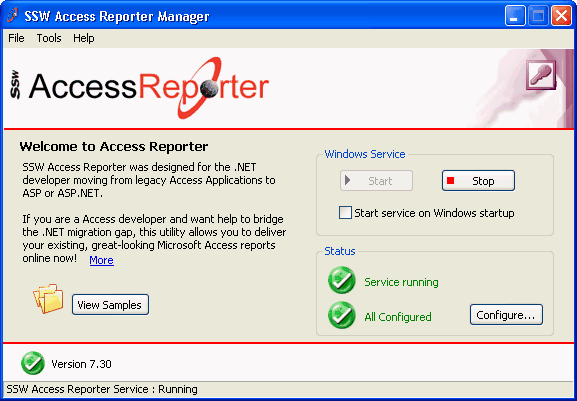
-
Figure: Configure SSW Access Reporter through one
simple interface
Mike Gunderloy says that SSW Access Reporter is
"Definitely Useful."
Mike Gunderloy -
Smart Access eXtra
The money you spend for this Report Server could be
one of the best purchases you make this year."
Danny J. Lesandrini -
Smart Access eXtra
How it works
I've developed many reports in Access and I believe
this program is very useful. I was very impressed with
the performance of it."
Alan Johns - HBP
The SSW Access Reporter utility is comprised of two
primary components: the Report Server and the Report
Client.
The Report Server can run on any machine and receives
requests from the Report Client. As the Report Server
does not need to run on the web server, the web server
can delegate report processing to another machine and
save resources.
The Report Client is a .NET DLL that the Web
Programmer uses in the Active Server Pages to request
reports. The Client and the Server communicate via
.NET Remoting which is essentially talking via TCP/IP.
The Report Server provides the user with Several
reporting formats, including Rich Text Format (RTF),
Text only, Microsoft Excel format (XLS), HTML,
Microsoft Access Snapshot format (SNP), and Adobe
Acrobat format (PDF). The snapshot format requires a
free plugin for viewing the reports unless Microsoft
Office 2000 or XP is already installed on the clients
PC.
How did this product eventuate?
The staff at Toyota Australia had a problem: they
wanted their Access reports to be viewable over the
web, and did not want to pay costly licensing fees
to have a copy of Access on every machine. SSW
developed Access Reporter to automate the process of
turning Access reports into web-based reports, thus
solving Toyota's problem.
You can create many databases Jobs, these jobs only
require three settings:
-
Is this Job enabled?- You may not want to monitor
all the setup databases.
-
Where is the Access Database to monitor? - This can
also be an adp (which uses SQL as its data source)
-
Where do you want the reports once generated? - This
may be an IIS server on another machine.
The client machines do not need any 3rd party DLL's to
view the reports from the website. (Except Acrobat
reader if you want to report PDF files and a free
Microsoft snapshot viewer OR Microsoft Access if you
want snapshot files).
The server only requires the Access Reporter Service
and any Microsoft Access version.
The three SSW component files that need to be placed
in the BIN directory of your ASP .NET application are:
- SSW.AccessReporter.Common.dll
- SSW.AccessReporter.ReportClient.dll
- SSW.AccessReporter.ReportObjects.dll
Only the ReportClient.dll component needs to be
referenced by your web app, but both must be present.
System Requirements
We are using Access Reporter and it is working
wonderfully. I've received much positive feedback
already. Everyone likes the ability to run reports
from their web browser."
Matthew Mitchell - Alpena General Hospital
- .NET Framework 2.0
- Microsoft Access (either 2000, XP or 2003)
-
Microsoft Windows (Windows 2000, Windows XP or
Windows 2003 Server)
Note: With Windows 2000 you may need to restart.
What does the unregistered version give me?
Unregistered versions of SSW Access Reporter provide
limited functionality for period of 1 year. SSW
provides free phone and email support to answer
queries on registered products.