Keep your code *healthy* with SSW Code Auditor - the
best .NET refactoring tool!
-
Keep your code consistent across all projects.
- Add your own rules.
-
Friendly licensing model
...Pay nothing for Full Version!
Are you looking to eradicate bugs and ensure
consistency? SSW Code Auditor is a tool that allows
developers to take control of your code, ensuring large,
complex source code can be simplified, cleaned and
maintained. The built-in rules focus on the most popular
.NET languages (C#, VB.NET) for both Windows Forms and
ASP.NET; however, the flexibility of SSW Code Auditor
allows the developer to add their own rules to target
any language in any text file.
As a project or company grows, managing code standards
throughout your team becomes virtually impossible.
Consistent code is crucial to future development and
maintenance. SSW Code Auditor lets you take control of
your code and automatically review your web apps and
projects - giving you more opportunity to spend time
where it really matters.
Here at SSW, we face the problem of maintaining our
standards across nearly five thousand web pages, over
twenty active projects in both Visual Basic (6 and .NET)
and C#. There comes a point where a tool to check our
work is needed, this tool is SSW Code Auditor.
SSW Code Auditor utilises the power of Regular
Expressions to audit your code. This powerful feature
permits the user to write their own set of rules and
have different rules for different projects.
Key Features & Benefits
SSW Code Auditor allows to you:
- Verify that coding standards are maintained
- Prevent bad coding practices
- Seamlessly integrates with VS.NET
|
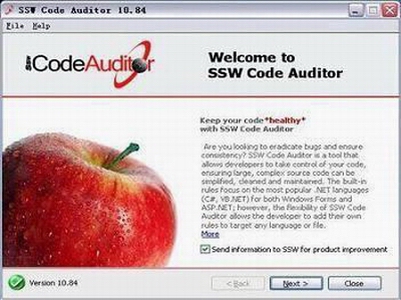
Great, user-friendly wizard style interface
With our
standards compliant
user interface, you are sure to have a
consistently great operating environment with SSW
products.
|
|
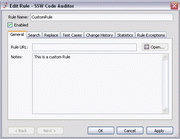
Make your own rules!
With our powerful regular expression enabled
parsing engine, you have the flexibility to scan
any text file for any kinds of rules. Rules can
check specific filetypes and have exceptions based
on other regular expression matches.
|
|
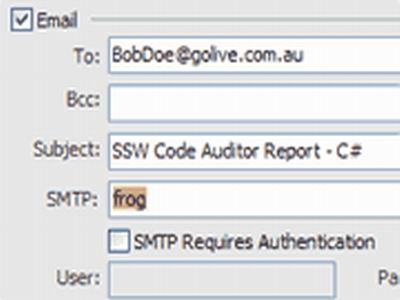
Stay on top of things...
Code Auditor has in-built scheduling and email
notification functionality so you can have regular
reminders of what needs attention in your
projects!
|
|
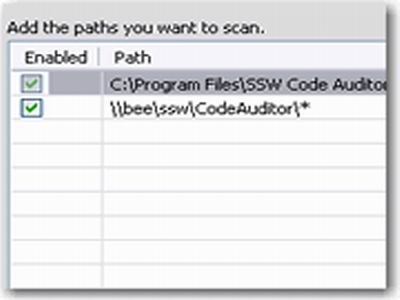
Spanning the big picture
Scan any number of directory trees with extensible
path selection. As many development projects can
be covered by your rules as you wish.
|
|
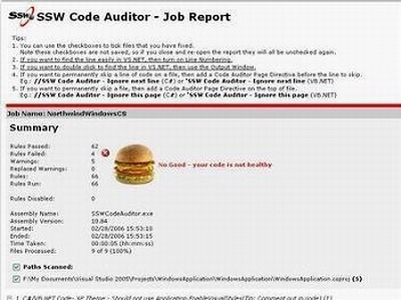
Report Output
See a sample good report from the Code Auditor
process.
See a sample bad report from the Code Auditor
process.
|
|
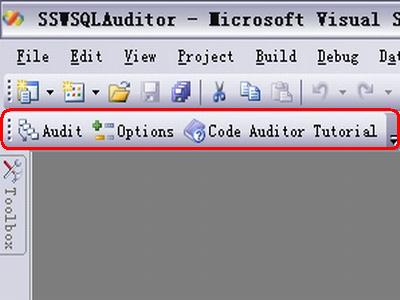
Visual Studio Add-in
Audit your project directly from Visual Studio
with just a click.
**Also works in Visual Studio 2005 **
See the
tutorial
.
|
|
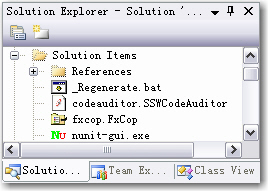
Visual Studio Add-in
Automatically add SSW Code Auditor, NUnit and
Microsoft FxCop project files to your solution so
that you can easily access the tools to make your
code healthier.
We have a rule
Do you Add SSW Code Auditor and Microsoft FxCop
project files to your Solution
|
|
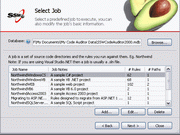
Built-in sample projects & sample database
We offer a sample database and kinds of sample
projects to help you run a professional demo scan.
|
More Technical Features include the ability to:
- Check any text file
- Check file names
-
Scan project directories for code that violates your
rules
- Perform deep traversal of directories
-
Scan websites for HTML that violates your rules -
including the information served by the web server!
-
Validate HTML code by using the Tidy HTML engine
-
Use the report that is written to an .mdb, or to
export to XML
- Organize separate projects into jobs
-
Allow exceptions to rules, thus ignoring files that
you are aware of
-
Full scheduling abilities with email alerts, providing
regular automated checks on your code base.
- Use Regular Expression to define more rules
- Regular Expression builder included
See more screenshots in the
Code Auditor User guide
.
Upcoming Features
- XML based settings
- Web service rules sharing
Predefined Rules - these are examples of what rules you
can define
|
What about FxCop?
SSW Code Auditor is similar to
Microsoft FxCop
. FxCop has a good set of rules however there
are some issues:
-
FxCop works against compiled assemblies and
uses MSIL to get information about the code.
SSW Code Auditor on the other hand looks at
the source code itself.
-
FxCop only works against .NET assemblies. SSW
Code Auditor on the other hand works against
any plain text files.
-
Overall
FxCop rules
are good - however many are obscure (Eg: we do
not worry about the
Mobility rules
and
Portability rules
). SSW Code Auditor on the other hand has
rules that are more 'general developer'
oriented.
-
In addition SSW Code Auditor provides many
rules to improve your User Interface.
-
For most users
FxCop rules are fixed
(unless you want to build a .NET Assembly).
SSW Code Auditor rules can easily be extended
using regular expressions.
-
Out of the box FxCop only provides one type of
report in xml
. SSW Code Auditor on the other hand provides
a
report that is flexible and shows the data
in different views
.
-
Both can be scheduled via a command line. SSW
Code Auditor's
wizard
makes it real easy to help you keep your code
projects clean all the time.
-
SSW Code Auditor encourages you to use both
within the
VS.NET environment
.
|
 WEB - HTML
-
Anchor Name can't start with #
-
Anchor names must be valid
-
CSS stylesheets must specify a font (you should never
use Times New Roman)
-
Do not use META tags to redirect
-
Always close quotations of HTML attributes. See
Do you close quotations of all your html attributes?
for more details.
-
Empty tags must not exist (except server tags, SCRIPT
or TD)
-
FONT tags must not be used
-
Google Alt Or Title in Image Tag
-
Google File Size Limit
-
Google Relevancy
-
Google URL Case Sensitive
-
Heading tags should not contain bold or strong tags
-
No absolute paths or direct external links
-
No UNC in HTML Link
-
Page must contain META description
-
Page must contain META keywords
-
Page must have a TITLE tag
-
Page must not link to the same URL twice. See
Do you only have one link to the same page per page?
for more details.
-
Page must reference a CSS stylesheet
-
Special characters must be encoded
-
Specify shortcut icon "favicon.ico" at the site level.
See
Where do you store your favicon.ico file?
for more details.
-
Table tags should not specify the width
-
Times New Roman should not be used
-
TITLE tag must exist
-
No non ASCII characters
-
CSS stylesheets must have DocType to display
accurately across all browsers. See
Do you use DocType in Web Pages while using CSS
style sheets?
for more details.
-
Links for reading back through data should use "<
Back" instead of "< Previous" or other variations.
See
Do you use "< Back" instead of "< Previous" or
other variations?
for more details.
-
"Return to" links should not be used for inter-page
navigation. See
Do you leave your users Bread Crumbs instead of
"Return to" links?
for more details.
-
Width of images in web pages must not be more than 600
pixels. See
Printing: Do you check for oversized images and
table?
for more details.
-
Images referenced in your page should be inside an
Images folder. See
Do you put all images in your image folder?
for more details.
WEB - ASPX
-
Don't use listboxes. See
Do you use Combo Boxes instead of single-select List
Boxes?
and
Do you use Checked List Boxes instead of
multi-select List Boxes?
for more details.
-
Don't use server controls image paths
-
Windows must not be opened from a function that is
called by the OnLoad event
-
Windows must not be opened in the OnLoad event
-
Do not put debug attributes on page. See
Do you put debug information on page?
for more details.
 C#
C#
-
All Buttons (except OK and Cancel), CheckBoxes,
RadioButtons must have mnemonics. Look at
Do your buttons have a mnemonic?
for more details.
-
AssemblyInfo.cs must have AssemblyVersion attribute
-
Boolean Properties must be prefixed by a verb
-
Buttons, CheckBoxes, GroupBoxes, Labels &
RadioButtons must have System FlatStyle. Look at
Do you have consistent look on your buttons?
for more details.
-
CenterParent must be used with FixedDialog
-
CenterScreen must be used with FixedSingle
-
Exception variables should be called ex
-
Exception should be caught more precise. Look at
Do you catch exception more precise?
for more details.
-
FixedDialog must be used with CenterParent
-
FixedSingle must be used with CenterScreen
-
If statement must have braces
-
EnableVisualStyles must not be used, should include
manifest file. Look at
Do your applications support XP themes?
for more details.
-
No empty catch blocks
-
No variable name with the same class name.
-
OK and Cancel buttons should not have mnemonics
-
SQL stored procedure names should be prefixed with the
owner (dbo). Look at
Do you always prefix SQL stored procedure names with
the owner?
for more details.
-
String literals containing file paths should be
@-quoted
-
Windows Forms should use Tahoma Font
-
WinExe Must have MainForm
-
Don't use hard coded connection string. Look at
Do you hard coded your connection string?
for more details.
-
Button heights must be 23 pixels.
-
Use Standard width for Date control. Look at
Do you make common control with certain width?
for more details.
-
Use Standard width for Ellipsis button. Look at
Do you make common control with certain width?
for more details.
-
Use .Net naming standard. See
Commonly used variables
for more details.
-
Message box title must be the application's product
name and version only. See
Do you know how to make message boxes user friendly?
for more details.
 VB.NET
-
All Buttons (except OK and Cancel), CheckBoxes,
RadioButtons must have mnemonics. Look at
Do your buttons have a mnemonic?
for more details.
-
AssemblyInfo.vb must have AssemblyVersion attribute
-
Boolean Properties must be prefixed by a verb
-
Buttons, CheckBoxes, GroupBoxes, Labels &
RadioButtons must have System FlatStyle. Look at
Do you have consistent look on your buttons?
for more details.
-
CenterParent must be used with FixedDialog
-
CenterScreen must be used with FixedSingle
-
Do not re-throw exceptions?. See
Do you re-throw your exceptions?
for more details
-
FixedDialog must be used with CenterParent
-
FixedSingle must be used with CenterScreen
-
EnableVisualStyles must not be used, should include
manifest file. Look at
Do your applications support XP themes?
for more details.
-
Exception should be caught more precise
-
No Empty Catch Blocks. See
Do you have meaningless Catch blocks in your
applications?
for more details.
-
Open In Try Block
-
Option Explicit must not be off. See
Do you always use Option Explicit?
for more details.
-
Project must Option Strict On
-
SQL stored procedure names should be prefixed with the
owner. See
Do you always prefix SQL stored procedure names with
the owner?
for more details.
-
String variables must have the str prefix
-
Windows Forms should use Tahoma Font. See
Do you use Microsoft Recommended Font in your
Application?
for more details.
- WinExe Must have MainForm
-
Button heights must be 23 pixels
-
Do not use CreateObject() for COM. See
Do you use interoperability mechanism for COM
object?
for more details.
-
Windows applications must have a MainForm or
WizardPage. See
Do you have a MainForm in your Windows application?
for more details.
-
Use .Net naming standard. See
Commonly used variables
for more details.
-
Do not put Exit Sub just before End Sub. See
Do you put Exit Sub before End Sub?
for more details.
-
Message box title must be the application's product
name and version only. See
Do you know how to make message boxes user friendly?
for more details
 VB.NET & C#
-
AcceptButton must be called OK or Next. See
Do your Accept button called OK or Next?
for more details.
-
CancelButton must be called Cancel
-
Controls must be less than (800,600). See
Does your application's interface fit in the screen
under any resolutions?
for more details.
-
Don't use listboxes. See
Control Choice - Do you use Combo Boxes instead of
single-select List Boxes?
for more details.
-
Forms which have buttons must have a CancelButton. See
Do your form have Accept and Cancel Button?
for more details.
-
Forms which have buttons must have an AcceptButton
-
Greater than/less than operators should not be used on
integer/decimal literals (use >=)
-
MessageBoxes must have icons
-
Ok is not OK
-
TextAlign should be TopLeft or MiddleLeft
-
No non ASCII characters
-
Use more descriptive variable names at least 3 letters
-
Never use empty string like this "", use String.Empty.
See
Do you use String.Empty instead of ""?
for more details.
-
Not to Release in Debug mode. See
Do you release your product in release mode?
for more details
-
Windows form name should not start with frm. See
Do you use more meaningful names than Hungarian
short form?
for more details.
-
Windows Form should have a minimum size to avoid
unexpected UI behavior. See
Do you keep a minimum size in the window forms?
for more details.
-
TimeSpan.Parse() function must be used with
FormatTimeSpanString() to pre-format the time-string
parameter. See
Do you pre-format your time strings before using
TimeSpan.Parse()?
for more details.
VB 6.0
-
Standard Button must be 23 pixels in height. See
Do you make your buttons 23 pixels in height?
for more details.
-
Option Explicit must be on. See
Do you always use Option Explicit?
for more details.
 SQL Server Scripts
-
Do you avoid using the FILENAME parameter of CREATE
DATABASE? See
Do you create new databases in the default data
directory?
for more details.
|
How is Code Auditor able to work on Access
.mdbs and .adps?
We convert all forms, reports and modules to
text or .vb files.
Once you installed SSW Code Auditor, try our
sample from <Installation Path>\SSW Code
Auditor\Samples\NorthwindAccess2003
|
 Access 2003
-
OnError Goto Statements should not be used. See
Do you use OnError Goto Statements?
for more details.
 File Structure
-
.BMP Files must not exist
-
Images should be in the images directory. Look at
Do you put all images in your image folder?
for more details.
-
No BAK Files
-
There must not be any zz-ed files
-
Images Folder can only contain Image Files
-
Always include setup files in setup folder. Look at
Do you put setup files in setup folder?
for more details.
 All Text Files
-
No carriage returns without line feed
-
Spelling in American standards
-
Non ASCII characters must not exist. Look at
Do you check for funny apostrophes?
for more details.
-
Email is not Email. Look at
Do you know email should be email without the
hyphen?
for more details.
 Reporting Services
What does the unregistered version give me?
In respect to the unregistered version we know you want
to see it working before you buy it. We aim for that.
Note: we also give free version targeted to the little
guys
More details see
http://www.ssw.com.au/ssw/KB/KB.aspx?KBID=Q658302
SSW provides free phone and email support to answer
queries on registered products.
How to show that your application is 'SSW Code Auditor'
Compliant
 To show your users that you have taken the care to
create a 'healthy' code, you may display this icon on
any web pages and applications that validates.
To show your users that you have taken the care to
create a 'healthy' code, you may display this icon on
any web pages and applications that validates.
For web pages:
Here is the HTML you could use to add this icon to your
web page:
                          <p>
                          <a href="http://www.ssw.com.au/ssw/CodeAuditor"><img
                              src="/archive/code-auditor/images/codeauditorcompliant.gif"
                              alt="Code Auditor compliant" height="50" width="148" /></a>
                          </p>
Download the logo in
PNG
or
GIF
format.
Where should I put this icon?
We recommend that the logo to be placed on your website
footer or in the
About Box
if it's a winform application.
Getting Support
If you can't find it in the product documentation then
check our
knowledge base
for further information and tips about this product.
Please send us
bug reports
and
feedback
so that we can evolve our software into a product that
matches your requirements. We guarantee a response.
I'm Sold... What's next?