This course is also available to groups of 5 or more by
appointment. Please
contact us
if you are interested in booking this course on another
date.
- Massively increase your output of work
- Use VS + TFS 2013 effectively with Scrum
- Become "Scrum certified"
- The *only* Microsoft approved course
Are you familiar with Scrum?
The 5 day course is aimed at people are new to scrum.
Check out our
3 day course
if you already know the basic scrumdamentals.
Scrum Training
This Professional Scrum Developer (PSD) course is a
unique and intensive five-day experience for software
developers. The course guides teams on how to turn
product requirements into potentially shippable
increments of software using the Scrum framework, Visual
Studio 2013, and modern software engineering practices.
Attendees will work in self-organizing, self-managing
teams using a common instance of Visual Studio Team
Foundation Server 2013 to achieve this goal.
Audience
This course is suitable for any member of a software
development team - architect, programmer, database
developer, tester, etc. Entire teams are encouraged to
attend and experience the course together, but
individuals are welcome too. Attendees will
self-organize to form cross-functional Scrum teams.
These teams require an aggregate of skills specific to
the selected case study. Please see the last page of
this document for specific details. Product Owners,
ScrumMasters, and other stakeholders are welcome too,
but keep in mind that everyone who attends will be
expected to commit to work and pull their weight on a
Scrum team.
What should you know by the end of the course?
Scrum will be experienced through a combination of
lecture, demonstration, discussion, and hands-on
exercises. Attendees will learn how to do Scrum
correctly while being coached and critiqued by the
instructor, in the following topic areas:
- Form effective teams
-
Explore and understand legacy "Brownfield"
architecture
-
Define quality attributes, acceptance criteria, and
"done"
- Create automated builds
- How to handle software hotfixes
- Verify that bugs are identified and eliminated
- Plan releases and sprints
- Estimate product backlog items
- Create and manage a sprint backlog
- Hold an effective sprint review
- Improve your process by using retrospectives
-
Use emergent architecture to avoid technical debt
- Use Test Driven Development as a design tool
- Setup and leverage continuous integration
-
Use Test Impact Analysis to decrease testing times
- Manage SQL Server development in an Agile way
- Use .NET and T-SQL refactoring effectively
- Build, deploy, and test SQL Server databases
- Create and manage test plans and cases
- Create, run, record, and play back manual tests
- Setup a branching strategy and branch code
- Write more maintainable code
-
Identify and eliminate people and process dysfunctions
-
Inspect and improve your team's software development
process
What does the week look like?
This course is a mix of lecture, demonstration, group
discussion, simulation, and hands-on software
development. The bulk of the course will be spent
working as a team on a case study application delivering
increments of new functionality in mini-sprints. Here is
the week at a glance:
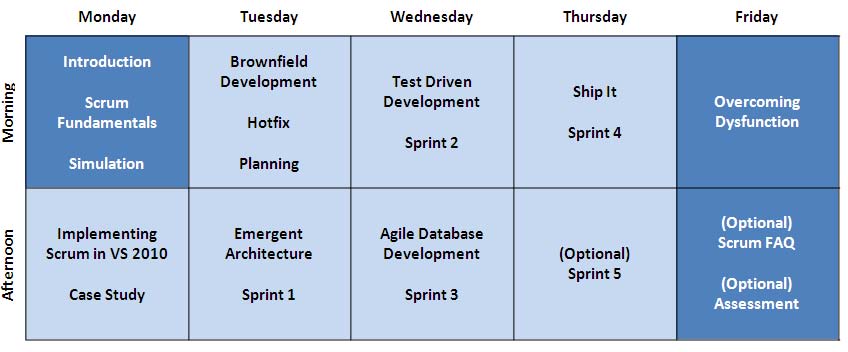
Monday morning and most of the day Friday will be spent
with the computers powered off, so you can focus on
sharpening your game of Scrum and avoiding the common
pitfalls when implementing it.
What will be expected of you?
This is a unique course in that it's
technically-focused, team-based, and employs
timeboxes
. It demands that the members of the teams self-organize
and self-manage their own work to collaboratively
develop increments of software.
All attendees must commit to:
-
Pay attention to all lectures and demonstrations
- Participate in team and group discussions
- Work collaboratively with other team members
- Obey the timebox for each activity
- Commit to work and do your best to deliver
All teams should have these skills:
- Understanding of Scrum
- Familiarity with Visual Studio
- C#, .NET 4.0 & ASP.NET 4.0 experience*
- SQL Server 2008 development experience
- Software testing experience
* Check with the instructor ahead of time for the exact
technologies
Self-organizing teams
Another unique attribute of this course is that it's a
technical training class being delivered to
teams
of developers, not pairs, and not individuals. Ideally,
your actual software development team will attend the
training to ensure that all necessary skills are
covered. However, if you wish to attend an open
enrolment course alone or with just a couple of
colleagues, realize that you may be placed on a team
with other attendees. The instructor will do his or her
best to ensure that each team is cross-functional to
tackle the case study, but there are no guarantees. You
may be required to try a new role, learn a new skill, or
pair with somebody unfamiliar to you. This is just good
Scrum!
Who should NOT take this course?
Because of the nature of this course, as explained
above, certain types of people should probably
not
attend this course:
-
Students requiring command and control style
instruction - there are no prescriptive/step-by-step
(think traditional Microsoft Learning) labs in this
course
-
Students who are unwilling to work within a timebox
-
Students who are unwilling to work collaboratively on
a team
-
Students who don't have any skill in any of the
software development disciplines
-
Students who are unable to commit fully to their team
- not only will this diminish the student's learning
experience, but it will also impact their team's
learning experience
Location Details
Canberra
|
Presented by
Adam Cogan
,
Peter Gfader
.
Hosted at Microsoft Canberra
Level 4, 6 National Circuit,
Barton
Directions
|
|
Sydney
|
Presented by
Adam Cogan
,
John Liu
.
Hosted at SSW
Gateway Court Suite 10
81 - 91 Military Road
Neutral Bay
Directions
|
|
Melbourne
|
Presented by
Adam Cogan
,
Peter Gfader
.
Hosted at Microsoft Melbourne
Level 5, 4 Freshwater Place
Southbank
Directions from CBD
|
|
Brisbane
|
Presented by
Adam Cogan
,
Peter Gfader
.
Hosted at Microsoft Brisbane
Level 28, 400 George Street
Brisbane
Directions from CBD
|
|
Perth
|
Hosted at Microsoft Office - Perth
Level 14, QV1 Building
250 St George's Terrace
Directions from CBD
|
|
Milan
|
Presented by
Adam Cogan
,
Peter Gfader
.
Hosted at Microsoft Milan
Via Rivoltana, 13 20090 Segrate (MI)
Directions
|
|
London
|
Room - Shivling
Bldg 4, Third Floor, Zone D
Microsoft Reading Offices
Microsoft Campus
Thames Valley Park
Reading RG6 1WG
Directions
|
|
Beijing
|
This course will be available in both English and
Mandarin.
Presented by
Adam Cogan
,
Lei Xu
.
Hosted at Microsoft Beijing
1st Floor, Microsoft Tower, LSH Plaza
8 Wangjing Street, Chaoyang
Directions
|
|
Vancouver
|
Presented by
Adam Cogan
.
Hosted at Microsoft Vancouver
1111 Georgia Street West
Suite 1100
Vancouver, BC, Canada
Directions
or via
Google Maps
|
| Honolulu |
Presented by
Adam Cogan
.
|
Course Materials
What You Need To Bring
-
A laptop (4GB of RAM, Windows XP or higher, 20GB of
free disk space)
- A mouse
-
If you do not have access to a laptop you can use for
the course you can rent one from SSW for $75 a day.
Please contact sales on +61 2 9953 3000 to arrange
this.
Related Links
Past Events - Completed
-
Los Angeles |
19th - 23th Sep
-
New York |
26th - 30th Sept
-
Toronto |
3rd - 7th Oct
-
Canberra |
3rd - 7th May
-
Sydney |
24th - 28th May
-
Melbourne |
21st - 25th June
-
Milan |
28th June - 2nd July
-
London |
26th - 30th July
-
Beijing |
2nd - 6th Aug
-
Sydney |
13th - 17th Sept
-
Melbourne |
20th - 24th Sept
-
Perth |
11th - 15th Oct
-
Beijing |
6th - 10th Dec
-
Sydney |
10th - 14th Jan
-
Perth |
24th - 28th Jan
-
Los Angeles |
31st Jan - 4th Feb
-
Vancouver |
7th - 11th Feb
-
San Francisco |
14th - 18th Feb
-
Canberra |
21st - 25th Feb
-
Melbourne |
7th - 11th Mar
-
Beijing |
7th - 11th Mar
-
Wellington |
28th Mar - 1st Apr