-
Identify and fix problems in database design
- Keep SQL database standards
- Prevent bad database practices
- Friendly licensing model
Keep your SQL Server 7/2000/2005/2008 database free
from design flaws with SSW SQL Auditor
Are you looking for a consistent and optimized SQL
Server database? Maintaining consistent quality code
across a large team can be a challenge. Even when
standards are in place, developers can make mistakes
that will slip through Quality Assurance. SQL
Auditor is a part of the range of database tools
designed by SSW to help to check best practice
standards and optimize SQL Server performance. SSW
SQL Auditor supports SQL Server 7/2000/2005/2008.
SSW SQL Auditor not only reports on design issues
and areas where SQL performance could be improved,
it also has wizards that generate SQL scripts to
correct common problems. It was developed to assist
in performance tuning in SQL Server 7/2000/2005/2008
by performing a SQL Server audits on your database.
It allows Developers to check their database design
against common SQL Server design rules and report on
the elements that do not conform to those rules.
If you are looking for a DB Auditing Tool that can
perform a SQL database audit and assist with SQL
Server performance tuning, download a trial of SSW
SQL Auditor today.
Key Features and Benefits
SSW SQL Auditor is a solution that will globally
change the data structure in a database or range of
tables.
By using SSW SQL Auditor's simple wizard interface
you can:
-
Identify and fix problems in database design, eg.
-
Identify any basic technical issues eg.
missing primary keys
- Identify any naming problems
- Identify Missing relationships
-
More
- Keep SQL database standards
- Prevent bad database practices
|
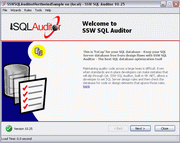
Great, user-friendly wizard style interface
With our
standards compliant
user interface.
|
|
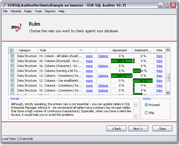
Comprehensive rules to keep your database
healthy
Learn from the many SQL Rules.
Enable or disable the rules, and learn from
the community of SQL developers which rules
are popular and which convention is popular.
|
|
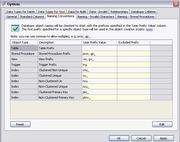
Customizable rules
There is a detailed options form which helps
you customize rules checking.
|
|
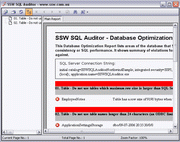
Automatically generates a report of the
violations for your database
You can get detailed reports of all the
violations by a simple click.
|
|
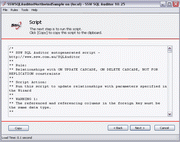
Automatically generates scripts
SSW SQL Auditor will automatically generate
scripts to correct most of the violations.
|
|
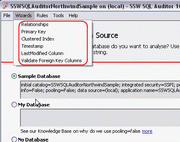
Wide-ranging wizards, easy to use
There are 6 different wizards in SQL Auditor
now, and there will be more in future, these
wizards will guide you to complete some
complicated tasks: e.g. adding foreign key
relationships, adding clustered indexes or
adding LastModified columns for appropriate
tables.
|
More Technical Features include the ability to:
-
Generate SQL script to create a
timestamp
column in every Table
-
Check for columns using the
ntext
and
text
datatypes and compare the maximum length of
existing data and see a large variance from
current size of
varchar(8000)
-
List all
rowguid
columns that have indexes
-
As Enterprise Manager and Access do not allow you
to enter a null in a
bit
column. Unfortunately, you can with ADO code.
Therefore, the problem occurs when you have ADO
code that enters a record and then if you try to
edit the record in your front end Access
application, it will not allow you to save your
changes. Access will say someone else has edited
the record since you started editing (the famous 3
button 'Write Conflict' error)
-
Check for Cascade/Update, Delete/Cascade
relationships - especially to see the
relationships without cascading updates turned on.
See more screenshots in the
SQL Auditor User Guide
.
Upcoming Features
-
Add online profile - lists users scans (by
PCName_DatabaseName), votes and comments for the
rules
- XML based project definition files
- Multi-Databases scan at a time
-
Group rules to compliant with different version of
SQL Server
How it Works
SSW SQL Auditor allows Developers to check their
database design against common SQL Server design
rules and report on the elements that do not conform
to those rules.
SSW SQL Auditor not only reports on design issues
and areas where SQL performance could be improved,
it also has wizards that generate SQL scripts to
correct common problems.
Predefined Rules - these are examples of the rules
you use
General
-
Object names should not contain spaces. See
Object name should follow your company Naming
Conventions.
-
Database collation differs from SQL Server
collation (server-wide check). See
Do you make sure you use a consistent Collation
server-wide?
-
Usage of SQL Server reserved words. See
Object name should follow your company Naming
Conventions.
Data Structure
-
Columns using the Unicode data type of nchar,
nvarchar or ntext. See
Only use Unicode datatypes (nchar, nvarchar and
ntext) in special circumstances.
-
Columns using datetime datatype when data could be
stored in a smalldatetime column. See
Use smalldatetime datatype, where possible,
instead of datetime datatype.
-
Columns using bit datatype and allowing NULL
values. See
Do you use Bit/Numeric data type correctly?
-
Columns with RowGuid datatype and an Index. See
Do not avoid using indexes on RowGuid column.
-
Tables missing Clustered Index. See
Do you create clustered index on your tables?
-
Every table should have Primary Key. See
Do you create primary key on your tables?
-
Tables missing Timestamp Column (configure
Timestamp column name in the Timestamp Wizard).
See
Do you create primary key on your tables?
-
Tables missing "Standard Columns" (user defined
columns that all tables should have). It is
definable in Tools -> Options
-
Maximum row size for a table larger than SQL
Server data page size (8060 bytes). See
Maximum row size for a table.
-
Table names longer than 24 characters. See
Object name should follow your company Naming
Conventions.
-
Columns using bit datatype. Recommended to use
smallint instead. See
Do you use Bit/Numeric data type correctly?
-
Indexes and constraints without a fill factor of
90%. See
Use FillFactor of 90% for indexes and
constraints.
Relationships
-
Relationships not using ON UPDATE CASCADE. See
Use ON UPDATE CASCADE clause when creating
relationship.
-
Relationships using ON DELETE CASCADE. See
Do not use ON DELETE CASCADE clause when
creating relationship.
-
Relationships not using NOT FOR REPLICATION. See
Use NOT FOR REPLICATION clause when creating
relationship.
Data
-
Data in character type columns having empty line
(<Ctrl> + <Enter>) as the first
character
-
Data in character columns having empty string
instead of NULL. See
Don't allow Nulls in text fields.
- Data that violates referential integrity
Stored Procedures
-
Stored procedures and Views with unsynchronized
names in procedure/view definition and object
name.
-
Stored procedures missing "Standard Stored
Procedure Description" (configure in
Tools>Options)
-
User-defined stored procedures starting with "sp_"
or "dt_"
The Database Optimization Report lists areas of the
database that may be changed to improve SQL
performance. It shows a summary of violations for
each rule database is checked against. Here is
a sample report:
System Requirements
What does the unregistered version give me?
In respect to the unregistered version we know you
want to see it working before you buy it. We aim for
that.
Note:
we also give free version targeted to the little
guys
For more details see
http://www.ssw.com.au/ssw/KB/KB.aspx?KBID=Q658302
SSW provides free phone and email support to answer
queries on registered products.
I'm Sold... What's next?
Microsoft and the Office logo are trademarks or
registered trademarks of Microsoft Corporation in
the United States and/or other countries.