Do you use a daily development digest when changes outpace discussion?
Loading last updated info...
When development moves too fast for people to keep up day to day, they need a way to catch up on what actually changed. For example, when a team merges more pull requests (PRs) than it can discuss, a failed deployment or reverted feature gets lost among completed changes. Reading each person's update still leaves the team to reconstruct what changed across the product.
Post a short daily development digest before the Daily Scrum: group changes by theme, put exceptions first, and link claims to evidence. A person checks the draft so the team can rejoin the conversation and plan its next steps.
Show outcomes and exceptions together
Summarise the reporting window across the team, rather than repeating individual updates. Name the user benefit under themes such as Orders, Customers and Platform. Put failed deployments, reverts, blockers and decisions above those themes, with an owner and next action.
These matched illustrations use example data from a fictional Northwind team. All people, PRs, builds and links are fictional. Both show the same six merged PRs; the second also includes the deployment and verification evidence needed to interpret them.
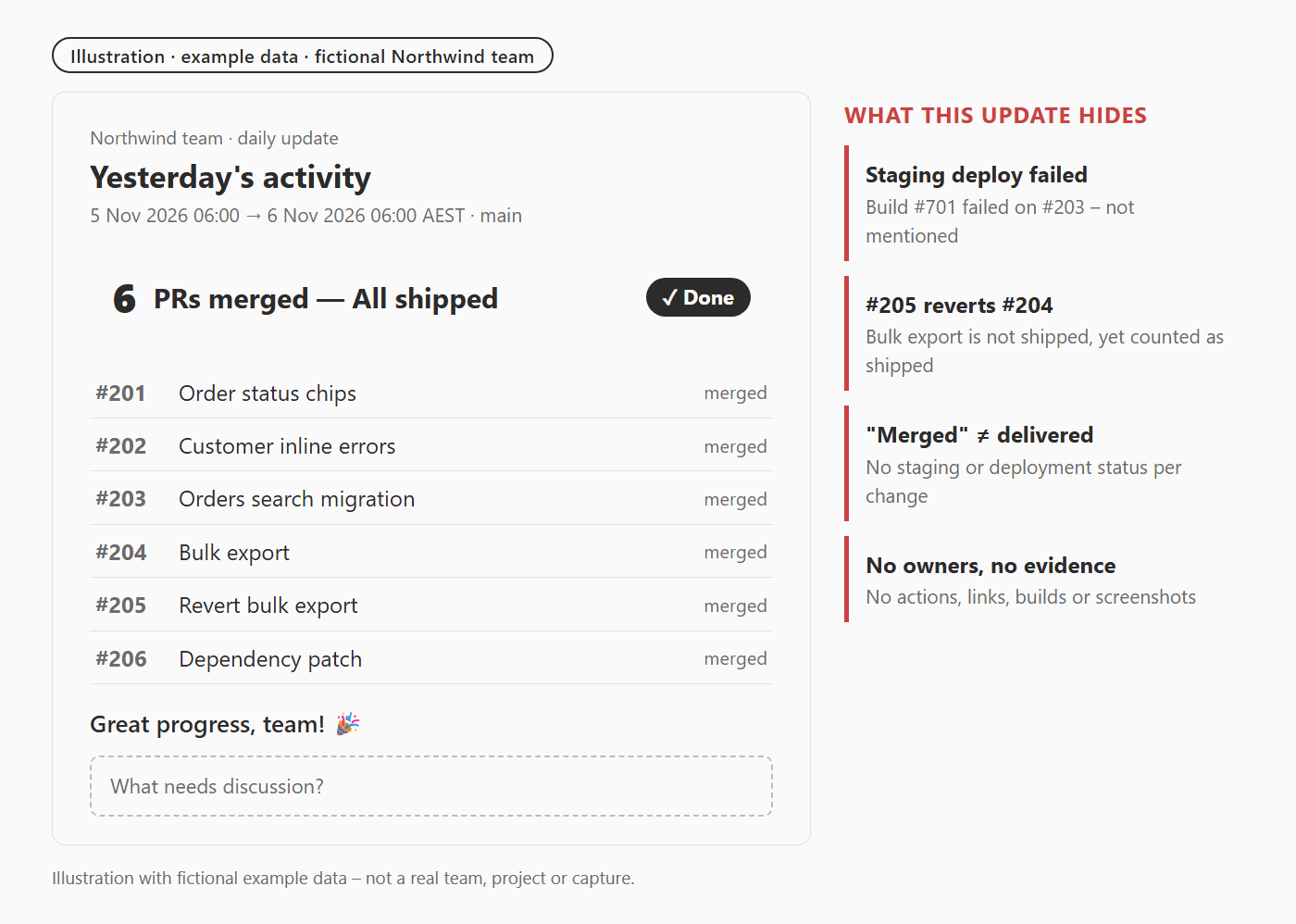
❌ Figure: Bad example - A merge list calls everything shipped and hides the failed deployment and the effect of the revert
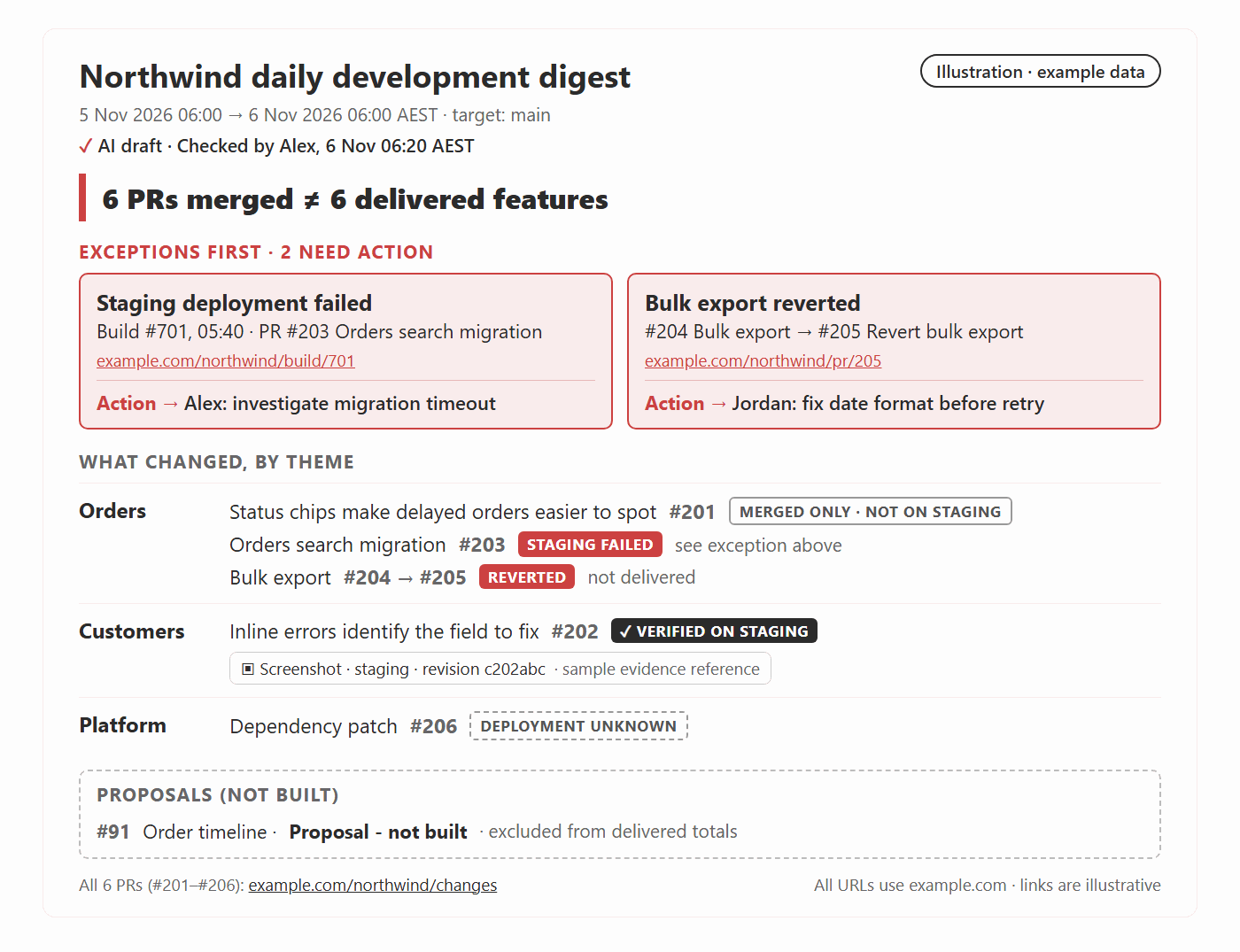
✅ Figure: Good example - The same six merges become a decision aid when exceptions, deployment state and source links sit beside the outcomes
Keep the full PR inventory available behind a link. A theme can cover several PRs, so six merges need not mean six delivered features. Avoid per-person counts and leaderboards: they do not tell the team what is available or what needs attention.
Collect a bounded, traceable set of evidence
Start manually; schedule an agent when gathering the sources becomes repetitive. Give the drafting job read-only access to approved PR, work-item and build sources. It does not need permission to merge, deploy or post without review.
- Fix the scope - Record the repository, target branch, start and end times, timezone and previous successful cutoff. Use adjacent windows, including weekends, so changes are neither missed nor counted twice.
- Collect the changes - Read the merged PRs and their descriptions, linked work items, reverts and unfinished work. Follow every page of results and deduplicate by PR identifier. Use repository metadata rather than a merge-commit count, which can miss squash merges.
- Join the evidence - Match each claimed outcome to its PRs, the deployed revision and environment, and any test or capture. Check deployment failures even when the build passes. GitHub records deployment status separately; use your platform's equivalent.
- State the limits - Show unavailable sources and unknown states. If collection is incomplete, label the digest partial and omit totals that appear complete. After a failed run, collect from the previous successful cutoff.
Keep merged, deployed and verified distinct. A merged PR record establishes merge state; a successful deployment record identifies an environment and revision; a test or capture supports only the behaviour it checks. None alone proves that the work meets the team's Definition of Done.
Label visuals and keep proposals separate
Reuse captures from the running application when they help explain a change. Show the environment and revision so readers can tell which version they see. Use synthetic data, inspect the whole frame for sensitive information, and check that the intended audience can access the linked evidence.
Use visible labels that survive cropping and video playback:
- Screenshot - A capture from the running application, with its environment and revision. It shows the captured state, not every acceptance criterion.
- AI mockup - merged change - A labelled illustration of a merged PR. Check it against the diff; it explains the change without proving it runs.
- Proposal - not built - An idea for discussion. Put it in Proposals (not built) after the change summaries and exclude it from delivered-work totals.
The Northwind pair above is an illustration of a digest layout. Its sample evidence links and capture references demonstrate what to include; they are not real verification records.
Compare matching viewports for before-and-after captures. Remove or mark reverted features, and describe non-visual work in words rather than inventing a screen. An optional short video can summarise selected highlights, but keep labels and captions visible and check every scene before sharing. Omit it when it adds no useful explanation.
Check the draft before the team reads it
A named, rotating checker verifies each summary against its sources, reconciles the counts, and checks visual labels and audience access. In the Northwind example, Alex confirms that PR #205 reverts #204 and that build #701 fails on staging; neither a merge total nor a green build can replace that check.
Record the checker and check time on the digest, and indicate AI assistance when used. Post one concise channel message linking the digest. If review is unavailable, hold the generated draft and share only a smaller update someone can verify. Escalate urgent incidents when they occur; do not wait for the next digest.
Use the digest to prepare, then discuss the plan
This is a synthesis across many PRs, with deployment and verification state attached. Clear status updates explain one update; good PR descriptions explain one change; Done notifications close the loop on completed work. Keep those records and link to them from the digest. Meeting summaries capture decisions from a meeting; the digest prepares the team before one.
The digest supports the Daily Scrum, whose purpose is to inspect progress towards the Sprint Goal and adapt the plan. BREAD Daily Scrums provides a meeting format and individual preparation; the digest adds a checked view across the product. Use it as input to the team's plan, with detailed problem-solving in follow-ups.
Try a digest when the team repeatedly misses changes or spends the meeting reconstructing them, and someone can check it before readers need it. Keep it only if readers can identify exceptions and affected areas without opening every PR. Shorten or stop it when checking and reading cost more time than the discussion it saves.