This product is no longer supported.
This simple, powerful and effective utility keeps your
system up to date, and helps to resolve intricate
software compatibility issues.
To aid our developers in analyzing software related
issues, it helps if we collect some basic information
about your system. This utility will help you collect
the relevant information easily.
Key Features & Benefits
- Checks required software.
- Checks for and advises on obsolete versions.
-
Automatically emails summaries of your software.
- Easily customized to your specific needs.
- Award winning software!
-
A $199 value given away 100% free. No Adware or
Spyware.
-
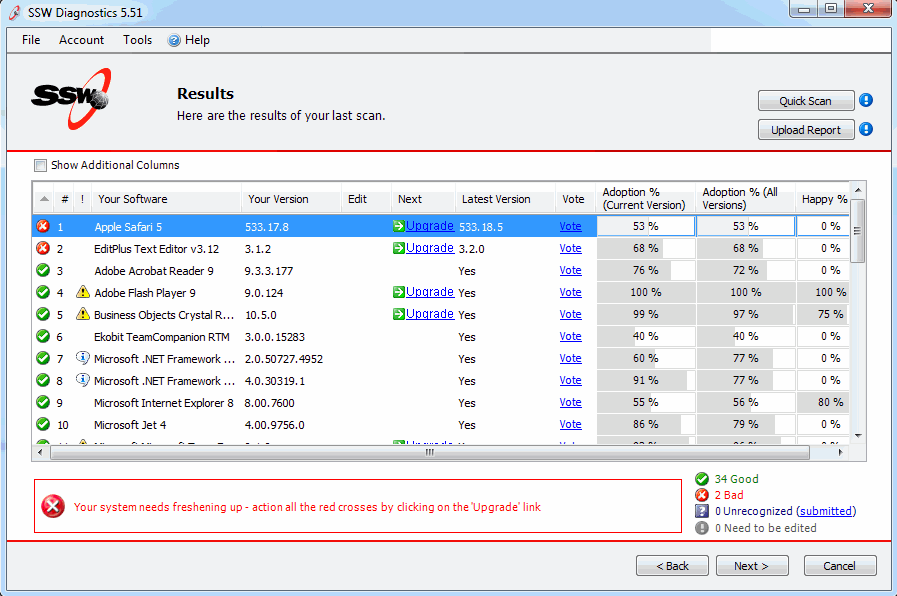
-
Figure: The goal is to lose all these red crosses,
so you only see green ticks
More screen shots in the User Guide
Upcoming Features
-
Release 10 - Scan "Add/Remove Programs" and add to
your online profile
-
Release 11 - Auto data updating with Sync Framework
-
Release 12 - Add online profile - lists users scans
(by PC name)
-
Release 13 - Add to online profile, your favourite
software with votes and comments
-
Release 14 - Add to online profile, your "bad
versions" and "good versions"
-
Release 15 - Add to product profile, the Health
Rating + to windows client
-
Release 16 - Add to product profile, popularity of
installation
-
Release 17 - Integration with related software E.g.
http://alternativeto.net/software/dropbox
User Guide
Welcome to the
User Guide
. This help facility is designed to quickly get you up
and running using our software.
Demonstration Options
-
If you are in Sydney,
call
today for a free no-obligation demonstration at
your office!
-
If you are not in Sydney, please take advantage of
our SSW Phone Walkthrough. The SSW Phone
Walkthrough is a service where we will call you,
anywhere in the world and once you have installed
our product we will guide you over the important
features of the software. Saves you time, playing
around with the software trying to work out all
the useful features, please
email us
today.
Awards and Ratings
Our SSW Products are also listed on Shareware web
sites. Some of these sites review and/or rate our
products. Here's how our products rated on other third
party sites.
How it Works
-
You come across a problem with a program you are
running.
-
You contact the vendor and the first thing they ask
is, "Have you got the latest version of XYZ
installed?"
- "One moment, I'll check.", you reply.
-
Clicking on SSW Diagnostics, your system is checked,
and not only does it tell you your version number
and whether you need an upgrade, but also where to
go to get the upgrade.
-
Then with another click, your version list is
emailed to the vendor so they can get to work
solving your problem.
System Requirements
Getting Support
If you can't find what you are looking for in the
product documentation then check our
knowledge base
for further information and tips about this product.
Please send us
bug reports
and
feedback
so that we can evolve our software into a product that
matches your requirements. We guarantee a response.
I'm Sold... What's next?