This product is no longer supported.
Office XP offers Smart Tag functionality. Smart Tags
recognise text in your Word/Excel or Outlook (with Word
as your editor) and then offer a range of possible
actions and commands. With SSW Time PRO! Smart Tags you
can access your corporate database from Microsoft
Office, and send letters, faxes or emails based on
existing templates.
Key Features & Benefits
SSW Time PRO! Smart Tags allows you to access your
corporate database from Microsoft Office and send
letters, faxes or emails based on existing templates.
-
Recognizes any Contact Name, Company Name or
Customer ID in your corporate database.
-
Generate Letters, Faxes or Emails based on existing
templates.
-
Search for a contact.
-
Handle duplicates - if you enter a Surname of
'Smith' then a list of all Smiths will be displayed.
You just select the one you want and then you can
proceed.
-
Display Contact details in a web page - if you have
a web page you use to view your Contact in, then
Smart Tags can link in to this web page and display
the current Contact information.
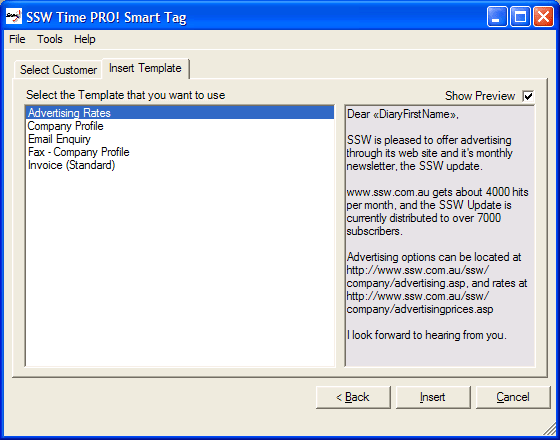
Figure: With SSW Time PRO! Smart Tags you can access
your corporate database from Microsoft Office, and
send letters, faxes or emails based on existing
templates
More screen shots in the User Guide
User Guide
Welcome to the SSW Time PRO! Smart Tags
User Guide
. This help facility is designed to let you get quickly
up and running using SSW Time PRO! Smart Tags.
Demonstration Options
-
If you are in Sydney,
call
today for a free no-obligation demonstration
at your office!
-
If you are not in Sydney, please take
advantage of our SSW Phone Walkthrough. The
SSW Phone Walkthrough is a service where we
will call you, anywhere in the world and once
you have installed our product we will guide
you over the important features of the
software. Saves you time, playing around with
the software trying to work out all the useful
features, please
info@ssw.com.au
today.
|
Awards and Ratings
Our SSW Products are also listed on Shareware web sites.
Some of these sites review and/or rate our products.
Here's how our products rated on other third party
sites.
How it works
SSW Time PRO! Smart Tags incorporates the Office XP
Smart Tag technology and connects to your database to
provide Search and Letter generation functionality based
off your templates. Using a series of simple actions,
you can generate custom letters to your Contacts.
System Requirements
.NET Framework
What does the unregistered version give me?
In respect to the unregistered version we know you want
to see it working before you buy it. We aim for that.
Note: we also give free version targeted to the little
guys
More details see
http://www.ssw.com.au/ssw/KB/KB.aspx?KBID=Q658302
SSW provides free phone and email support to answer
queries on registered products.
Getting Support
Please send us
bug reports
and
feedback
so that we can evolve our product in one that matches
your requirements.
I'm Sold... What's next?