This product is no longer supported.
SSW Data PRO! records every change made to your Access
backend. When the new front end is installed at the
client site, the backend will automatically be
upgraded with the changes you made. Never be out of
sync again!
Key Features & Benefits
SSW Data PRO! is version control for your database
written for Microsoft Access. SSW Data PRO! is
available for Access 97 and 2000. The Access 2000
version also runs in Access 2002 and 2003.
With SSW Data PRO! when your client gets the new
version of your database, it will detect that the data
structure needs revisions and performs the revisions
automatically.
A Common Scenario of a Access developer is to have a
new version of a database ready for your client ..."Oh
no, now I'll have to find out the new tables, fields
and relationships that I've added. I'd better get the
client to send me a copy of their data so I can do a
comparison and make the changes... Hope they don't
mind being offline for a day... Hope I haven't
forgotten any of the changes. What were those fields
that I renamed?..."
The beauty of this utility is that it takes the
guesswork out of administering database structures for
your clients.
Note:
If you want to use SSW Data PRO! on your existing
databases, they must be in sync (the same) before you
start using SSW Data PRO! But to help this occur
SSW has developed a sister product SSW Data Renovator
for Microsoft Access that can compare two databases
and tell you the difference. You can do the changes
manually or automatically. Once you get the two data
structures in sync, use SSW Data PRO! so they never
get out of sync again.
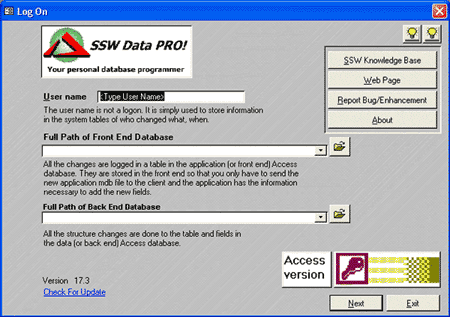
Figure: SSW Data PRO! is version control for your
database written for Microsoft Access
Related Software
While SSW Data PRO! manages Access database, use
SSW SQL Deploy
to manage a SQL Server database.
How it Works
You stop making changes to your data structure using
Microsoft Access or SQL Server. You start using SSW Data
PRO! to add, delete and rename tables (with fields and
relationships) so all changes can be replayed later. A
side benefit of this is every data structure change is
logged and available through concise reports.
For all this amazing functionality you must follow one
rule. Don't use Microsoft Access or SQL Server to
change your data structure. Now you have SSW Data
PRO!'s friendly interface.
System Requirements
What does the unregistered version give me?
In respect to the unregistered version we know you
want to see it working before you buy it. We aim for
that.
Note: we also give free version targeted to the little
guys
More details see
http://www.ssw.com.au/ssw/KB/KB.aspx?KBID=Q658302
SSW provides free phone and email support to answer
queries on registered products.
Getting Support
If you can't find it in the product documentation then
check our
knowledge base
for further information and tips about this product.
Please send us
bug reports
and
feedback
so that we can evolve our software into a product that
matches your requirements. We guarantee a response.
Access Links
I'm Sold... What's next?
Microsoft and the Office logo are trademarks or
registered trademarks of Microsoft Corporation in the
United States and/or other countries.